Need help?
Do you have a question about the Sonoff S31 Lite zb and is the answer not in the manual?
Instructions for downloading the companion app for device setup.
Steps to connect the device to a ZigBee hub.
Guidance on powering on the device and entering pairing mode.
Instructions for adding the device to the app.
Procedure to reset the device to its factory default settings.
Information on FCC compliance and radiation exposure limits.
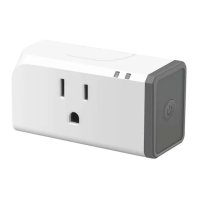
The SONOFF S31 Lite zb is a Zigbee Smart Plug (US Type) designed to integrate seamlessly into your smart home ecosystem. This smart plug allows users to control connected appliances remotely, schedule their operation, and even manage them through voice commands, offering a convenient and efficient way to automate your home.
The S31 Lite zb operates using the Zigbee wireless protocol, connecting to your internet via a Zigbee hub. This connectivity enables a range of smart functionalities. Users can turn devices on or off from anywhere using a compatible application, providing flexibility and control over their home appliances. The plug also supports timing schedules, allowing you to set specific times for devices to power on or off, which is ideal for automating daily routines, saving energy, or enhancing security by making your home appear occupied. Voice control is another key feature, enabling hands-free operation through popular voice assistants like Amazon Alexa and Google Home, provided your Zigbee hub supports these integrations. The device also supports "Share Control," which means you can share access to the smart plug with family members, allowing everyone in the household to manage the connected devices. For more advanced automation, "Smart Scene" functionality allows the S31 Lite zb to interact with other smart devices in your home, triggering actions based on various conditions or events. Finally, "LAN Control" provides local network control, ensuring that you can still manage your devices even if your internet connection is temporarily unavailable.
To begin using the S31 Lite zb, you first need to download the appropriate application for your Zigbee hub. Recommended platforms include SmartThings and Amazon Alexa. Once the app is installed, you'll need to connect the smart plug to your Zigbee hub. The device supports various Zigbee hubs, including echo studio, Echo Plus (models: ZE39KL, L9D29R), 2nd Gen Echo Show (model: DW84JL), and Samsung SmartThings hub. If you encounter connection issues, moving the hub closer to your phone and retrying the connection is recommended.
After powering on the S31 Lite zb, it will automatically enter pairing mode during its initial use, indicated by a flashing LED signal. If the device doesn't pair within a certain timeframe, it will exit pairing mode. To re-enter pairing mode, simply long-press the manual switch on the plug for 5 seconds until the LED signal indicator flashes again, then release. Once in pairing mode, you can add the device through your chosen smart home application, ensuring you select "eWeLink" or "SONOFF" as prompted.
The physical design of the S31 Lite zb includes a configuration button, which also serves as a manual switch for local control. This button is crucial for initiating pairing mode and for performing a factory reset. The plug features an On/Off LED indicator (red) and an LED signal indicator (blue), providing visual feedback on its status and connectivity.
The S31 Lite zb is designed for straightforward use and minimal maintenance. Should you need to reset the device to its factory default settings, perhaps for re-pairing with a different hub or resolving persistent issues, a "Factory Reset" option is available. This is achieved by long-pressing the configuration button for 5 seconds. The LED signal indicator will flash, and upon release, the device will successfully reset and re-enter pairing mode. This process is particularly useful if you need to pair the device with a hub again after a previous setup.
For ongoing support and troubleshooting, SONOFF provides resources such as a user manual accessible via a QR code or their website. This manual includes instructions for voice control with Amazon Echo and Google Home. In case of any problems or inconveniences with the product, customer support is available via email. SONOFF also encourages users to share their buying experience and stay updated on new arrivals, promotions, and how-to videos through their social media channels, fostering a community around their products. The device is manufactured in China and adheres to FCC regulations, with specific guidelines regarding radiation exposure and interference to ensure safe operation. Users are advised to maintain a minimum distance of 20cm between the radiator and their body during operation. If interference occurs, troubleshooting steps such as reorienting antennas, increasing separation, or consulting a technician are suggested.
 General
| Model | S31 Lite zb |
|---|---|
| Type | Smart Plug |
| Connectivity | Wireless |
| Wireless Protocol | Zigbee 3.0 |
| Input Voltage | 100-240V AC |
| Output Voltage | 100-240V AC |
| Max Load | 15A |
| Maximum Current | 15A |
| Maximum Power | 1800W |
| Maximum Load Power | 1800W |
| Operating Temperature | 0°C to 40°C |
| Operating Humidity | 5% to 95% RH, non-condensing |

 To Next Page