Need help?
Do you have a question about the Sonoff S31 and is the answer not in the manual?
Guide to downloading the eWeLink application for device control.
Instructions for powering on the smart plug and entering pairing mode.
Steps to add the smart plug to the eWeLink app.
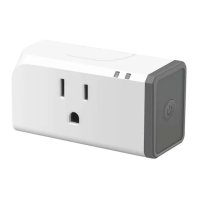
The SONOFF S31/S31 Lite is a Wi-Fi Smart Plug designed for US type outlets, offering convenient control and monitoring capabilities for your electrical appliances. The S31 model includes power monitoring features, while the S31 Lite is a simpler version without this functionality. This smart plug allows you to transform ordinary household devices into smart ones, enabling remote management and automation through the eWeLink app.
At its core, the SONOFF S31/S31 Lite functions as a smart switch that plugs into a standard US wall outlet, providing a controlled power source for any connected appliance. The primary function is to turn devices on or off remotely, from anywhere, using your smartphone or tablet. This means you can switch off a light you forgot about after leaving home, or turn on a fan before you arrive, all with a few taps in the eWeLink app.
Beyond simple on/off control, the smart plug integrates with the eWeLink ecosystem to offer a range of advanced functionalities. One of the most useful features is "Timing Schedule," which allows you to set specific schedules for your devices to power on or off automatically. This can be used for energy saving, security (e.g., making it look like someone is home by turning lights on and off), or simply for convenience, such as having your coffee maker start brewing at a set time each morning.
"Voice Control" is another key feature, enabling hands-free operation of your connected devices. The SONOFF S31/S31 Lite is compatible with popular voice assistants like Amazon Echo and Google Home. By linking your eWeLink account to these platforms, you can use voice commands to control your smart plug, for example, "Alexa, turn on the living room lamp" or "Hey Google, turn off the fan." This adds a layer of convenience, especially when your hands are full or you're across the room.
The "Share Control" feature allows you to share access to your smart plugs with family members. This means multiple users can control the same devices from their own eWeLink accounts, ensuring that everyone in the household can manage the smart appliances without needing to set up each device individually. This is particularly useful in shared living spaces where multiple people might need to control lights, fans, or other electronics.
For the S31 model, "Power Monitoring" is a significant advantage. This feature provides real-time data on the power consumption of the connected appliance. You can view how much energy a device is using, which can help you identify energy-hungry appliances and make informed decisions to reduce your electricity bill. This data is accessible through the eWeLink app, offering insights into your energy usage patterns. This feature is explicitly not available for the S31 Lite.
The smart plug also includes "Over-load Protection," a safety feature designed to prevent damage to your appliances and the plug itself. If a connected device draws too much current, exceeding the plug's maximum capacity, the over-load protection will automatically cut off power, safeguarding against potential hazards like overheating or electrical fires.
"LAN Control" is another valuable function, allowing you to control your devices even when there is no internet connection. As long as your smartphone and the smart plug are on the same local area network (Wi-Fi), you can still issue commands through the eWeLink app. This ensures continuous control even during internet outages, providing a more robust and reliable smart home experience.
While not a direct function of the smart plug itself, the "Camera Feature" within the eWeLink app allows for integration with compatible smart cameras. This means you can view live camera feeds alongside your smart plug controls, adding a visual element to your home automation and security setup. For example, you could see if a light is on or off in a room and then control it directly from the same interface.
Getting started with the SONOFF S31/S31 Lite involves a straightforward setup process. First, you need to download the eWeLink app from the App Store or Google Play. Once the app is installed, you power on the smart plug by plugging it into an outlet. During its first use, the device automatically enters "quick pairing mode (Touch)," indicated by the Wi-Fi LED indicator flashing in a cycle of two short and one long flash. If the device doesn't pair within 3 minutes, or if you need to re-enter pairing mode, you can long-press the manual switch on the plug for about 5 seconds until the Wi-Fi LED indicator shows the same flashing pattern.
Adding the device to the app is simple: you tap the "+" icon in the eWeLink app and follow the on-screen prompts. This typically involves selecting your Wi-Fi network and entering the password. The app guides you through the process, making it accessible even for those new to smart home technology.
The physical design of the plug includes a "Configuration button/Manual switch." This button serves multiple purposes: it can be used to manually turn the connected appliance on or off, and it's also essential for initiating pairing mode or performing a factory reset. This provides a physical override for control, which is useful if your phone isn't readily available or if there's an issue with the app.
LED indicators on the plug provide visual feedback on its status. There's an "On/Off LED indicator" that shows whether the connected appliance is currently receiving power. A separate "Wi-Fi LED indicator" displays the network connection status, helping you troubleshoot any connectivity issues. For instance, the specific flashing patterns of the Wi-Fi LED indicate whether the device is in pairing mode, attempting to connect to Wi-Fi, or connected to the server.
The device is designed for ease of use, allowing you to turn on/off devices from anywhere, schedule power on/off times, and share control with family members. The intuitive interface of the eWeLink app makes managing multiple smart plugs and other eWeLink-compatible devices simple and efficient.
Maintaining the SONOFF S31/S31 Lite primarily involves ensuring a stable Wi-Fi connection and, if necessary, performing a factory reset.
A crucial aspect of maintenance is understanding the Wi-Fi LED indicator's behavior, as it provides key diagnostic information for common problems. If the device stays "Offline" in the app, the blue Wi-Fi indicator's flashing pattern can tell you why. If it quickly flashes once per second, it means the switch failed to connect to your Wi-Fi. This could be due to an incorrect Wi-Fi password, the plug being too far from the router, environmental interference, or the use of a 5G Wi-Fi network (the device only supports 2.4GHz). It could also be due to MAC address filtering being enabled on your router. In such cases, troubleshooting steps include verifying the password, moving the plug closer to the router, disabling MAC filtering, or even creating a Wi-Fi hotspot from your phone to add the device.
If the blue indicator quickly flashes twice per second, it means the device has connected to Wi-Fi but failed to connect to the server. This usually points to an unsteady network connection. Ensuring a stable internet connection is vital. If this double flash occurs frequently, it suggests an unstable network rather than a product issue. In such situations, restarting the switch by turning off and on its power can often resolve the problem.
The "Factory Reset" feature is a key maintenance tool. If you encounter persistent issues, want to move the device to a new Wi-Fi network, or simply wish to clear all settings, a factory reset can be performed. This is done by long-pressing the configuration button for about 5 seconds until the Wi-Fi LED indicator changes to the quick pairing mode pattern (two short and one long flash). Releasing the button confirms the reset, and the device will then be ready to be paired again as if it were new. This is particularly useful if you change your Wi-Fi router or password, or if you're giving the device to someone else.
The device is designed to be robust, with "Over-load Protection" acting as an internal maintenance mechanism to prevent damage from excessive current. This automatic safety feature minimizes the need for manual intervention in case of an electrical fault.
For further assistance and detailed user guides, SONOFF provides resources online. You can scan a QR code to access voice control instructions for Amazon Echo and Google Home, or visit their website (https://www.sonoff.tech/usermanuals) for comprehensive documentation. This ensures that users have access to support and information for troubleshooting and optimizing their smart plug experience.
 General
| Model | S31 |
|---|---|
| Category | Smart Plug |
| Wi-Fi Standard | 802.11 b/g/n |
| Rated Voltage | 100-240V AC |
| Rated Current | 15A |
| Power Monitoring | Yes |
| Compatibility | Amazon Alexa, Google Assistant, IFTTT |
| App Control | eWeLink App |
| Operating Humidity | 5%-90% RH, non-condensing |
| Maximum Load | 1800W |
| Operating Temperature | 0ºC to 40°C |
| Certification | FCC, CE |


 To Next Page