5 Controls and ports
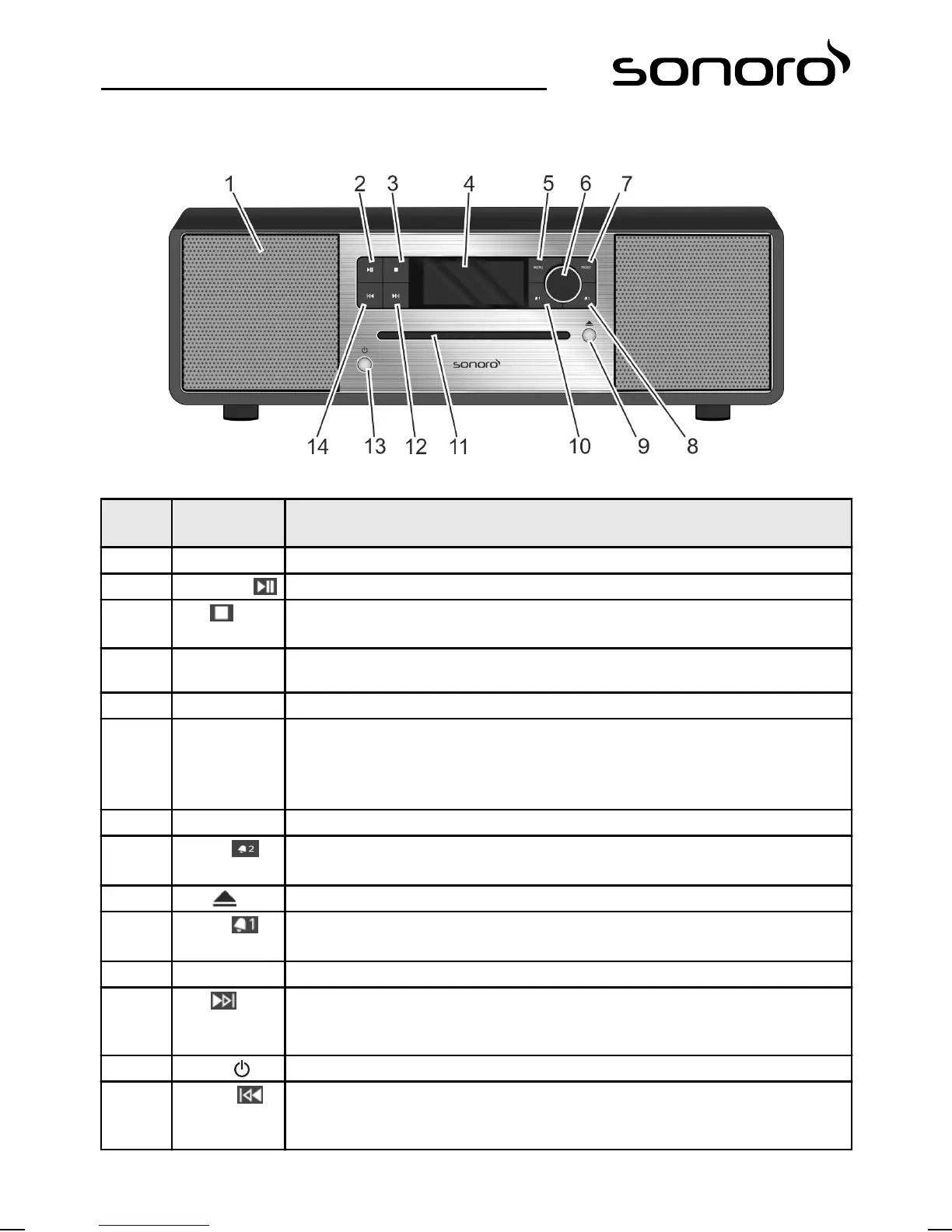
sonoroSTEREO front view
Fig. 3: sonoroSTEREO front view
Item
(Fig. 3)
Designation Function
1 Loudspeaker Loudspeaker opening.
2 Play/Pause CD/USB: start/pause playback.
3 Stop CD/USB: stop playback.
DAB and FM: info button.
4 LC-Display Displays current time and date when the device is switched off. Displays mode-
related information when the device is switched on.
5 MENU Open and save/close the menu items.
6 Click wheel
n Turn: set volume, FM/DAB station, alarm, navigation.
n Press: confirm individual submenus, FM station list/DAB station list, start/stop
audio playback, stop alarm.
n Press and hold, then turn: set FM frequency/DAB frequency manually.
7 MODE Switch to next playback mode.
8 Alarm 2
n Press: switch alarm 2 on/off, stop alarm.
n Press and hold: set alarm.
9 Eject Eject CD.
10 Alarm 1
n Press: switch alarm 1 on/off, stop alarm.
n Press and hold: set alarm.
11 CD slot Loads CD when the device is switched on or in Standby mode.
12 Next
n Press: navigate menu items; search FM/DAB stations, next track in CD, USB,
Bluetooth, Relax Music, Demo Music modes.
n Press and hold: fast forward.
13 Standby Switch device on/off. Stop alarm.
14 Previous
n Press: navigate menu items; search FM/DAB stations, previous track in CD, USB,
Bluetooth, Relax Music, Demo Music modes.
n Press and hold: fast reverse.
80


 To Next Page
 Loading...



