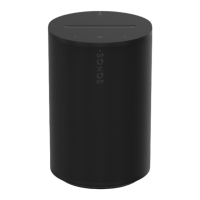
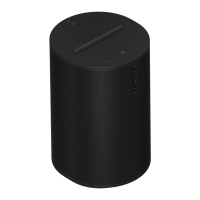
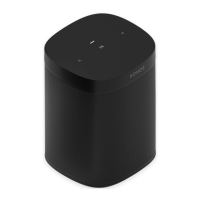
The Sonos Era 100 is a compact smart speaker designed to deliver room-filling sound. Its versatile design allows it to fit beautifully on a bookshelf, kitchen counter, nightstand, or mounted to a wall or stand. The speaker offers flexible connectivity options including WiFi, Bluetooth®, and a USB-C line-in. Control is made easy through the Sonos app, voice commands, or intuitive touch controls on the device itself. For an even wider soundstage, two Era 100 speakers can be paired as a stereo pair, or used as rear surrounds with the latest Sonos soundbars for a true home theater experience.
Technical Specifications:
Audio:
- Amplifier: Three Class-D digital amplifiers.
- Tweeter: Two angled tweeters create a crisp and accurate high-frequency response and a separated sense of right and left.
- Woofer: One mid-woofer ensures faithful playback of mid-range vocal frequencies plus deep, rich bass.
- Stereo Pair: Turns two speakers into separate left and right channel speakers for wider, deeper sound.
- Home Theater: Add two Era 100 speakers as surrounds for a true surround sound experience.
- Microphones: Features a far-field microphone array. All microphones, including those for voice control, can be turned off using the microphone switch on the back of the speaker.
Power / Connectivity:
- WiFi: Connects to WiFi with any 802.11a/b/g/n/ac/ax 2.4/5 GHz broadcast-capable router using Sonos S2.
- Bluetooth: Bluetooth 5.0 supports audio streaming from any Bluetooth-enabled device. A dedicated Bluetooth button allows for pairing.
- Power Supply: Auto-switching 100 - 240V ~ 50-60 Hz 1A AC universal input.
- USB-C Port: One USB-C port designed for line-in and Ethernet connections using the Sonos Line-In Adapter or Combo Adapter (sold separately). It is not a power source for charging other devices.
- Ethernet: Connects Era 100 directly to a router for a hardwired connection (useful if WiFi is unstable) via the Sonos Combo Adapter and an Ethernet cable.
- Line-in: Connects a turntable, CD player, or other device via the Sonos Line-In Adapter or Combo Adapter.
- CPU: Quad Core 1.4 GHz A-55.
- Memory: 1GB SDRAM, 8GB NV.
- Sonos S2: Set up and control with the latest generation of the Sonos app.
- Apple AirPlay 2: Works with AirPlay 2 on Apple devices iOS 11.4 and higher.
Details / Dimensions:
- Dimensions (H x W x D): 7.18 x 4.72 x 5.13 inches / 182.5 x 120 x 130.5 mm.
- Weight: 4.85 lb / 2.2 kg.
- Operating Temperature: 32° to 104° F / 0° to 40° C.
- Storage Temperature: -4° to 158° F / -20° to 70° C.
- Humidity-resistant: Designed to withstand high humidity, suitable for bathrooms with running showers. (Not waterproof or water-resistant.)
- Product Finish: Available in white with white grille or black with black grille.
- Package Contents: Sonos Era 100, 6 ft (2 m) power cable, Quickstart Guide.
Usage Features:
Control and Lights:
- Volume Control: Slide right or tap '+' for volume up; slide left or tap '-' for volume down. Press and hold for quick volume changes.
- Play/Pause: Press once to play or pause audio. Press and hold to add the playing music to another room.
- Next/Previous: Press '>' to skip to the next song; press '<' to go to the previous song. (Note: Skipping is not available for radio stations.)
- Voice Services On/Off: Press the microphone icon on top of the speaker to turn voice services on or off. When the indicator light is on, voice control is available (provided the microphone switch on the back is also on). When off, voice control is off.
- Status Light: Displays WiFi connection, indicates muted volume, and signals errors. Can be turned off in settings if distracting.
- Bluetooth Button: Press and hold to pair a new device; press once to reconnect.
- Universal Microphone Switch: Located on the back, this switch toggles all product microphones on or off. When off, microphone-enabled features like Trueplay quick tuning and voice services are unavailable. When on, these features are available (voice services also require the top indicator light to be on).
Location and Setup:
- Placement: Can be placed almost anywhere. For best performance, leave at least 1" (2.5 cm) of space around the back if placed next to a wall or on a shelf. If used as surrounds, leave at least 8" (203 mm) clearance around each speaker.
- Bluetooth Pairing: Turn on Bluetooth in device settings, press and hold the Bluetooth button on the speaker until a tone is heard and the status light blinks blue, then select "Sonos Era 100" from available devices.
- Microphone Control: Two ways to control: universal switch on the back (all microphones on/off) and voice services button on top (voice services on/off, without affecting Trueplay microphones).
- Trueplay™ Tuning: Measures how sound reflects off surfaces to fine-tune the speaker's sound.
- Advanced Tuning: Custom and precise, takes about 5 minutes using an iOS device's microphone (iOS 8 or later) while moving around the room. Best for large rooms.
- Quick Tuning: Fast and accessible, takes about a minute using the Sonos product's microphone, no movement required. Good for smaller rooms.
- Auto Trueplay: Portable Sonos products (like Roam and Move) can tune themselves automatically using their microphones for periodic adjustments.
- Set up Stereo Pair: Pair two identical Sonos speakers in the same room for a wider stereo experience. Place speakers 8 to 10 feet apart, with the listening position 8 to 12 feet from the speakers.
- Set up Surrounds: Turn two identical Sonos speakers (or a Sonos Amp with non-Sonos speakers) into separate right and left channels for home theater. Place surround speakers about 10 ft from the listening position, angled toward the seating area.
- Surround Audio Settings: Adjustable settings include turning surround sound On/Off, adjusting TV Level and Music Level, and setting Music Playback to Ambient (subtle) or Full (louder, full range) (does not apply to Dolby Atmos Music playback).
- Voice Services: Use voice-enabled Sonos products to control content, volume, and more.
- Sonos Voice Control: Hands-free control with privacy.
- Amazon Alexa: Requires Sonos and Alexa apps with Sonos skill enabled.
- Siri: Requires Apple Home app and AirPlay2-compatible Sonos speakers.
- Line-in: Connect an audio device (projector, CD player, turntable with phono preamp) to the USB-C port using a Sonos Line-In or Combo Adapter. Select the source in the Sonos app.
- Line-in Settings: Adjustable settings include Source name, Source level (to adjust volume if too quiet or distorted), Audio Delay (to reduce audio issues on grouped speakers), and Autoplay (to start playing line-in audio automatically when a signal is detected).
Product Settings (customizable via Sonos app > System):
- Room Name: Change the speaker's name if moved to a new room.
- Turn off WiFi: (Not available for Era 100, Era 300, or portable products) Reduces power consumption and improves connectivity for wired speakers.
- EQ: Adjust sound settings (bass, treble, balance, loudness) to personal preferences.
- Trueplay: Adapts sound for surroundings and content.
- Volume Limit: Set a maximum volume for each room.
- Status Light: Turn off if distracting.
- Touch Controls: Disable to prevent accidental adjustments.
- Battery Saver: (For portable products only) Set portable speaker to power off automatically instead of going to sleep to save battery life.
Accessories:
- Era 100 Stand: Custom-designed stand for secure speaker placement. Fixed height, optimal for home theater surrounds. Easy assembly, with a channel in the pole to hide the power cable. Includes stand base, pole, speaker platform, pole cap, and mounting kit. Requires Phillips-head screwdriver.
- Era 100 Wall Mount: Easy-to-install mount that supports speaker weight and secures it in place. Allows access to ports, buttons, and touch controls, and cleanly routes the cable. Offers flexibility for best sound positioning. Intended for vertical orientation. Includes wall mount, wall bracket, drywall anchors, and mounting kit. Requires pencil, level, and Phillips-head screwdriver.
Maintenance Features:
- Cleaning: Clean only with a dry soft cloth. Household cleaners or solvents can damage the finish.
- User-serviceable parts: This product does not have any user-serviceable parts. Do not open, disassemble, or attempt to repair it. Refer all servicing to Sonos qualified service personnel.
- Power Cable Protection: Protect the power cable from being walked on or pinched.
- Ventilation: Do not block any ventilation openings.
- Heat Sources: Do not install near radiators, heat registers, stoves, or other heat-producing apparatus.
- Moisture: Do not expose to rain or moisture, dripping or splashing. Do not place objects filled with liquids (e.g., vases) on the apparatus.
- Shielded Cable: Connections between the device and external equipment must use a shielded cable to maintain compliance with FCC radio frequency emission limits.

 Need help?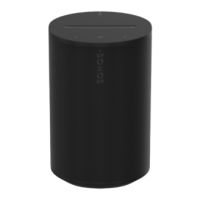

 To Next Page
 General