Need help?
Do you have a question about the Sonos Five and is the answer not in the manual?
Use touch gestures on the speaker for volume adjustment, playback control, and track skipping.
Place speakers 8-10 feet apart. Listening position should be 8-12 feet from speakers for optimal stereo imaging.
Read and keep instructions, heed warnings, follow all instructions, and do not use near water.
Clean with dry cloth, ensure ventilation, avoid heat sources, protect power cable, and use manufacturer accessories.
No user-serviceable parts. Refer servicing to qualified personnel for damage from liquid, drops, or abnormal operation.
Unplug during lightning storms or long periods of inactivity. Do not expose to rain, moisture, dripping, or splashing.
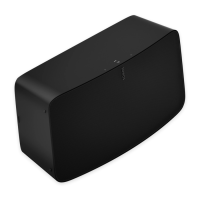
The Sonos Five is a high-fidelity speaker designed to deliver superior sound, offering a versatile and immersive audio experience. Its design incorporates smart orientation sensing, allowing it to adapt its sound output based on its placement. When two Fives are paired horizontally, they automatically separate the left and right channels, creating impressive stereo sound. If paired vertically, each speaker smartly adjusts to mono, providing more detailed stereo separation and an even wider soundstage. This adaptability makes the Five suitable for various room configurations and listening preferences.
Controlling the Five is intuitive, with touch controls conveniently located on the speaker itself. These controls allow users to adjust the volume, play or pause audio, and skip through songs with a simple touch or swipe. For more detailed control, the Sonos app, available for both Android and iOS devices, can be used to manage volume and other settings. The speaker also features a line-in port, enabling connection to external audio devices such as turntables or CD players, expanding its versatility beyond wireless streaming. This integration allows users to enjoy their analog audio collections through the high-quality Sonos system.
The Sonos Five is designed for flexible placement within your home. For optimal performance, it should be placed on a flat, robust, and durable surface, ensuring its rubber feet sit completely on the surface. It's recommended to maintain at least a 2-inch perimeter around the Five, including its power cord, to allow for proper ventilation and operation. For a single Five speaker, horizontal positioning is advised to enable stereo sound. The speaker should ideally be placed across the room from the listening position, at or close to ear height, for the best results. The Five is humidity resistant, making it suitable for use in bathrooms, but it is not water resistant and should not be positioned near water or left outdoors during rain.
Setting up a stereo pair with two Sonos Fives enhances the listening experience significantly. When paired, one speaker serves as the left channel and the other as the right, creating a wider and more immersive stereo soundstage. For stereo pairing, the speakers should be placed 8 to 10 feet apart, with the preferred listening position 8 to 12 feet from the paired speakers. Closer placement can increase bass, while greater distance improves stereo imaging. The Sonos app guides users through the setup process, allowing them to select the speakers and configure them as a stereo pair.
Beyond stereo pairing, the Sonos Five can also be integrated into a home theater system as surround speakers. Two Fives (or other compatible Sonos speakers of the same model, or a Sonos Amp with non-Sonos speakers) can be configured to provide separate right and left channels for surround sound. For this setup, each surround speaker should be placed approximately 10 feet from the main listening position, angled towards the seating area. The Sonos app facilitates this configuration, allowing users to add surrounds to a room with a soundbar. During setup, surround sound is optimized for the specific room, and these settings can be adjusted later. Users can turn surround sound on or off, and adjust the surround volume for both TV audio and music. For music playback, the surround sound can be set to "Ambient" (subtle) or "Full" (louder, full range), though this does not apply to Dolby Atmos Music playback.
The status light on the Sonos Five provides visual feedback on the product's connection to WiFi, indicates when the volume is muted, and signals errors. If desired, users can disable playback or volume adjustments via the speaker's touch controls through the room's settings in the Sonos app. This feature offers an additional layer of control and customization for the user experience.
Maintenance of the Sonos Five is straightforward. It should be cleaned only with a dry, soft cloth. Household cleaners or solvents are not recommended as they can damage the finish of the product. The device does not contain any user-serviceable parts, and users should not attempt to open, disassemble, repair, or replace any components. All servicing should be referred to qualified Sonos personnel. It is important to protect the power cable from being walked on or pinched, especially at plugs, convenience receptacles, and where it exits the apparatus. The Mains plug should be readily accessible for disconnection. The apparatus should not be exposed to rain or moisture, or to dripping or splashing liquids, and no objects filled with liquids, such as vases, should be placed on it. These guidelines ensure the longevity and safe operation of the Sonos Five.
 General
| Woofer | Yes |
|---|---|
| Number of speakers | 1 |
| Bluetooth | - |
| Connectivity technology | Wired & Wireless |
| Recommended usage | Universal |
| Product color | White |
| Volume control | Touch |
| Power source type | AC |
| AC adapter frequency | 50/60 Hz |
| AC adapter input voltage | 100 - 240 V |
| Internal memory | 512 MB |
| Quantity per pack | 1 pc(s) |
| RMS rated power | - W |
 Weight and Dimensions
| Depth | 154 mm |
|---|---|
| Width | 364 mm |
| Height | 203 mm |
| Weight | 6360 g |

 To Next Page