EasyManua.ls Logo

Sonos S38 - User Manual

Sonos S38
17 pages
Print Icon
To Next Page IconTo Next Page
Loading...
SONOS USER GUIDE
-1
S
T
Question and Answer IconNeed help?

Do you have a question about the Sonos S38 and is the answer not in the manual?

Summary

Getting Started with Sonos

New to Sonos?

Guide for first-time users on app download and initial setup.

Setup Options

Information on setting up Sonos via WiFi or Ethernet connection.

Adding Sonos Products

Instructions for adding new Sonos products to an existing system.

S38 Product Overview

Stereo and Home Theater Use

Using the S38 for stereo pairing and home theater surrounds.

Controls and Features

Touch Controls and Status Light

Details on volume, playback, and status light functionality.

Connector Panel

Explanation of join button, Ethernet, and power inputs.

Selecting a Location

Guidelines for optimal placement of the S38 speaker.

S38 Specifications

Audio and Connectivity Specs

Technical details on audio components and networking.

General Product Specifications

Information on power, dimensions, weight, and operating conditions.

Important Safety Information

General Safety Precautions

Essential safety instructions for using the Sonos apparatus.

Warnings and Cautions

Specific safety warnings regarding electrical hazards and misuse.

Explore Other Sonos Products

Sonos Speakers for Music and TV

Overview of Sonos speakers for different audio needs.

Audio System Upgrades and Accessories

Information on amplifiers, streaming components, and accessories.

The Sonos App

App Functions and Controls

Overview of what the app can do and its main controls.

Sonos App Navigation

Music Sources and Playback

Accessing music via My Sonos, Browse, Rooms, and Search.

Queue Management

Controlling song order, repeat, crossfade, and saving queues.

Mac;PC App Controls

Desktop App Interface

Overview of the desktop app layout and main controls.

Playback and Queue Management

Controlling playback, rooms, sleep timers, and music sources.

Advanced Playback Controls

Song Navigation and Effects

Details on previous/rewind, fast forward, repeat, shuffle, and crossfade.

Rooms and Room Settings

Managing Multi-Room Audio

Grouping rooms and playing music across multiple locations.

Customizing Room Settings

Adjusting Trueplay, EQ, room name, status light, and max volume.

Advanced Connectivity and Pairing

WiFi and Line-In Connections

Turning off WiFi and using Line-In for audio devices.

Stereo Pairing

Instructions for pairing two Sonos speakers for stereo sound.

Sonos Home Theater Setup

Home Theater Components

Overview of soundbars, subs, and amplifiers for TV audio.

Surround Speaker Configuration

Setting up and adjusting surround speakers for home theater.

TV Audio Settings

Dialog and Autoplay Adjustments

Adjusting TV dialog, autoplay, and speech enhancement.

Remote Control Setup

Programming a remote control for the Sonos system.

Playing Music on Sonos

Music Control Methods

Using the Sonos app, voice commands, and other apps to play music.

Sonos Music Sources

Accessing music from streaming services, mobile devices, and computers.

Overview

The Sonos S38 is a compact speaker designed for stereo pairing and home theater surrounds, fitting into almost any space. It works with either Sonos S2 or Sonos S1 systems.

Function Description:

The S38 functions as a versatile speaker within the Sonos ecosystem. It can be used as a standalone speaker for music playback, paired with another S38 or a Sonos One for left-right stereo sound, or utilized as rear surrounds in a home theater setup. Its touch controls allow users to adjust volume, play/pause music, and skip through songs.

Important Technical Specifications:

  • Audio:
    • Amplifier: Two Class-D digital amplifiers.
    • Tweeter: One tweeter for crisp and accurate high-frequency response.
    • Mid-Woofer: One mid-woofer for faithful playback of mid-range vocal frequencies and deep, rich bass.
    • Stereo Pair: Can turn two speakers into separate left and right channels for wider, deeper sound.
    • Home Theater: Can add two speakers as surrounds for a true surround sound experience.
  • Networking:
    • Wireless Connectivity: Connects to home WiFi networks with any 802.11b/g/n router. Note: 802.11n only network configurations are not supported; users may need to change router settings or connect a Sonos product to their router.
    • Ethernet Port: One 10/100Mbps Ethernet port, allowing direct connection to a router if WiFi is unstable.
  • General:
    • Power Supply: Auto-switching 100 - 240V ~ 50-60 Hz 1A AC universal input.
    • Dimensions (H x W x D): 6.36 x 4.69 x 4.69 inches (161.45 x 119.7 x 119.7 mm).
    • Weight: 4.08 lb (1.85 kg).
    • Operating Temperature: 32° to 104° F (0° to 40° C).
    • Storage Temperature: -4° to 158° F (-20° to 70° C).
    • Humidity Resistant: Designed to withstand high-humidity environments like bathrooms with a running shower (not waterproof or water-resistant).
    • Product Finish: Available in white with white grille or black with black grille.
    • Package Contents: Sonos S38, power cord, and Quickstart Guide.

Usage Features:

  • Setup: Requires a mobile device connected to the same WiFi, the Sonos S2 app, and a Sonos account. New users download the app and follow guided setup. Existing users can add a new product via the app's System menu.
  • Controls:
    • Touch Controls: Located on the top of the speaker.
      • :: (Volume control): Touch and hold to quickly change volume (right for up, left for down).
      • >|| (Play/Pause): Press once to play or pause. Press and hold to add currently playing music to another room.
      • :: >|| :: (Next/Previous): Swipe right to skip to the next song, swipe left to go to the previous song. (Note: Skipping is not available for radio stations).
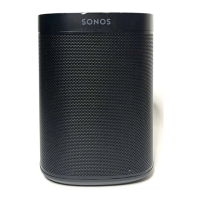
    • Status Light: Indicates the speaker's status. Can be turned off in room settings if distracting.
    • Join Button: Used for connecting during setup.
    • Ethernet Port: Optional connection to a router, computer, or NAS device.
    • AC Power (mains) input: For power connection using the supplied power cord.
  • Placement: Can be placed almost anywhere, including next to a wall or on a shelf. For best performance, maintain at least 1" (2.5 cm) space around the back. Its humidity resistance makes it suitable for bathrooms, but it is not water-resistant.
  • Sonos App: The primary interface for controlling the Sonos system.
    • Discover and Play Music: Explore internet radio, browse, and search for music.
    • Music and Voice Services: Add various music and voice services for touch-free play (with voice-enabled Sonos speakers).
    • Sonos Playlists: Save songs to playlists.
    • Multi-room Audio: Group rooms to play the same music everywhere or listen to different music in each room.
    • Queue Controls: Manage the music queue with options like Shuffle, Repeat, Crossfade, and Save as a Sonos playlist.
  • Mac/PC Controls: A desktop app offers similar control functionalities, including volume, playback, shuffle, repeat, music EQ, crossfade, and access to music sources.
  • Room Settings: Customizable settings for each Sonos product:
    • Trueplay: Analyzes room acoustics and adjusts speaker output for optimal sound.
    • EQ Settings: Adjust bass, treble, balance, or loudness.
    • Room Name: Change the name of the speaker's room.
    • Status Light: Turn the status light on or off.
    • Speaker Touch Controls: Disable touch controls to prevent accidental adjustments.
    • Set Max Volume: Set a maximum volume level for each room.
    • Turn off WiFi: Option to turn off the speaker's WiFi when connected via Ethernet, reducing power consumption and potentially improving connectivity for wired setups.
    • Line-In: Connect external audio devices (e.g., turntable, MP3 player) to compatible Sonos products (like Play:5, Amp, Connect, or Connect:Amp) and stream audio to Sonos.
  • Stereo Pairs: Pair two identical Sonos speakers in the same room to create a wider, stereo sound experience, with one serving as the left channel and the other as the right.
  • Home Theater: Use two S38 speakers as rear surrounds for a home theater setup.
    • Surround Settings: Adjust surround sound (On/Off), TV Level, Music Level (Ambient/Full), and Balance Surround Speakers.
    • TV Dialog Settings: Adjust audio delay (lip sync).
    • TV Autoplay: Automatically switches to TV audio when the TV is turned on (can be disabled).
    • Ungroup on Autoplay: Automatically ungroups the home theater speaker from other products when the TV is turned on (can be disabled).
    • Speech Enhancement: Makes TV dialog easier to hear.
    • Night Sound: Enhances quiet sounds and reduces loud sounds for lower volume listening.
    • Remote Control Setup: Program a remote control during setup.
  • Music Playback: Multiple ways to play music: Sonos app, voice commands (with voice-enabled Sonos speakers), speaker controls, other streaming apps (e.g., Spotify), and AirPlay 2.
  • Music Sources: Access to internet radio, music services, music stored on mobile devices or computers (NAS), imported playlists (iTunes, M3U, WPL, PLS), and other external audio devices (e.g., turntables).

Maintenance Features:

  • Cleaning: Clean only with a dry, soft cloth. Household cleaners or solvents can damage the finish.
  • Humidity Resistance: Designed for high-humidity environments but not waterproof.
  • Service: Refer all servicing to Sonos qualified service personnel.
  • Power Cord: Use only the supplied power cord to avoid voiding the warranty. Insert firmly until flush with the bottom of the speaker.
  • Fuses: Replacement of fuses is for service personnel only.

Sonos S38 Specifications

General IconGeneral
BrandSonos
ModelS38
CategorySpeakers
LanguageEnglish

Related product manuals