EasyManua.ls Logo

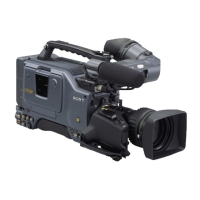
Sony 300PF - User Manual

Sony 300PF
124 pages
Print Icon
To Next Page IconTo Next Page
Loading...
1998 by Sony Corporation
Operating Instructions
Before operating the unit, please read this manual
thoroughly and retain it for future reference.
3-861-961-12(1)
Digital Camcorder
DSR-300F/300PF
DSR-300K/300PK
DSR-300L/300PL

Table of Contents

Questions and Answers

  • M
    Mary ChavezSep 12, 2025
    What does 'Er91-13F' mean on my Sony 300PF Camcorder display?
    • M
      Michelle BrownSep 12, 2025
      If the indication “Er91-13F” appears in the display window of your Sony Camcorder, the unit has failed in loading or saving the cassette memory data. Load a new cassette.
  • A
    Amanda ThomasSep 13, 2025
    Why does my Sony 300PF automatically eject the cassette?
    • H
      hayesrobertSep 13, 2025
      If the cassette is automatically ejected from your Sony Camcorder, an incorrect type of cassette is likely loaded. Load a correct type of cassette.
  • S
    Sharon HodgesSep 15, 2025
    Why can't I set the time code on my Sony 300PF Camcorder?
    • K
      Kelsey RitterSep 15, 2025
      If setting the time code is not possible on your Sony Camcorder, it may be because, at the recording, the ClipLink function is set to on (meaning ClipLink shooting is allowed) in menu 211, CONT is displayed in the display window and the time code generator is in the REGEN mode. Only the REGEN mode can be used for ClipLink shooting. If you will not perform ClipLink shooting, set the ClipLink function to oFF.

Summary

Chapter 1 Overview

Camcorder Key Features

Details on camera, VCR, and new functions like EZ mode, ATW, and advanced processing.

Chapter 2 Fitting and Connections

Power Supply Options

Details on using battery packs and AC adapters for camcorder power.

Chapter 3 Shooting

Basic Shooting and Recording

Step-by-step guide for starting a shoot, cassette handling, and basic recording.

Chapter 5 Adjustments and Settings

VCR Menu Operations

Guide to configuring the camcorder's VCR settings via the menu system.

Image Adjustments

Procedures for white balance, black balance, shutter, and iris control for image quality.

Appendixes

Maintenance and Troubleshooting

Procedures for cleaning heads and resolving operational issues.

Sony 300PF Specifications

General IconGeneral
BrandSony
Model300PF
CategoryCamcorder
LanguageEnglish

Related product manuals