8
GB
Checking the accessories
Remote (1)
Size AAA batteries (R03 type) (2)
Table-Top Stand (1)
*1
Fixing screws for Table-Top Stand
(M5 x 16) (3)
(except KDL-26/24/22EX32x)
Fixing screws for Table-Top Stand
(M4 x 12) (2)
(KDL-26/24/22EX32x only)
Assembling screws for Table-Top
Stand (M6 x 14) (4)
(KDL-55/46EX72x, KDL-46HX72x,
KDL-46EX52x, KDL-46CX52x only)
Assembling screws for Table-Top
Stand (M6 x 14) (3)
(KDL-40HX72x, KDL-40/37/32EX72x,
KDL-40/37/32EX52x, KDL-40/32CX52x,
KDL-32EX42x only)
Assembling screws for Table-Top
Stand (M6 x 14) (2)
(KDL-26EX321 only)
Assembling screws for Table-Top
Stand (M4 x 12) (2)
(KDL-26/24/22EX320 only)
Hexagon wrench (1)
(except KDL-26/24/22EX320)
Operating Instructions (this manual)
and other documents
*1
Refer to the supplied Table-Top Stand leaflet to
assemble the Table-Top Stand.
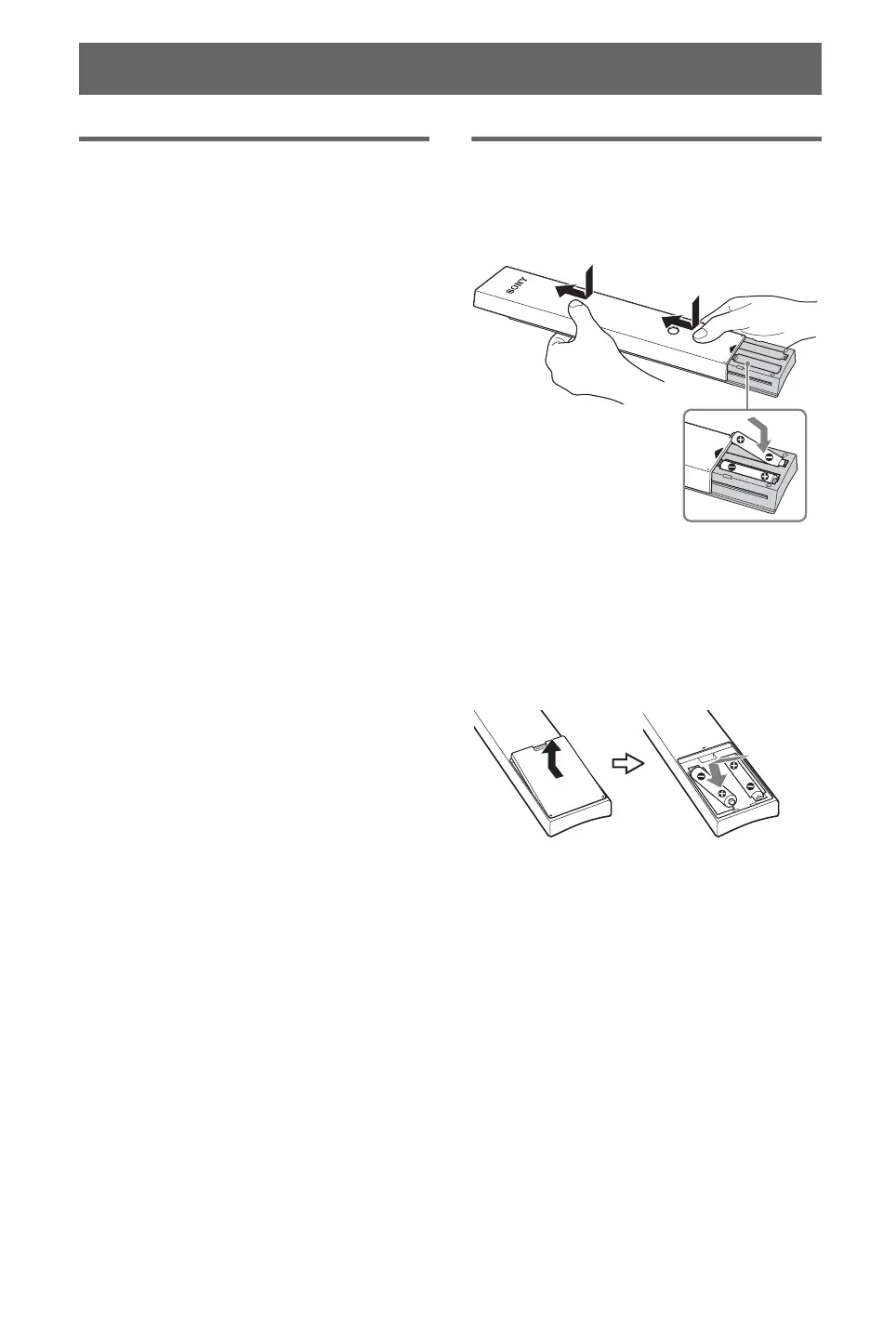
Inserting batteries into the
remote
B For KDL-55/46/40/37/32EX72x,
KDL-46/40HX72x
1 Remove the protection sheet.
2 Push and slide the cover upward.
B For KDL-46/40/37/32EX52x, KDL-46/40/
32CX52x, KDL-32EX42x, KDL-26/24/
22EX32x
1 Remove the protection sheet.
2 Push and lift the cover to open.
Getting Started


 To Next Page