EasyManua.ls Logo

Sony AC-500CE - Output Voltage Adjustment

Sony AC-500CE
31 pages
Print Icon
To Next Page IconTo Next Page
To Previous Page IconTo Previous Page
Loading...
SECTION
2
ADJUSTMENT
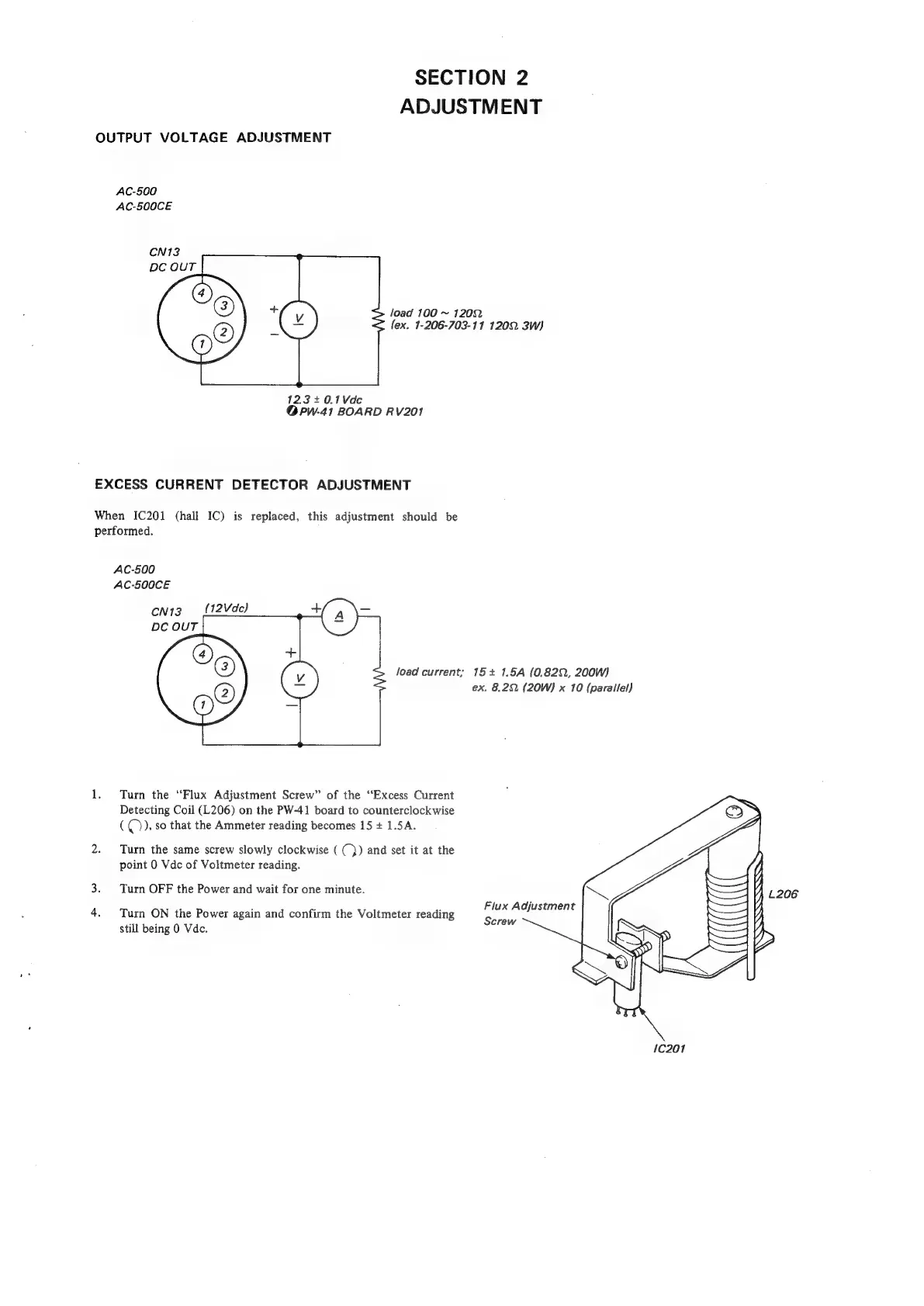
OUTPUT
VOLTAGE
ADJUSTMENT
AC-500
AC-500CE
N13
DC
OUT
@)
load
100
~
1202
lex.
1-206-703-11
1202.
3W)
123+40.1Vde
@Ppw-41
BOARD
RV201
EXCESS
CURRENT
DETECTOR
ADJUSTMENT
When
IC201
(hall
IC)
is
replaced,
this
adjustment
should
be
performed.
AC-500
AC-500CE
CN13
(12Vdc)
DC
OUT
load
current;
15+
1.5A
(0.822,
200W)
ex.
8.22.
(20W)
x
10
(parallel)
1.
Turn
the
“Flux
Adjustment
Screw”
of
the
“Excess
Current
Detecting
Coil
(L206)
on
the
PW-41
board
to
counterclockwise
(()),
so
that
the
Ammeter
reading
becomes
15
+
1.5A.
2.
Turn
the
same
screw
slowly
clockwise
((})
and
set
it
at
the
point
0
Vdc
of
Voltmeter
reading.
3.
Turn
OFF
the
Power
and
wait
for
one
minute.
Flux
Adjustment
4.
Turn
ON
the
Power
again
and
confirm
the
Voltmeter
reading
Screw
still
being
0
Vdc.
10201

Related product manuals