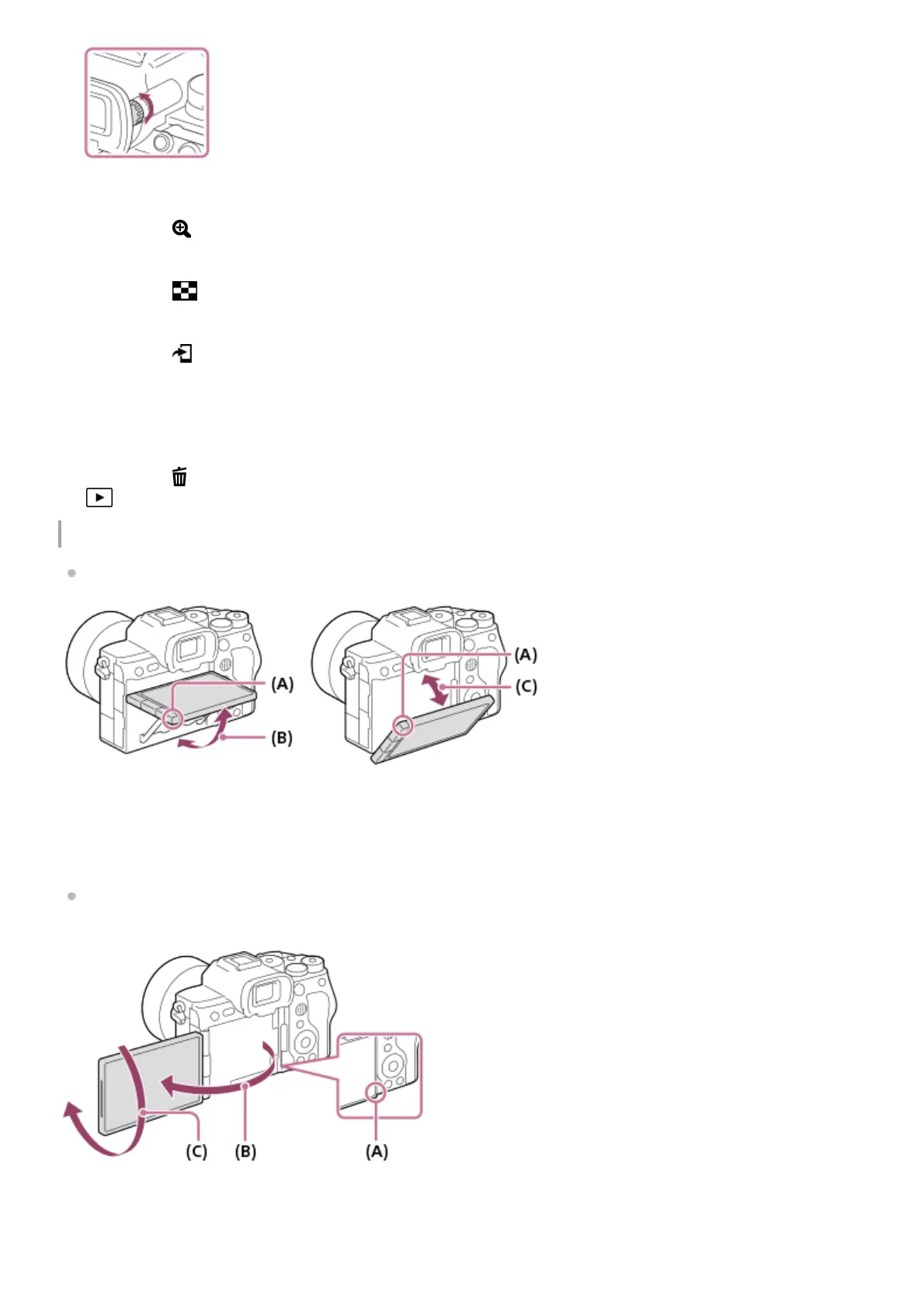
Adjusting the monitor angle
When holding the camera in the high or low position, pull the monitor toward you to adjust the angle.
(A): Where to place your fingers
(B): Approx. 98° from the rear surface of the camera
(C): Approx. 40° from the rear surface of the camera
In the self-portrait position with the monitor open sideways and the lens facing toward you, the monitor image is
flipped horizontally. Rotate the monitor backwards to cancel the flipped display.
(A): Where to place your fingers
(B): Approx. 180°
(C): Approx. 270°
C1 button (Custom button 1)8.
For shooting: AF-ON (AF On) button
For viewing: (Enlarge) button
9.
For shooting: AEL button
[AEL hold] is assigned to the AEL button in the default settings.
For viewing: (Image index) button
10.
Multi-selector11.
For shooting: Fn (Function) button
For viewing: (Send to Smartphone) button
You can display the screen for transferring images to a smartphone by pressing this button.
12.
Control wheel13.
Access lamp14.
For shooting: C4 button (Custom button 4)
For viewing: (Delete) button
15.
(Playback) button16.



 To Next Page