39
GB
Table of
contents
Sample photo Menu Index
Using functions with the control wheel
DISP (Display Contents)
Using the control wheel:
1 Press DISP (Display Contents) on the control wheel repeatedly to select
the desired mode.
Using the Menu:
1 During shooting, MENU t [Camera] t [LCD Display (DISP)/Finder
Display(DISP)].
During playback, MENU t [Playback] t [Display Contents].
2 Select the desired mode.
• [Histogram] is not displayed during following operations.
– Movie recording/playback
– Panorama recording/playback
–[Slide Show]
Notes
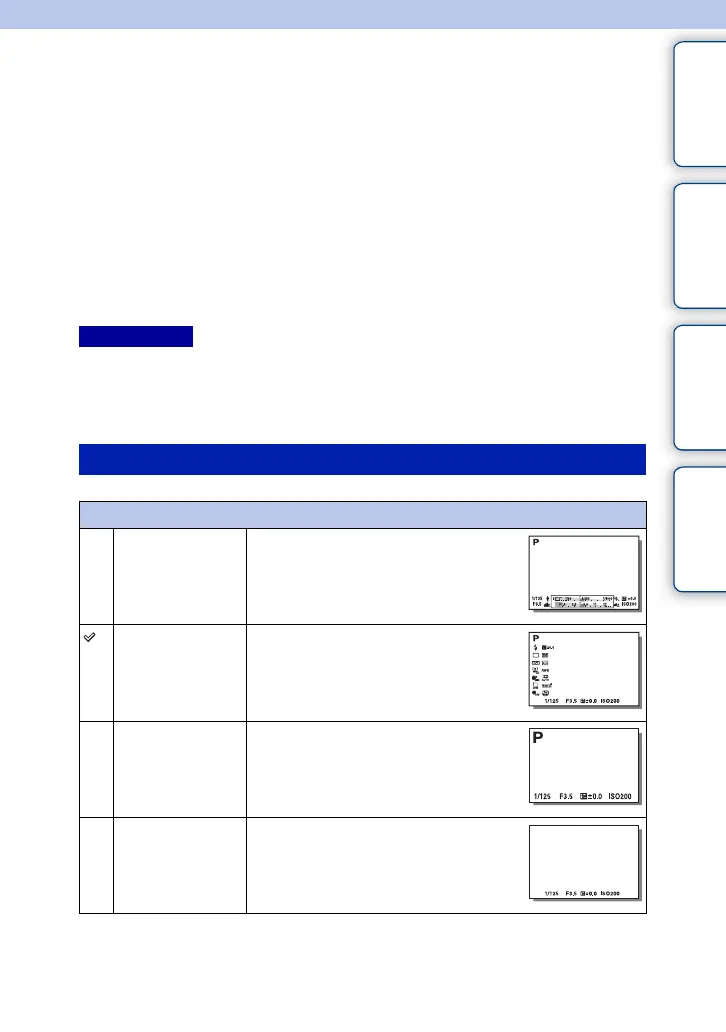
During shooting
LCD Display (DISP)
Graphic Display Shows basic shooting information.
Graphically shows the shutter speed and
aperture value, except for when [Shoot
Mode] is set to [Sweep Panorama].
Display All Info. Shows recording information.
Big Font Size
Disp.
Shows only major items in a larger size.
No Disp. Info. Does not show recording information.
Continued r











 To Next Page