132
GB
Table of
contents
Sample photo Menu Index
Custom Key Settings
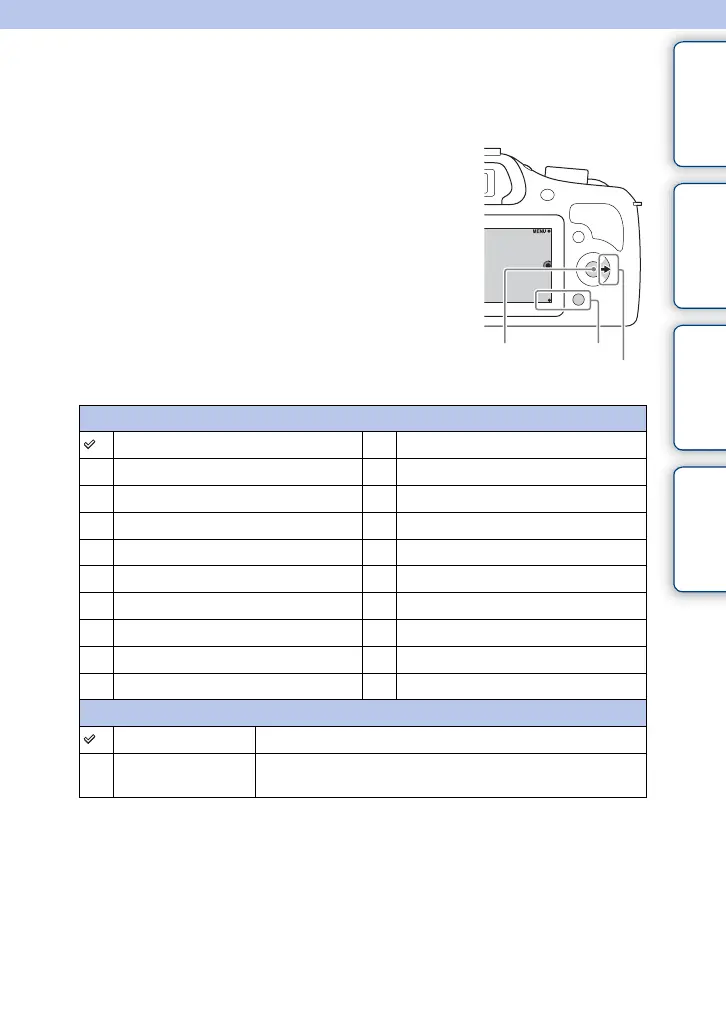
Assigning functions to the various keys allows you to speed up operations by pressing
the appropriate key on the shooting information screen.
1 MENU t [Setup] t [Custom Key Settings]
t desired setting.
Soft key B Setting
Shoot. Tips White Balance
Autofocus Mode Metering Mode
Tracking Focus DRO/Auto HDR
Zoom Picture Effect
Face Detection Creative Style
Smile Shutter Flash Mode
Auto Object Framing Flash Comp.
Soft Skin Effect MF Assist
Quality AEL toggle (page 134)
ISO Not set
Right Key Setting
ISO Sets the ISO sensitivity.
Function Menu Calls a function assigned to [Custom 1], [Custom 2], [Custom
3], [Custom 4], [Custom 5] or [Custom 6].
Soft key C Soft key B
Right key
Continued r






 To Next Page