1-17
1-4-5. BU Adjustment Flow [yy] ~
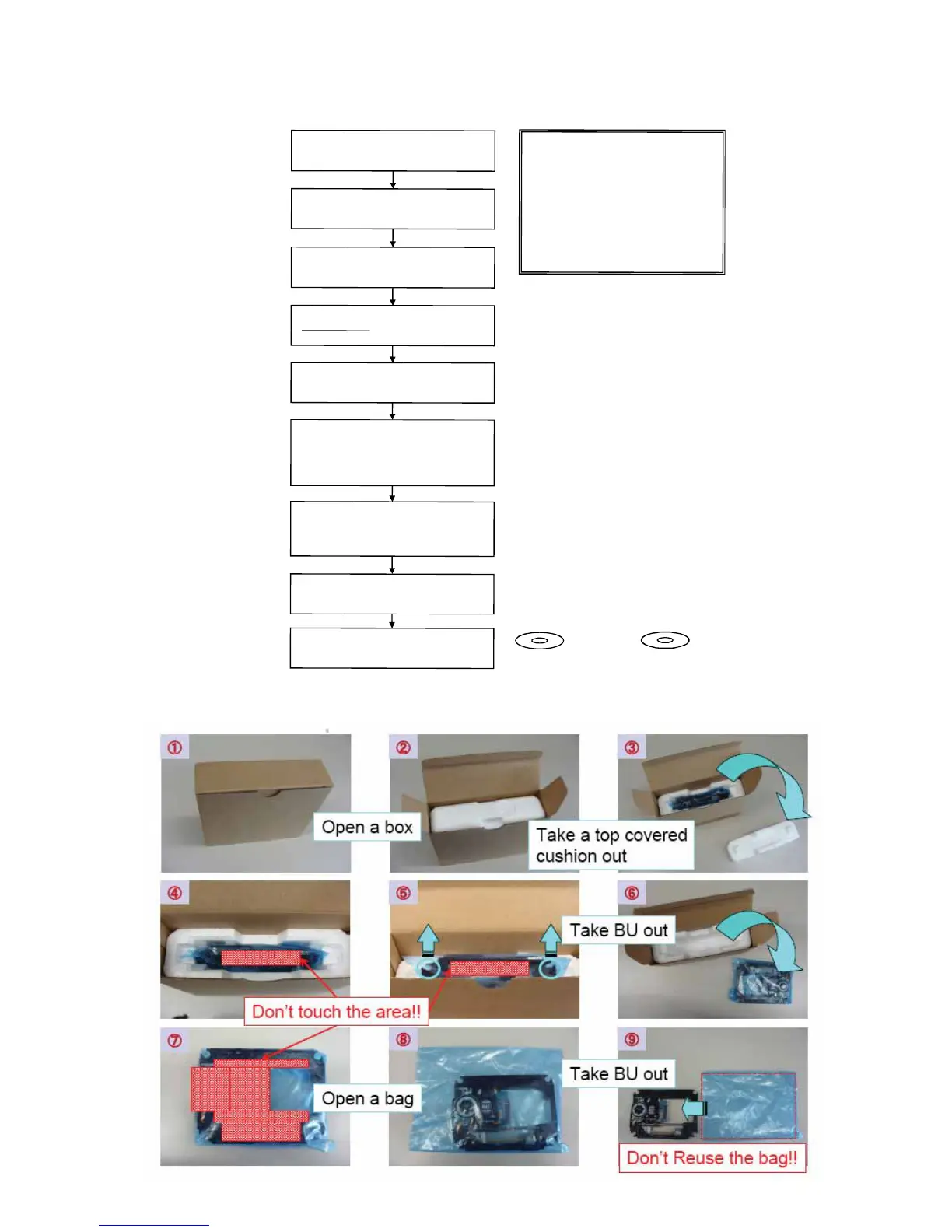
1-4-6. KEM-470AAA/C2RP Packing Spec.
KEM-430AAA/C2RP Packing Spec.
Optical Block
Unit (BU) OP Data Write Flow (yy) ~ [After BU/MB Replacement]
Remove the defective BU from Loading
Assy and also rem
ove BU insulator (4pcs)
Unpack new BU and take OP Data Barcode
photo by camera
Assembl
e BU with Insulators to Loading
Assy (tighten screw with 2kgf)
Decode the OP Data Barcode phot using
BDPRdec.exe
and save the test data to
USB memory
(File Name: BuData.txt)
Enter Service Mode
and insert USB memory
to USB connector
Select [8] Drive -->
Select [1] Drive OP data Write
Press ENTER
After Finishing ReWrite OP data
--> Turn AC Power OFF
And confirm dIOP by select [7] OP Check
Menu to verify IOP in specification
IOP in specification --> Turn AC Power O
FF
Turn Power ON and check playback
performance using BD, DVD and CD
BLX-104
DVD: HLX-513
CD: HLX-A1
The f
ollowing cases need OP Data Write:
(1) Replace BU (MB is original)
(2) Replace MB (BU is original)
(3) Replace both
BU and MB
JIG requirement
Digital camera (with
macro mode)
Barcode decoder (BDPRdec.exe)
installed in jig
PC's (jig purpose)
USB memory
ESD fre
e wor
k bench
BDP-S485


 To Next Page