17
GB
BDV-E3200
4-446-734-81(1)
D:\NORM'S JOB\SONY HA\SO130046\BDV-
N9200_7200_5200_E3200\4446734811_GB (E3200)\040GET.fm
masterpage:
Right
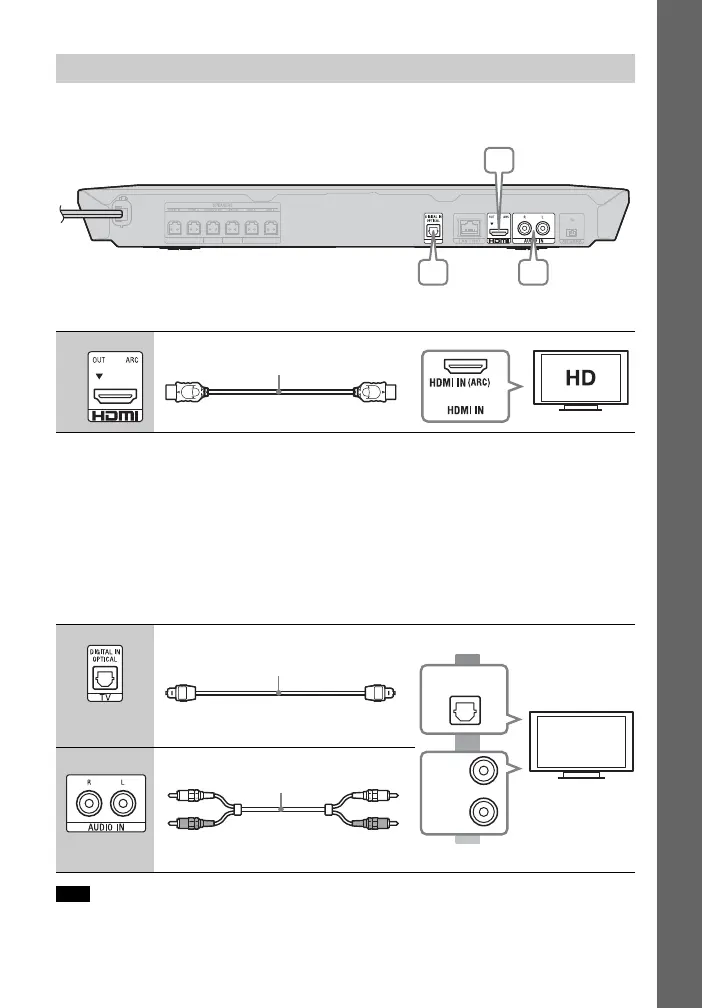
Select one of the following connection methods according to the input jacks on your
TV.
Video connection
1)
High Speed HDMI cable
2)
The Audio Return Channel (ARC) function enables the TV to output sound through the
system with an HDMI connection, without performing the B or C connection below. To
set the ARC function on this system, see [Audio Return Channel] (page 45). To check the
compatibility of your TV’s ARC function, refer to the operating instructions supplied with
your TV.
Audio connections
If your TV’s HDMI jack is not compatible with the ARC function, make an appropriate
audio connection (B or C) for listening to TV sound via the system’s speakers.
To enjoy TV sound, select “TV” function for connection B or “AUDIO” function for
connection C.
Connecting the TV
A
B High quality
C
Standard quality
Note
Optical digital cord
(not supplied)
OPTICAL
DIGITAL OUT
Audio cable (not supplied)












 To Next Page