18
GB
BDV-E3200
4-446-734-81(1)
D:\NORM'S JOB\SONY HA\SO130046\BDV-
N9200_7200_5200_E3200\4446734811_GB (E3200)\040GET.fm
masterpage: Left
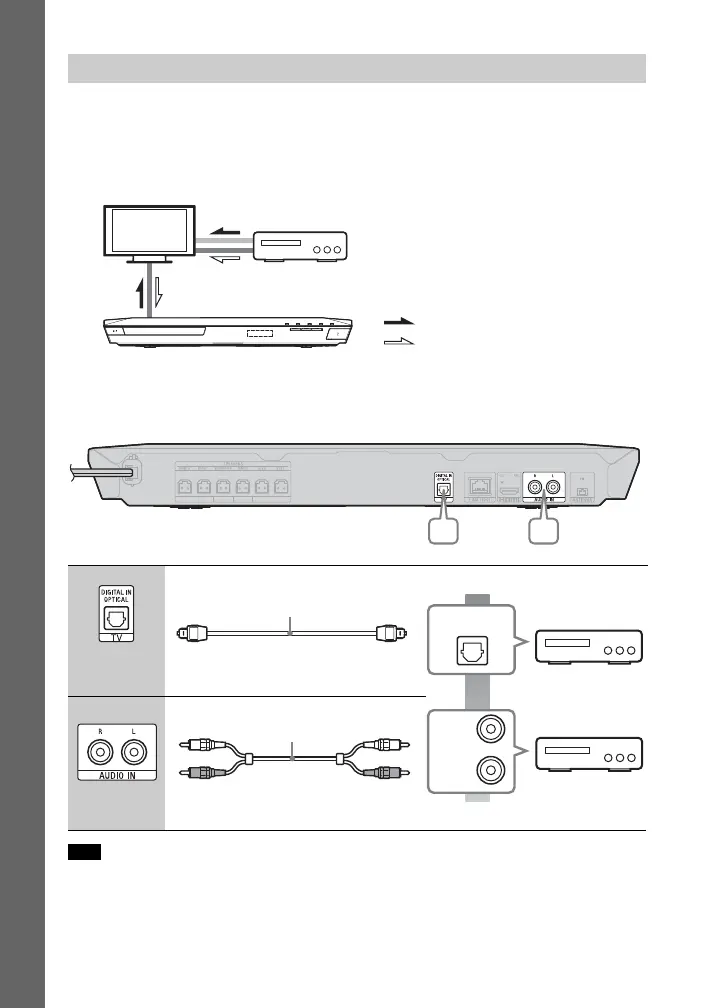
If your TV is compatible with Audio Return Channel (ARC) function
Connect audio and video jacks of your equipment to the TV. The equipment sound
can be output through the TV to the system by just making the HDMI connection A
in “Connecting the TV” (page 17).
If your TV is not compatible with Audio Return Channel (ARC) function
To enjoy the equipment sound via this system, make an appropriate audio
connection (A or B).
• If you make either connection above, set [Control for HDMI] in [HDMI Settings] of [System
Settings] to [Off] (page 45).
• You can enjoy equipment sound by selecting “TV” function for connection A or “AUDIO”
function for connection B.
Connecting the other equipment
A High quality
B
Standard quality
Note
System
Signal flow
TV
: Audio signal
: Video signal
Equipment
(Set-top box, VCR, PlayStation®, or
digital satellite receiver, etc.)
Optical digital cord
(not supplied)
L
R
AUDIO
OUTPUT
Audio cable (not supplied)












 To Next Page