masterpage:Left
specdef v20070110
filename[E:\BDV2011\Models\E2WF-
E8WF_UC\4261379111\4261379111BDV780WUC\gb03par.fm]
model name [BDV-E780W/BDV-E980W]
[4-261-379-11(1)]
10
US
Index to Parts and Controls
For more information, refer to the pages indicated in parentheses.
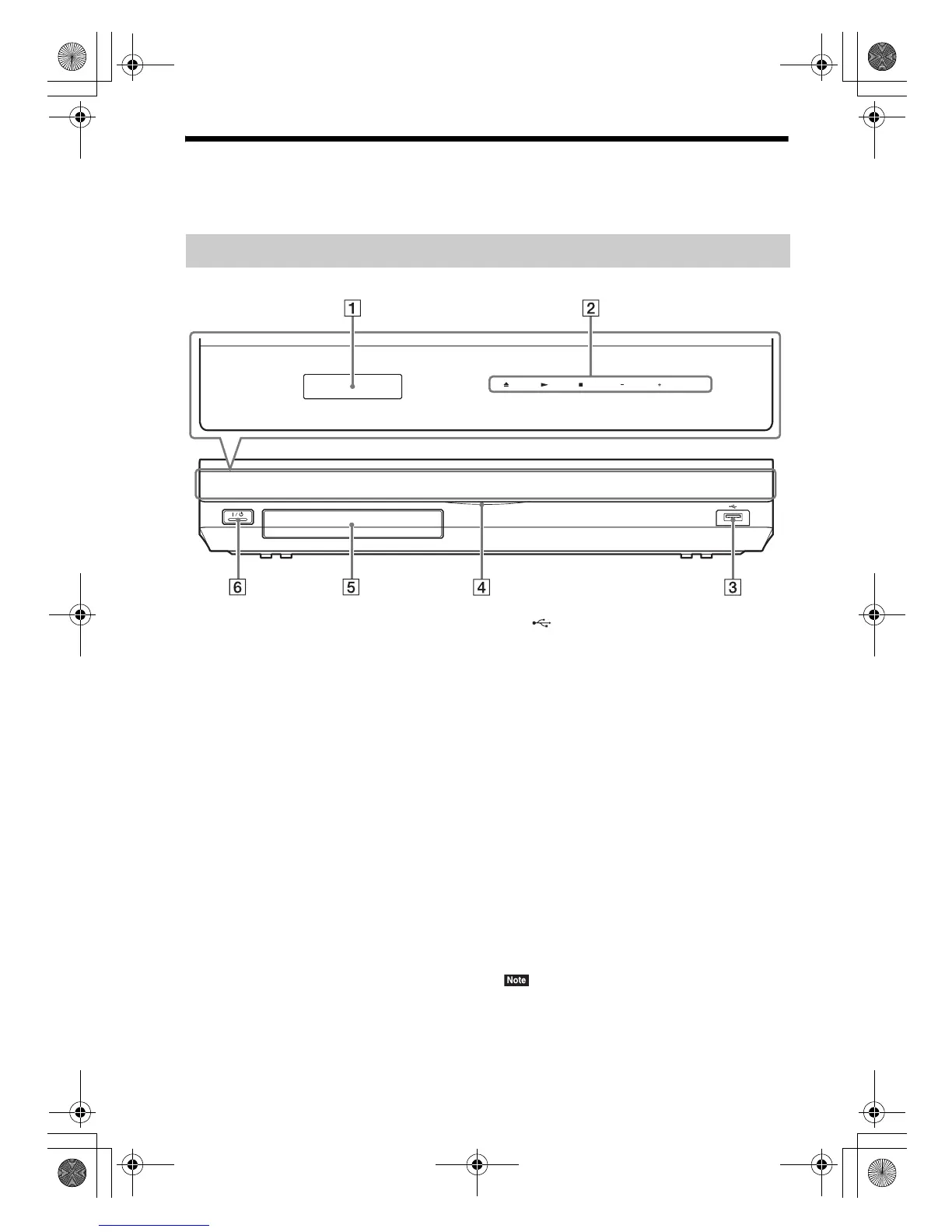
A Front panel display
B Soft-touch buttons/indicators
Z (open/close) (page 34)
Opens or closes the disc tray.
N (play)
Starts or re-starts playback (resume play).
Plays a slideshow when a disc containing
JPEG image files is inserted.
x (stop)
Stops playback and remembers the stop
point (resume point).
The resume point for a title/track is the last
point you played or the last photo for a
photo folder.
VOL +/–
Adjusts the system’s volume.
FUNCTION
Selects the playback source.
C (USB) port (page 35)
Used for connecting a USB device.
D Power indicator
Lights up while the system is turned on.
E Disc tray (page 34)
F "/1 (on/standby)/Remote sensor
Turns on the unit, or sets it to standby mode.
About soft-touch buttons/
indicators
These buttons function when the soft-touch
button indicators are lit.
You can turn on/off the indicators by setting
[Illumination/Display] (page 63). When you set
[Illumination/Display] to [Simple/Off], the
indicators turn off. In this case, touch any soft-
touch button. When the indicators light up,
touch the desired button.
• These buttons work when you touch them lightly. Do
not press on them with excessive force.
Front panel
VOL VOL FUNCTION
gb_book.book Page 10 Thursday, November 25, 2010 6:04 PM



 To Next Page