masterpage:Left
specdef v20080116
filename[E:\BDV2011\Models\E2WF-
E8WF_UC\4261379111\4261379111BDV780WUC\gb04gst.fm]
model name [BDV-E780W/BDV-E980W]
[4-261-379-11(1)]
28
US
Getting Started
Step 4: Setting up the
Wireless System
The unit transmits sound to the surround
amplifier that is connected to the surround
speakers. To activate wireless transmission,
perform the following Steps.
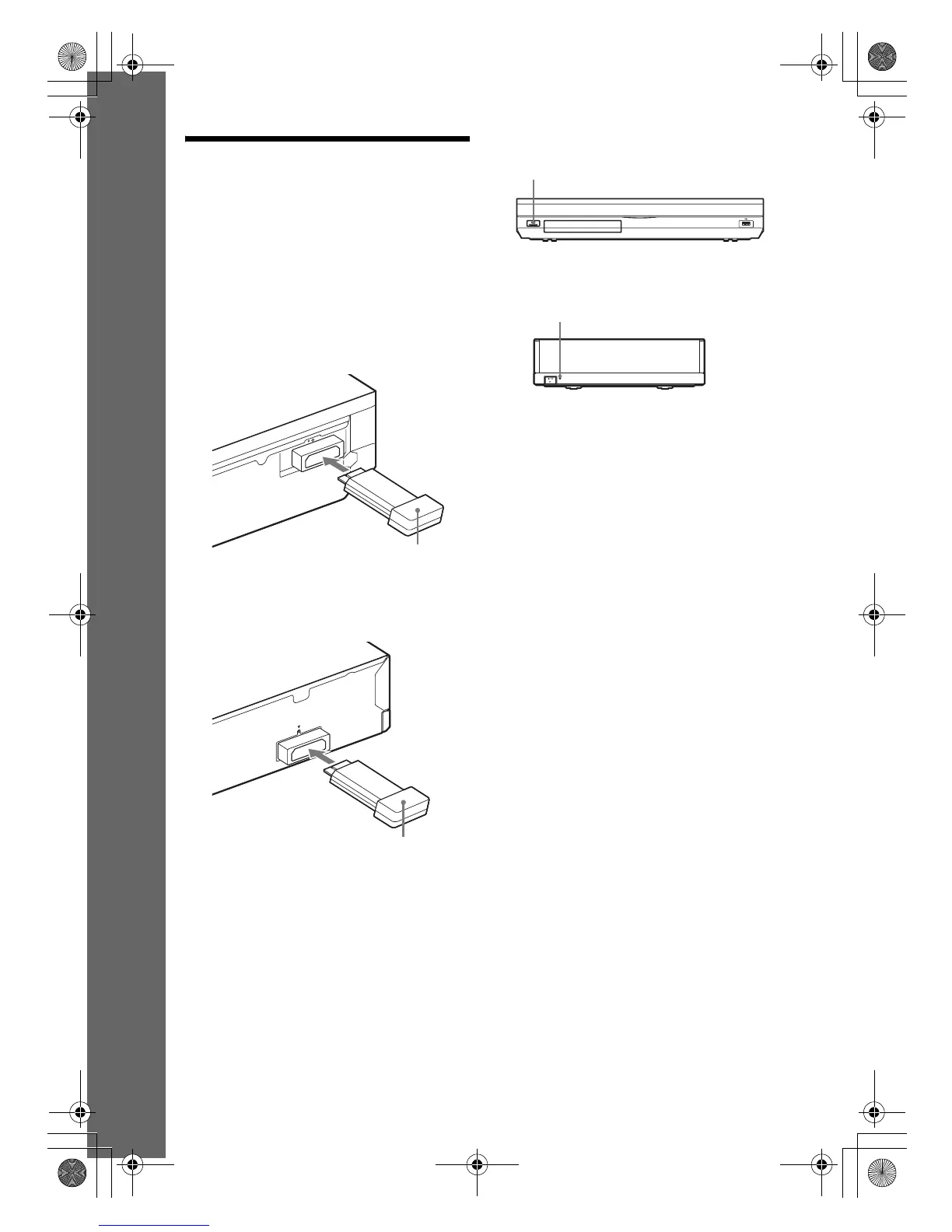
1 Insert the wireless transceiver into the
unit.
2 Insert the wireless transceiver into the
surround amplifier.
3 Connect the AC power cord (mains
lead) of the unit.
Before connecting the AC power cord,
make sure all connections in “Step 2:
Connecting the System” (page 20) are
secure.
4 Press "/1 to turn the system on.
5 Connect the AC power cord (mains
lead) of the surround amplifier.
When wireless transmission is activated,
the LINK/STANDBY indicator turns
green.
If the LINK/STANDBY indicator does not
turn on, see “Surround amplifier” (page 13)
and “Wireless sound” (page 71).
About the standby mode
The surround amplifier enters standby mode
automatically (the LINK/STANDBY indicator
turns red) when the main unit is in standby mode
or wireless transmission is deactivated.
The surround amplifier turns on automatically
(the LINK/STANDBY indicator turns green)
when the main unit is turned on and wireless
transmission is activated.
To specify the wireless
connection
If you use multiple wireless products, you can
specify the wireless connection to link the main
unit to the surround amplifier (Secure Link
function). For details, see “Further Settings for
the Wireless System” (page 54).
EZW-RT50
Rear panel of the unit
Wireless transceiver
Rear panel of the surround amplifier
E
Z
W
-R
T
5
0
Wireless transceiver
"/1
LINK/STANDBY
LINK/STANDBY indicator
gb_book.book Page 28 Thursday, November 25, 2010 6:04 PM



 To Next Page