masterpage:Right
specdef v20080116
filename[E:\BDV2011\Models\E2WF-
E8WF_UC\4261379111\4261379111BDV780WUC\gb04gst.fm]
model name [BDV-E780W/BDV-E980W]
[4-261-379-11(1)]
29
US
Getting Started
Step 5: Performing the
Easy Setup
Follow the Steps below to make the basic
adjustments for using the system.
Displayed items vary depending on the country
model.
1 Turn on the TV.
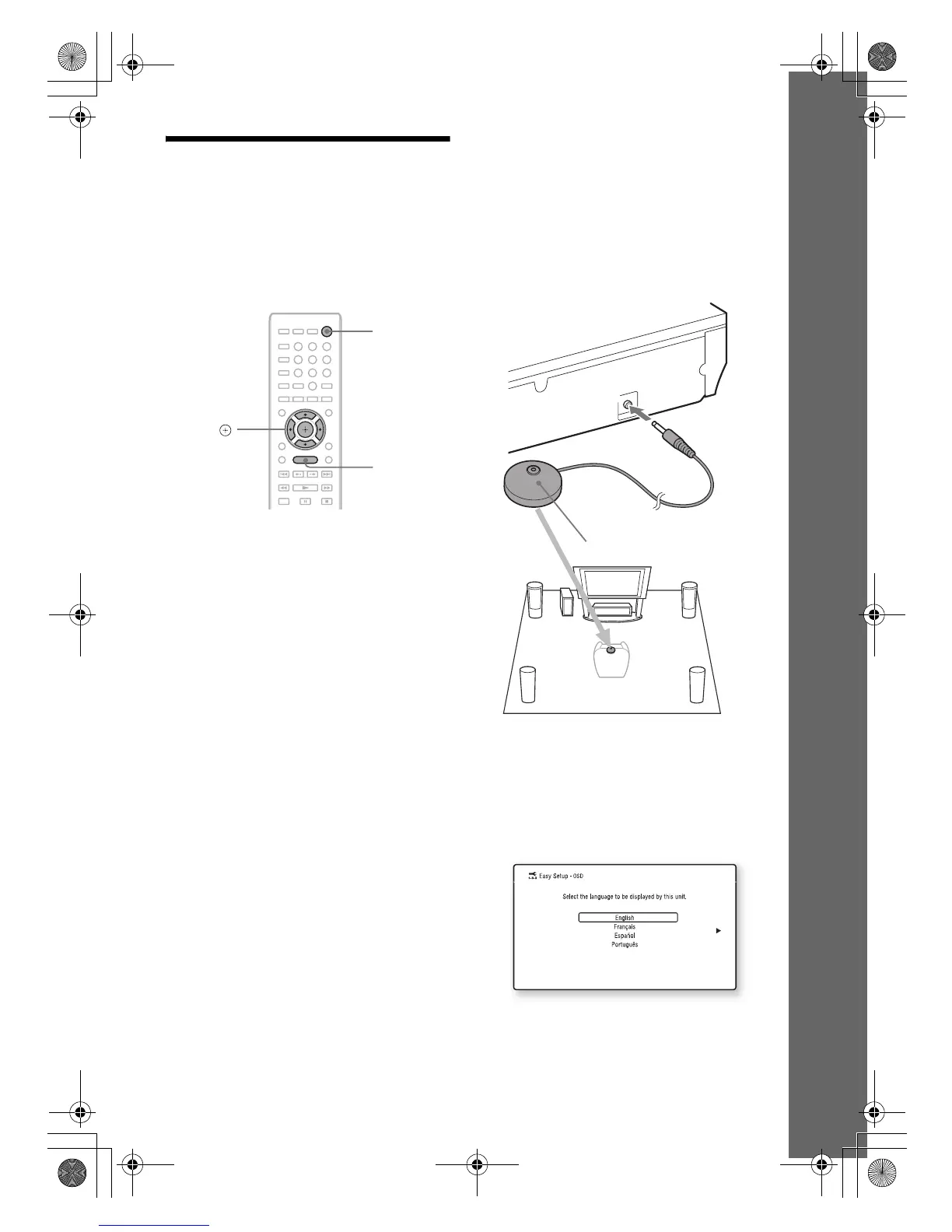
2 Connect the calibration mic to the
A.CAL MIC jack on the rear panel.
Set up the calibration mic at ear level using
a tripod, etc. (not supplied). The front of
each speaker should face the calibration
mic, and there should be no obstruction
between the speakers and the calibration
mic.
3 Press [/1.
4 Switch the input selector on your TV so
that the signal from the system
appears on the TV screen.
The Easy Setup Display for OSD language
selection appears.
8
0
97
564
231
C/X/x/c,
HOME
"/1
E
C
M
-
A
C
2
A.CAL MIC
Calibration mic
gb_book.book Page 29 Thursday, November 25, 2010 6:04 PM



 To Next Page