masterpage:Left
specdef v20080116
filename[E:\BDV2011\Models\E2WF-
E8WF_UC\4261379111\4261379111BDV780WUC\gb04gst.fm]
model name [BDV-E780W/BDV-E980W]
[4-261-379-11(1)]
20
US
Getting Started
Step 2: Connecting the System
For connecting the system, read the information on the following pages.
Do not connect the AC power cords (mains leads) of the unit and surround amplifier to a wall outlet
(mains) until all the other connections are made.
To assemble the speakers, refer to the supplied “Speaker Installation Guide.” (BDV-E980W only)
• When you connect another component with a volume control, turn down the volume of the other components to a
level where sound is not distorted.
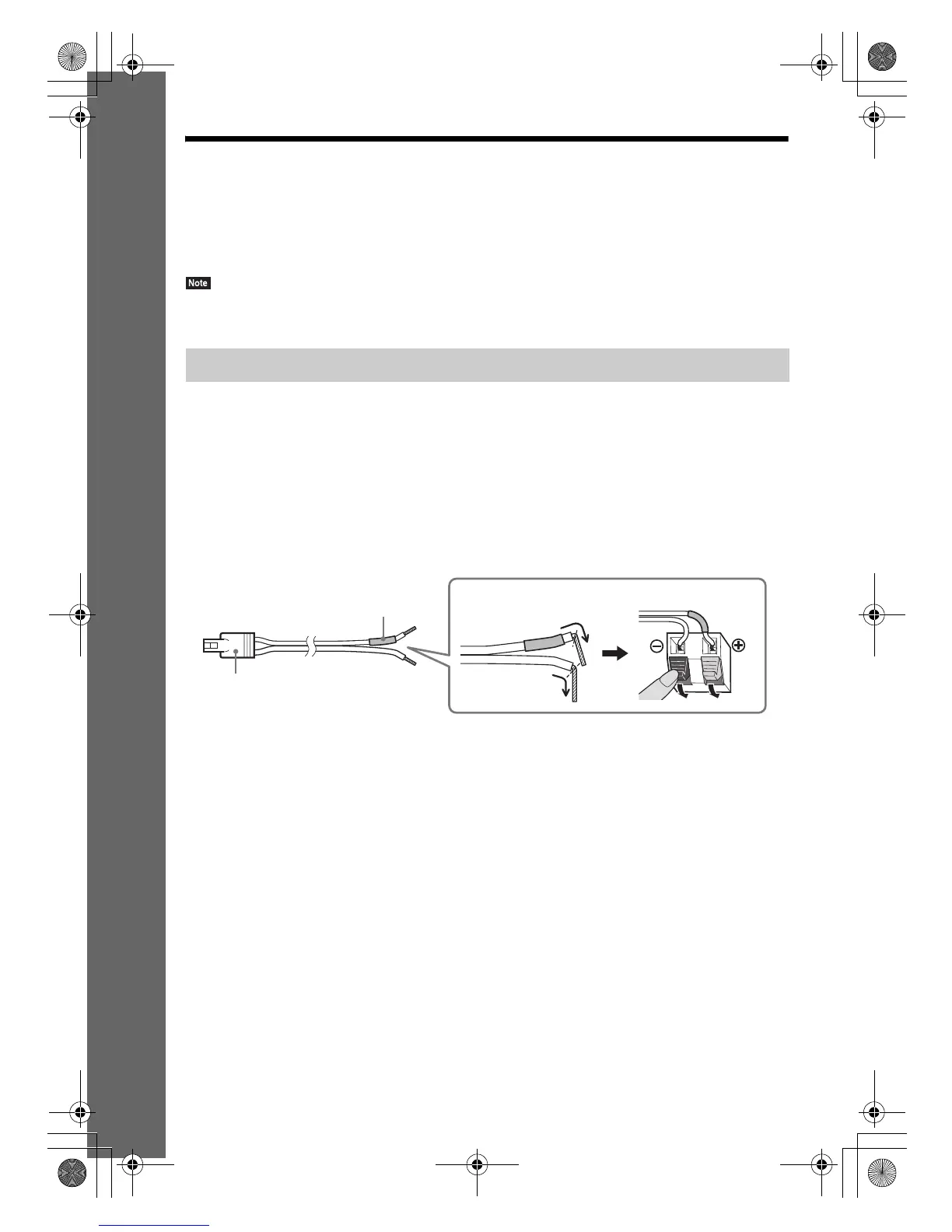
To connect speaker cords to the speaker
You need to connect a speaker cord to each of the following speakers:
• BDV-E780W: Center and surround speakers.
• BDV-E980W: Front, center, and surround speakers.
The connector of the speaker cords and the color tube are color-coded based on the speaker type.
Be sure to match the speaker cords to the appropriate terminals on the speakers: the speaker cord with
the color tube to 3, and the speaker cord without the color tube to #. Do not catch the speaker cord
insulation (rubber covering) in the speaker terminals.
Connecting the speakers
Color tube
(–)
(+)
Connector
Rear or bottom of the speaker
gb_book.book Page 20 Thursday, November 25, 2010 6:04 PM



 To Next Page