masterpage:Right
specdef v20080116
filename[E:\BDV2011\Models\E2WF-
E8WF_UC\4261379111\4261379111BDV780WUC\gb04gst.fm]
model name [BDV-E780W/BDV-E980W]
[4-261-379-11(1)]
21
US
Getting Started
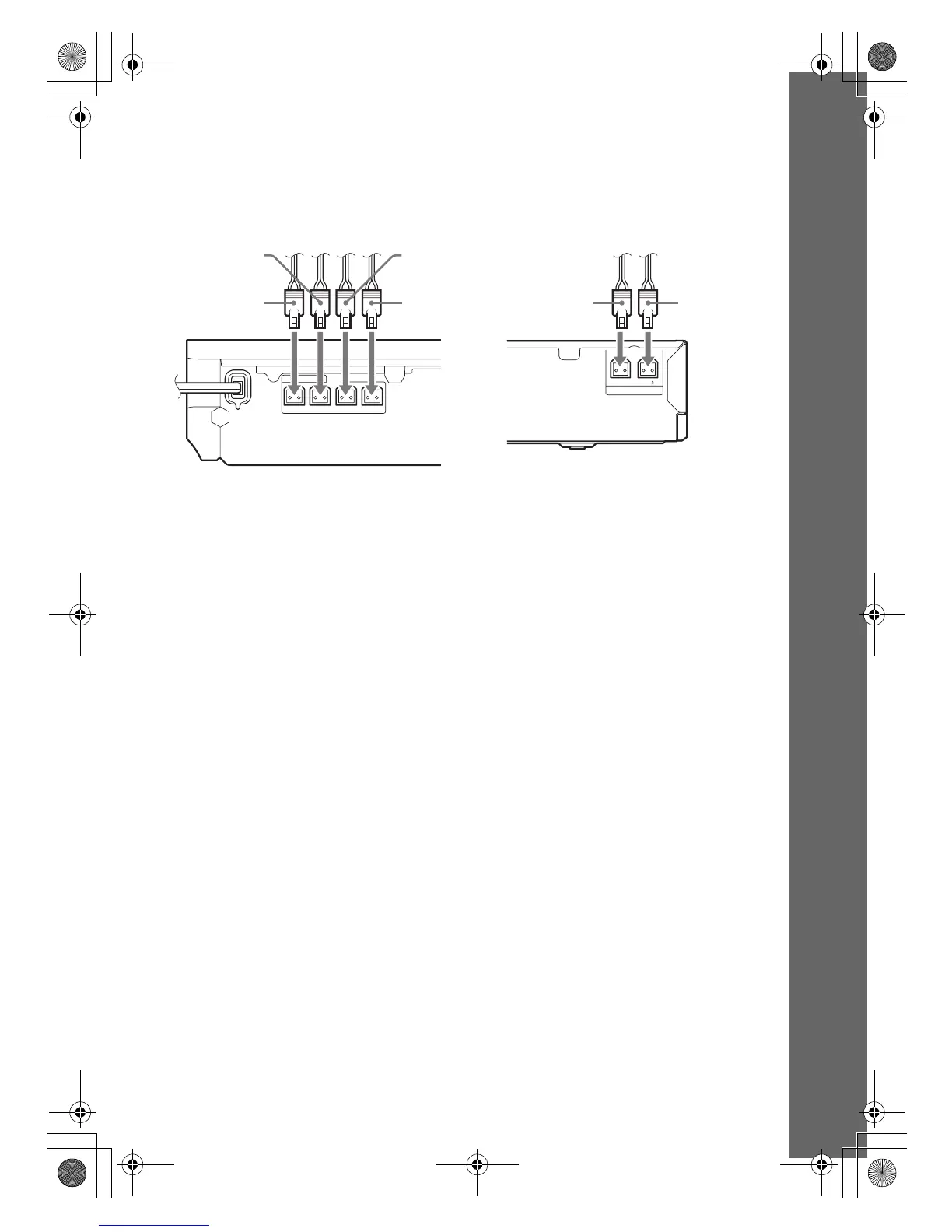
To connect speaker cords to the unit and surround amplifier
Connect the speaker cords to match the color of the SPEAKERS jacks of the unit and surround
amplifier.
When connecting to the unit and surround amplifier, insert the connector until it clicks.
FRONT R FRONT L CENTER
SUBWOOFER
SPEAKERS
L
R
3-16
IMPEDANCE USE
SPEAKERS
Green
(Center speaker)
Purple
(Subwoofer)
White
(Front left
speaker (L))
Red
(Front right
speaker (R))
Gray
(Surround right
speaker (R))
Blue
(Surround left
speaker (L))
Rear panel of the unit
Rear panel of the surround amplifier
gb_book.book Page 21 Thursday, November 25, 2010 6:04 PM



 To Next Page