10
GB
BDV-EF1100
4-446-737-11(1)
D:\NORM'S JOB\SONY HA\SO120045\BDV-EF1100\4446737111_GB
(CEK)\030UNP.fm
masterpage: Left
Guide to Parts and Controls
For more information, refer to the pages indicated in parentheses.
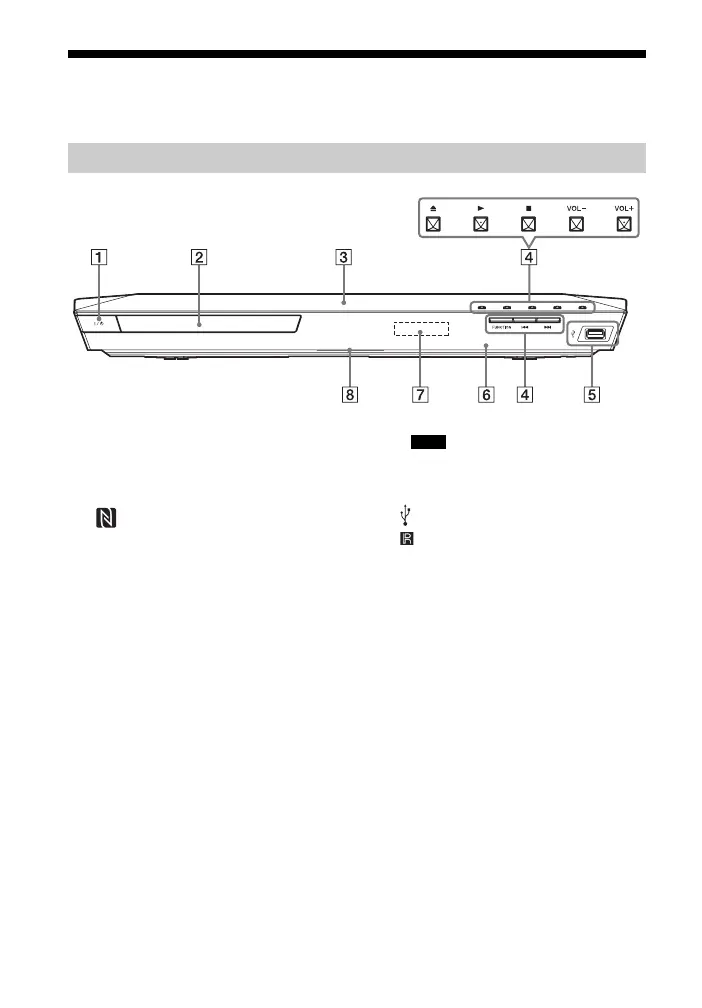
A "/1 (on/standby)
Turns on the unit, or sets it to standby
mode.
B Disc tray (page 23)
C (N-Mark) (page 28)
Position the NFC-compatible device
near this indication to activate the NFC
function.
D Play operation buttons
Z (open/close)
N
a) b)
(play)
x
b)
(stop)
VOL +/–
a)
./> (previous/next)
FUNCTION (page 21)
Selects the playback source.
a)
N and VOL + buttons have a tactile dot.
Use the tactile dot as a reference when
operating the unit.
b)
Hold down N on the unit for more than
2 seconds, the built-in sound
demonstration will be played back on the
system. Press x to stop the demonstration.
During the demonstration, the volume
level may be higher than the volume level
you have set.
E (USB) port (page 25)
F (remote control sensor)
G Front panel display
H LED indicator
White: Lights up when the unit is
turned on.
Blue (for Bluetooth status):
– System is ready for pairing: Flashes
quickly
– During pairing: Flashes quickly
– During connection: Flashes
– Connection is established: Lights up
Front panel
Note


 To Next Page