41
GB
BDV-EF1100
4-446-737-11(1)
D:\NORM'S JOB\SONY HA\SO120045\BDV-EF1100\4446737111_GB
(CEK)\080OTH.fm
masterpage: Right
Other Operations
Browsing Websites
1
Prepare for Internet browsing.
Connect the system to a network
(page 18).
2 Press HOME.
The home menu appears on the TV
screen.
3 Press B/b to select
[Network].
4 Press V/v to select [Internet
Browser], then press .
The [Internet Browser] display
appears.
Some websites may not display correctly, or not
function.
To enter a URL
Select [URL entry] from the options menu.
Enter the URL using the software
keyboard, then select [Enter].
To set the default start page
While the page you want to set is displayed,
select [Set as start page] from the options
menu.
To return to the previous
page
Select [Previous page] from the options
menu.
When the previous page does not appear
even if you select [Previous page], select
[Window List] from the options menu and
select the page you want to return to from
the list.
To quit Internet Browser
Press HOME.
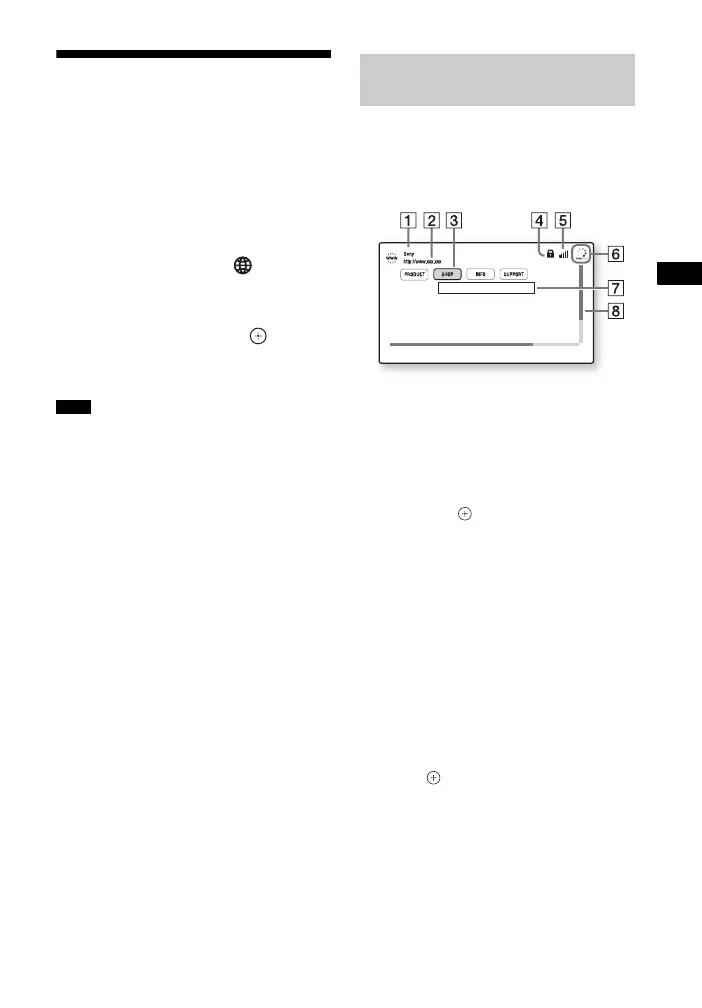
You can check website information by
pressing DISPLAY. The display
information differs depending on the
website and page status.
A Page title
B Page address
C Cursor
Move by pressing B/V/v/b. Place the
cursor on the link you want to view,
then press . The linked website is
displayed.
D SSL icon
Appears when the linked URL is
secured.
E Signal strength indicator
Appears when the system is connected
to a wireless network.
F Progress bar/Loading icon
Appears when the page is being read,
or during file download/transfer.
G Text input field
Press , then choose [Input] from the
options menu to open the software
keyboard.
H Scroll bar
Press B/V/v/b to move the page
display left, up, down, or right.
Note
Internet Browser
display


 To Next Page