4
3
1
2
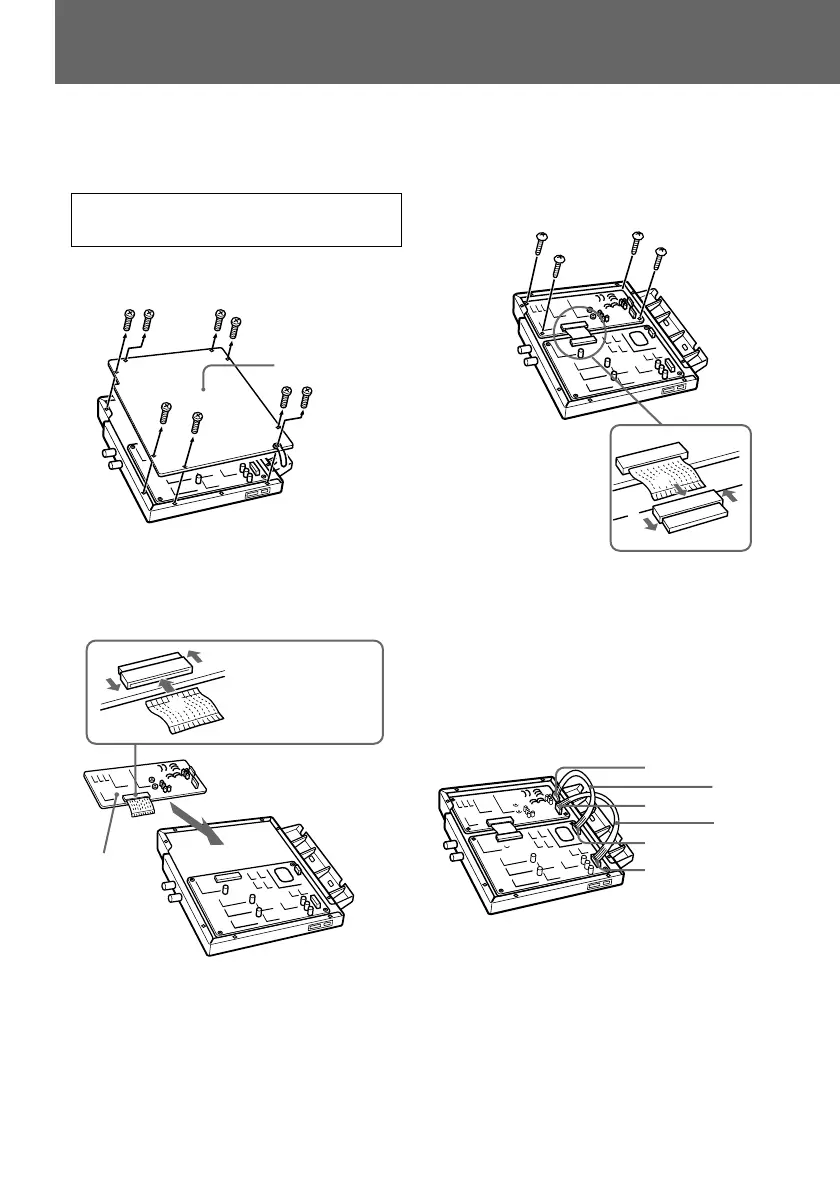
2 Insert the BA board into the SDI
module.
Use the 30-pin
flat cable with
the metal side
facing up.
BA board
3 Insert the 30-pin flat cable connector
into the CN5 terminal on the BV board,
and secure the BA board using the
supplied 4 screws with BKM-102.
4 Connect the CN1 terminal on the BA
board to the CN3 teminal on the BV
board, and connect the CN2 terminal on
the BA board to the CN4 terminal on
the BV board, using the connecting
cables supplied with BKM-102.
CN2
CN1
CN4
CN3
4-pin
connecting
cable
5-pin
connecting
cable
Installation
5 Install BKM-102 (BA board) in the SDI
module of BKM-101C.
If you do not install the BKM-102, skip step
5 and go to step 6.
1 Remove the cover of the SDI module.
Remove 8 screws.
Cover


 To Next Page