EasyManua.ls Logo

Sony BVE-600 - 3 Technical Information; How to Control;The AUTO FREEZE of

Sony BVE-600
37 pages
Print Icon
To Next Page IconTo Next Page
To Previous Page IconTo Previous Page
Loading...
SECTION
3
TECHNICAL
INFORMATION
3-1.
HOW
TO
CONTROL
THE
AUTO
FREEZE
OF
BVU-900
BY
USING
EDIT
PULSE
OUT
OF
BVE-600.
BVE-600
is
able
to
control
the
freeze
function
of
BVU-900
(with
BKU-902/904)
by
connecting
the
EDIT
PULSE
output
(T1
or
T2)
and
L-FREEZE
COMMAND
IN
TERMINAL
of
GPI
connector
(24pin).
e
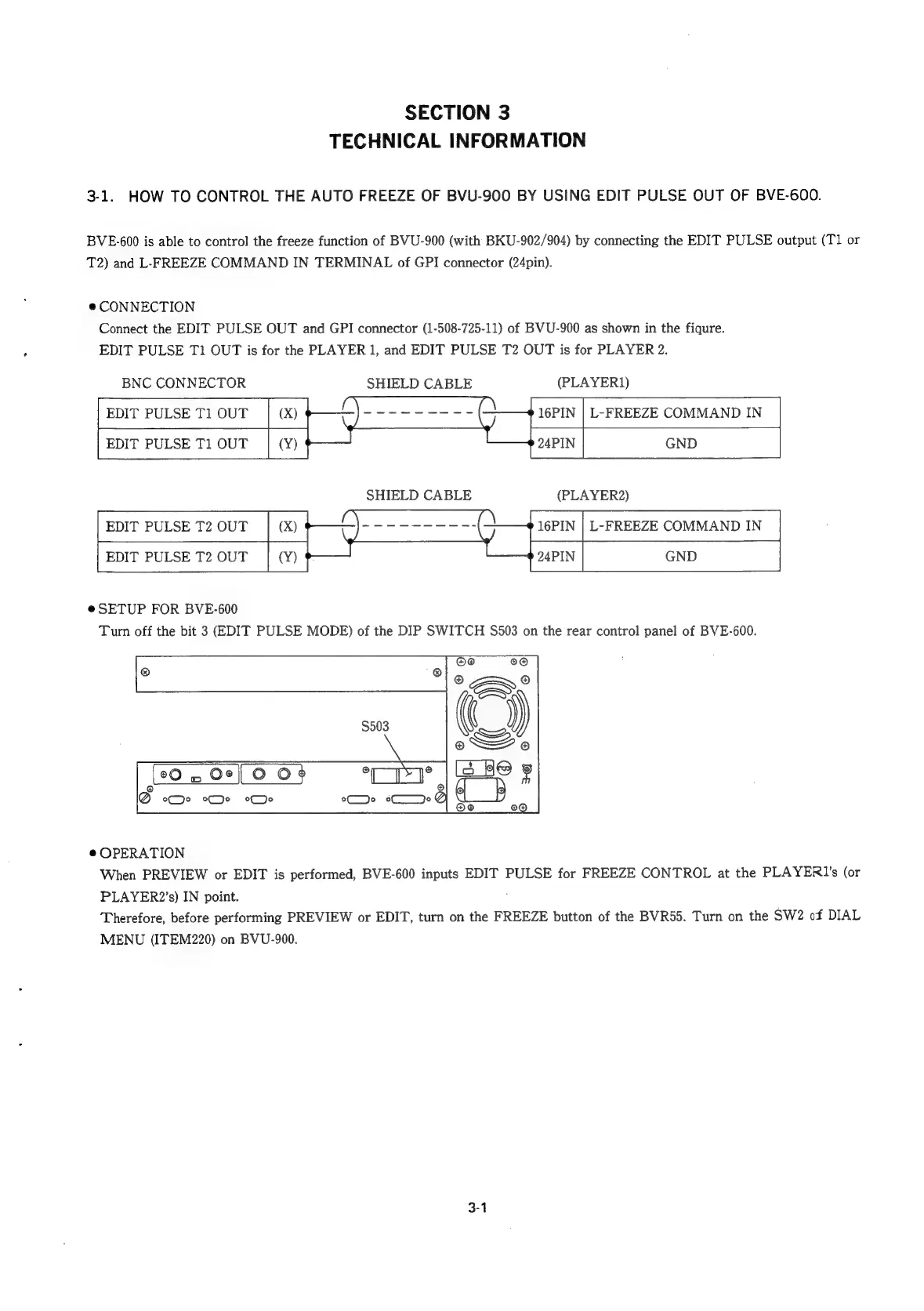
CONNECTION
Connect
the
EDIT
PULSE
OUT
and
GPI
connector
(1-508-725-11)
of
BVU-900
as
shown
in
the
fiqure.
EDIT
PULSE
Tl
OUT
is
for
the
PLAYER
1,
and
EDIT
PULSE
T2
OUT
is
for
PLAYER
2.
BNC
CONNECTOR
SHIELD
CABLE
(PLAYER})
EDIT
PULSE
T1
OUT
EDIT
PULSE
T1
OUT
16PIN
|
L-FREEZE
COMMAND
IN
24PIN
GND
SHIELD
CABLE
(PLAYER2)
16PIN
|
L-FREEZE
COMMAND
IN
EDIT
PULSE
T2
OUT
EDIT
PULSE
T2
OUT
e
SETUP
FOR
BVE-600
Turn
off
the
bit
3
(EDIT
PULSE
MODE)
of
the
DIP
SWITCH
$503
on
the
rear
control
panel
of
BVE-600.
{20
w
Or[
0
OF
Di
alls
Q
ce
ee
je
ele
00
Y
@
OPERATION
When
PREVIEW
or
EDIT
is
performed,
BVE-600
inputs
EDIT
PULSE
for
FREEZE
CONTROL
at
the
PLAYERI’s
(or
PLAYER2’s)
IN
point.
Therefore,
before
performing
PREVIEW
or
EDIT,
turn
on
the
FREEZE
button
of
the
BVR55.
Turn
on
the
SW2
of
DIAL
MENU
(ITEM220)
on
BVU-900.
3-1