EasyManua.ls Logo

Sony BVE-600 - Page 34

Sony BVE-600
37 pages
Print Icon
To Next Page IconTo Next Page
To Previous Page IconTo Previous Page
Loading...
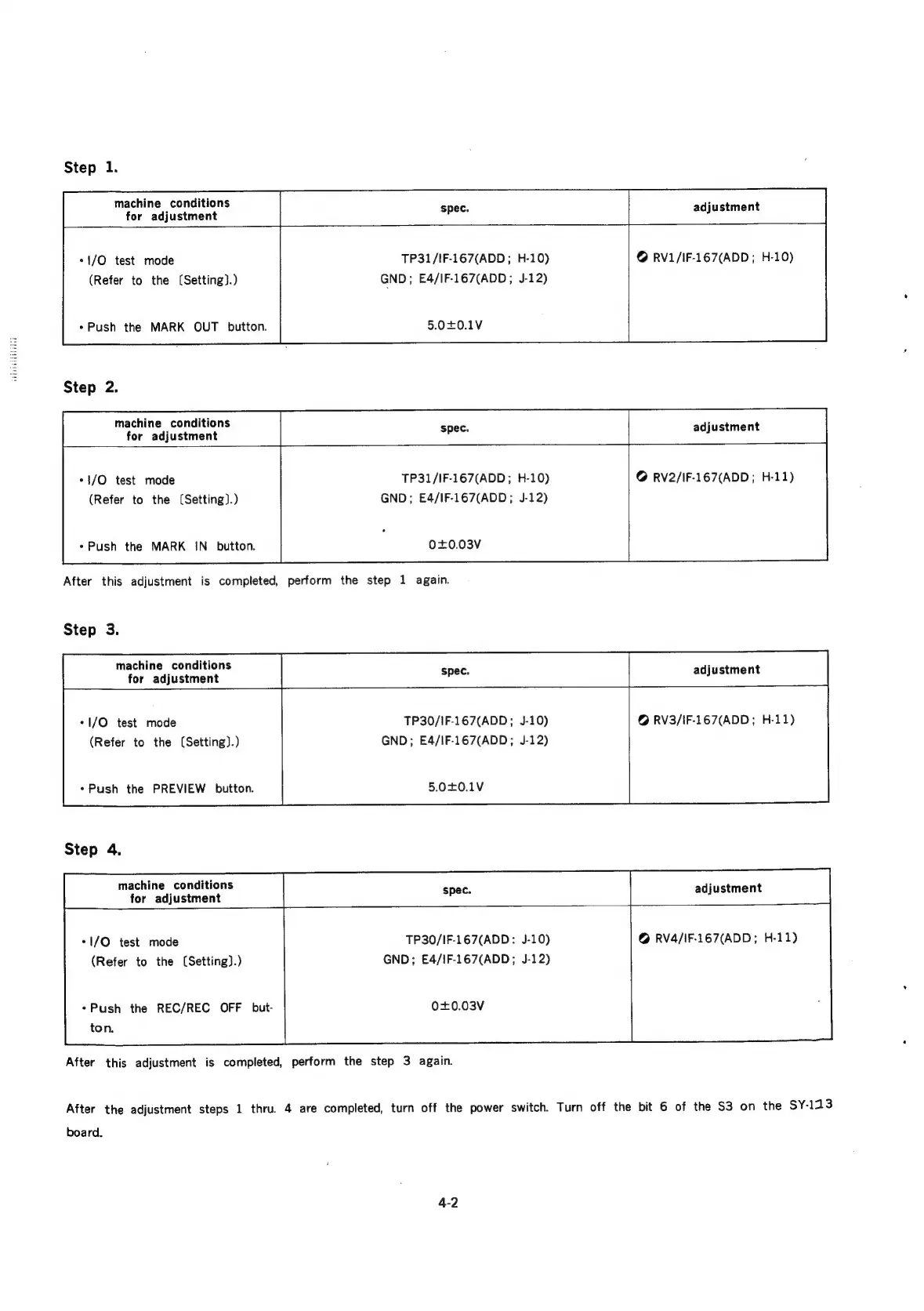
Step
1.
machine
conditions
for
adjustment
adjustment
*1/O
test
mode
(Refer
to
the
(Setting).)
«Push
the
MARK
OUT
button.
Step
2.
machine
conditions
for
adjustment
*1/O
test
mode
(Refer
to
the
(Setting).)
*Push
the
MARK
IN_
button.
TP31/IF-167(ADD;
H-10)
GND;
E4/IF-167(ADD;
J-12)
5.0+0.1V
@
RV1/IF-167(ADD
;
H-10)
adjustment
TP31/IF-167(ADD;
H-10)
GND;
E4/IF-167(ADD;
J-12)
0+0.03V
After
this
adjustment
is
completed,
perform
the
step
1
again.
Step
3.
machine
conditions
for
adjustment
*1/O
test
mode
(Refer
to
the
(Setting).)
«Push
the
PREVIEW
button.
Step
4.
machine
conditions
for
adjustment
TP30/IF-167(ADD;
J-10)
GND;
E4/IF-167(ADD;
J-12)
5.0+0.1V
@
RV2/IF-167(ADD;
H-11)
spec.
adjustment
@
RV3/IF-167(ADD;
H-11)
adjustment
*I/O
test
mode
(Refer
to
the
(Setting).)
*Push
the
REC/REC
OFF
but-
ton.
TP30/IF-167(ADD:
J-10)
GND;
E4/iF-167(ADD;
J-12)
0+0.03V
After
this
adjustment
is
completed,
perform
the
step
3
again.
@
RV4/IF-167(ADD;
H-11)
After
the
adjustment
steps
1
thru.
4
are
completed,
turn
off
the
power
switch.
Turn
off
the
bit
6
of
the
S3
on
the
SY-113
board.

Related product manuals