8
Cassette Player
Listening to a tape
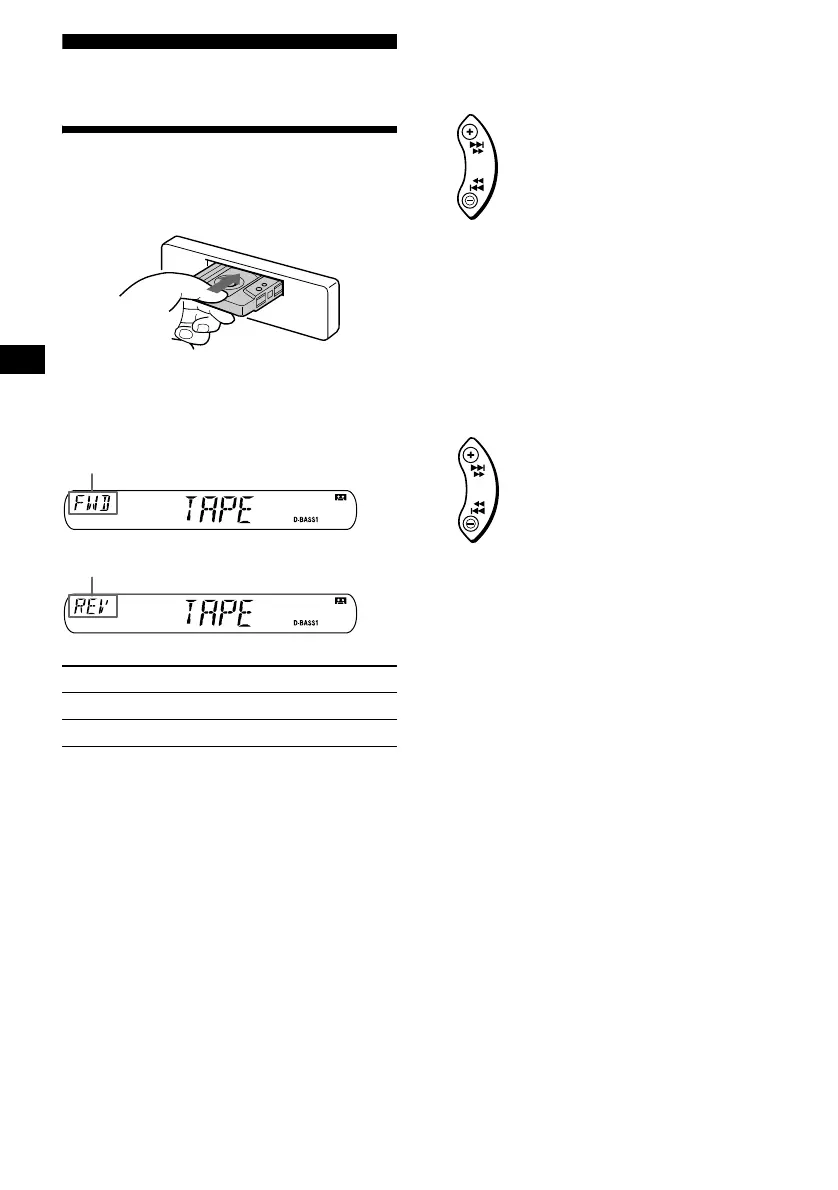
Insert a cassette.
Playback starts automatically.
If a cassette is already inserted, to start playback,
press (SOURCE) repeatedly until “TAPE”
appears.
Fast-winding the tape
During playback, press and hold either
side of (SEEK/AMS).
To start playback during fast-forwarding or
rewinding, press (MODE) (o).
Locating a specific track
— Automatic Music Sensor (AMS)
During playback, press either side of
(SEEK/AMS) momentarily for each
track you want to skip.
You can skip up to nine tracks at one time.
Note
The AMS function may not work when:
– the blanks between tracks are shorter than four
seconds.
– there is noise between tracks.
– there are long sections of low volume or quiet
sections.
To Press
Stop playback (OFF)
Eject the cassette Z
The side facing up is played
The side facing down is played
SEEK
AMS
Fast-forward
Rewind
SEEK
AMS
To locate succeeding tracks
To locate preceding tracks



 To Next Page