ConnectingTV Antenna/Cable
I Illl II III
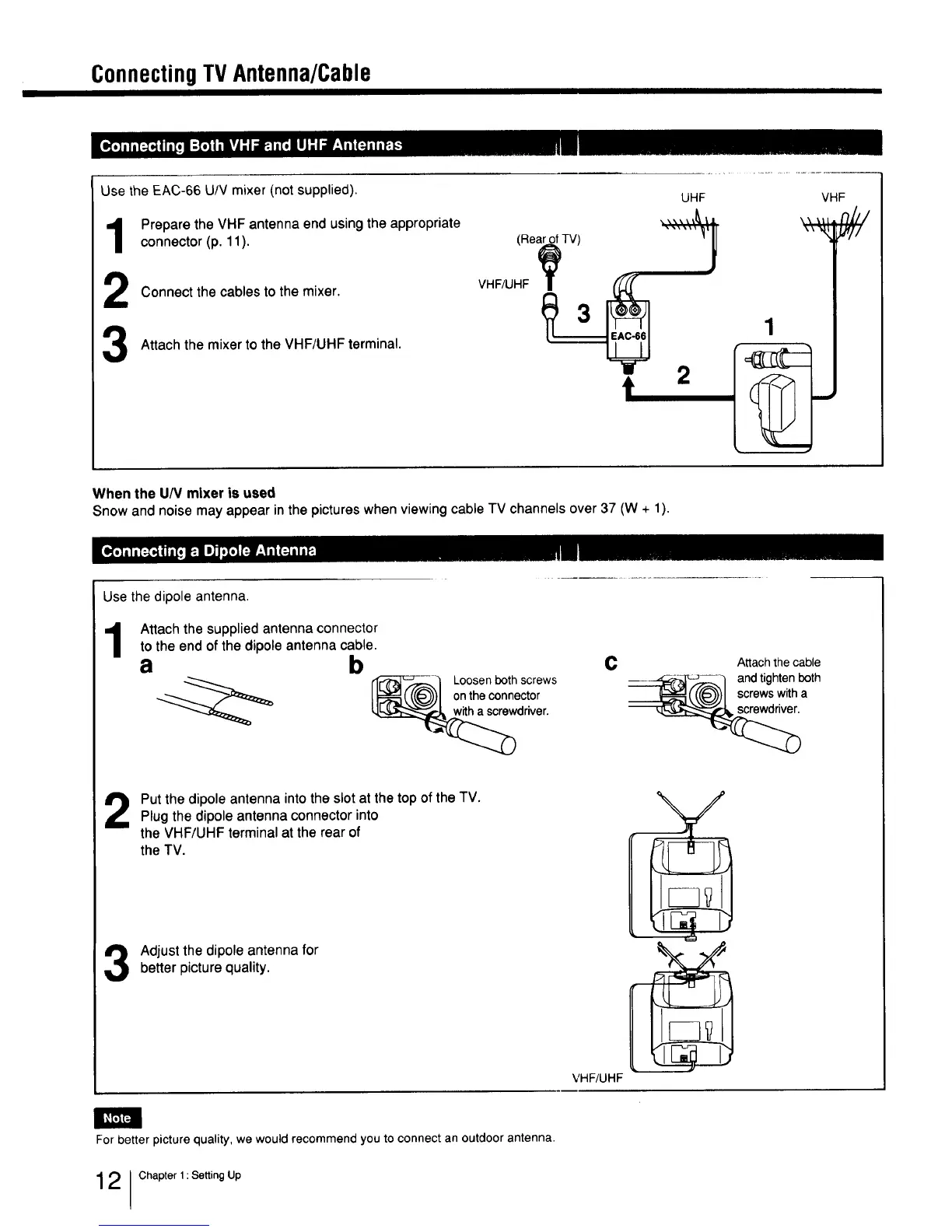
Use the EAC-66 U/V mixer (not supplied).
UHF
Prepare the VHF antenna end using the appropriate
connector (p. 11). (Rear.£ofTV)
"h
_ Connect the cables to the mixer. VHF/UHF__ 1
Attach the mixer to the VHF/UHF terminal. •
,
VHF
When the U/V mixer is used
Snow and noise may appear in the pictures when viewing cable TV channels over 37 (W + 1).
Use the dipole antenna.
Attach the supplied antenna connector
to the end of the dipole antenna cable.
a b c Attach the cable
---'_F_4_,,_,_] and tightenboth
(((@,))J screwswitha
_ Loosenbothscrews
on the connector
driver.
Put the dipole antenna into the slot at the top of the TV.
Plug the dipole antenna connector into
the VHF/UHF terminal at the rear of
the TV.
Adjust the dipole antenna forbetter picture quality.
VHF/UHF
\
%
/
For better picture quality, we would recommend you to connect an outdoor antenna.
2 Chapter 1: Setting Up



 To Next Page