Adjusting Picture and SoundUuulJty
III
f
MUTING SLEEP
TVNIDE0
®®®
®®®
®®®
8voL
RM-Y116
(KV-20TS29/2170RS/21STR2/20TS32/20TS50 only)
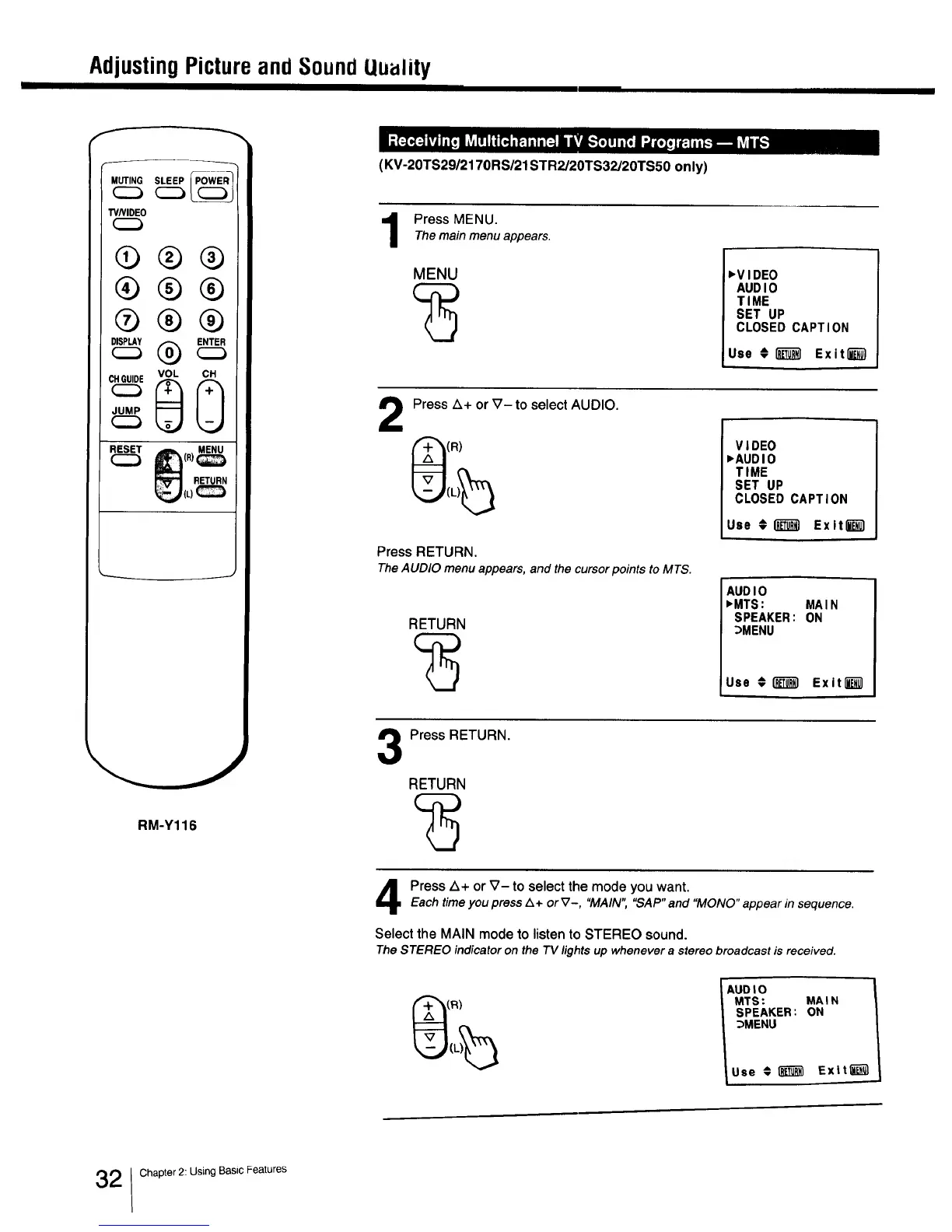
Press MENU.
Themain menu appears.
MENU 'VIDEO
AUDIO
TIME
SET UP
CLOSED CAPTION
Use O i_T_I Exit""""""""""_
2
Press Z_+ or V- to select AUDIO.
(R)
Press RETURN.
TheAUDIO menu appears, and the cursor points to MTS.
RETURN
VIDEO
_AUDIO
TIME
SET UP
CLOSED CAPTION
Use #1_ Exiting1
AUDIO
_MTS: MAIN
SPEAKER: ON
_MENU
Use €[_1 Exit[_l
Press RETURN.
RETURN
Press Z_+or _7- to select the mode you want.
Each time you press/k + or V-, "MAIN","SAP" and "MONO"appear in sequence.
Select the MAIN mode to listen to STEREO sound.
TheSTEREO indicator on the 73/lightsup whenevera stereobroadcast is received.
AUOIO
MTS: MAIN
SPEAKER: ON
_MENU
Use € _ Exiting1
2 Chapter 2: Using Basic Features



 To Next Page