UsingtheOn-ScreenMenus
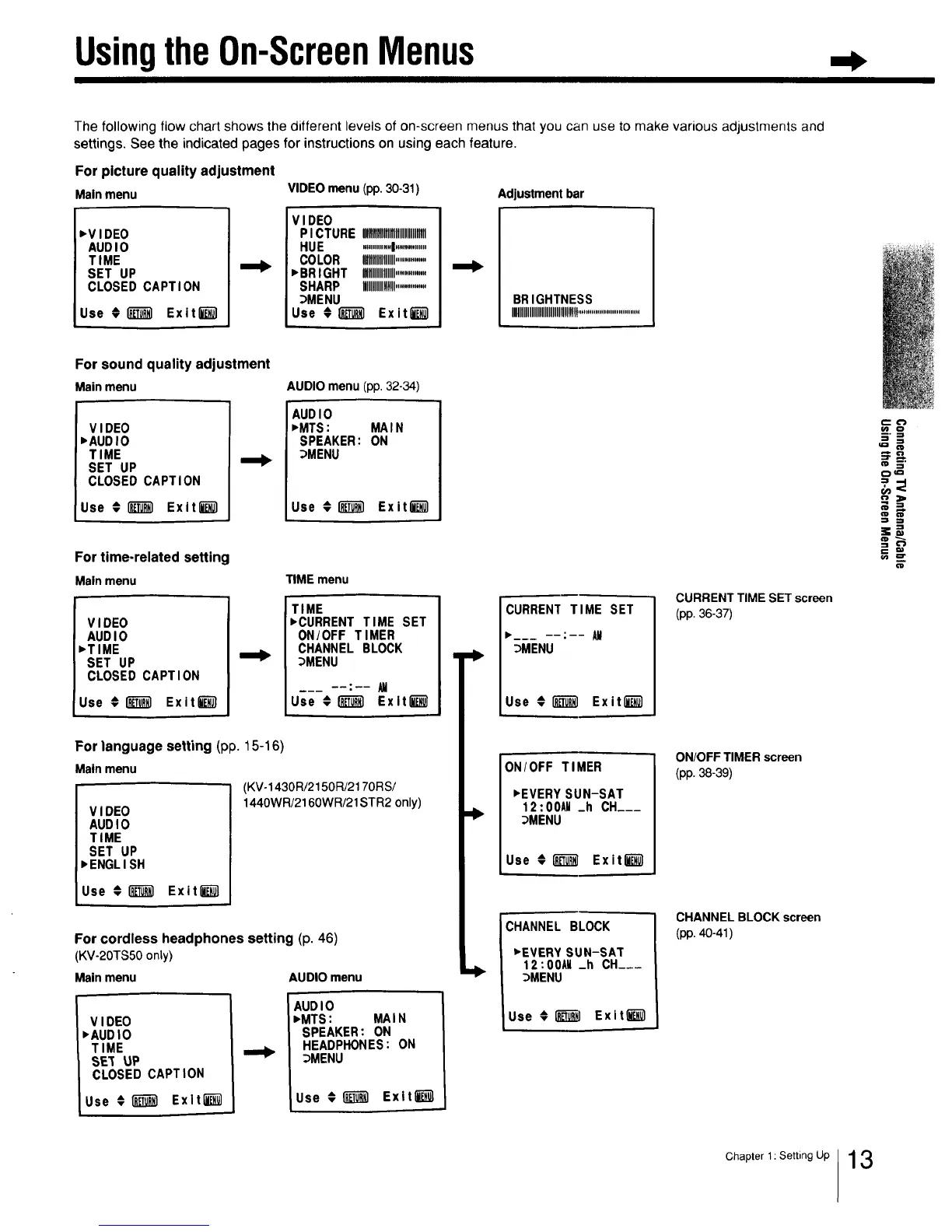
The following flow chart shows the different levels of on-screen menus that you can use to make various adjustments and
settings. See the indicated pages for instructions on using each feature.
For picture quality adjustment
Mainmenu
_VIDEO
AUDIO
TIME
SET UP
CLOSED CAPTION
Use €_ Exitli_l
VIDEO menu (pp. 30-31)
VIDEO
PICTURE ,llllllllllllI,llllllllllllllll
HUE ...............I................
COLOR IIIIIIIIIIlllllll..............
"BRIGHT Igllllllllllllll................
SHARP HIIIIIIIIIIIllll................
_MENU
Use ;1_) Exit_-_]
Adjustment bar
BRIGHTNESS
IIIIIIIIIIIIIIIIIIIIIIIIIIlUllll!................................
I
For sound quality adjustment
Mainmenu
VIDEO
,AUDIO
TIME
SET UP
CLOSED CAPTION
Use € _ Exitl_
AUDIO menu (pp. 32-34)
AUDIO
• MTS: MAIN
SPEAKER: ON
_MENU
Use €_ Exiti-_
For time-related setting
Mainmenu
VIDEO
AUDIO
,TIME
SET UP
CLOSED CAPTION
Use # _ Exit_
TIME menu
TIME
• CURRENT TIME SET
ON/OFF TIMER
CHANNEL BLOCK
_MENU
Use € _ Exlt_
For language setting (pp. 15-16)
Mainmenu
(KV-1430R/2150R/217ORS/
1440WR/2160WR/21STR2 only)
V I DEO
AUDI0
TIME
SET UP
• ENGLISH
Use € i_ Exitl_l
For cordless headphones setting (p. 46)
(KV-2OTS50only)
Mainmenu AUDIO menu
VIDEO
•AUDIO
TIME
SE_ UP
CLOSED CAPTION
Use € 1_ Exlt_
AUDIO
,MTS: MAIN
SPEAKER: ON
HEADPHONES: ON
_MENU
Use €1__1 Exltlk_
CURRENT TIME SET
"___ : AM
_MENU
Use €[_ Exitli_l
ON/OFF TIMER
• EVERY SUN-SAT
12:00AM _h CH___
_MENU
Use €_ ExitE-i_
i
CHANNEL BLOCK
"EVERY SUN-SAT
12:00AU _h CH___
_MENU
Use € _ Exitlk_l
i
CURRENT TIME SET screen
(pp. 36-37)
ON/OFF TIMER screen
(pp. 38-39)
CHANNEL BLOCK screen
(pp. 40-41 )
m 3'
0¢=
=3
=+=,
OlD
Chapter l: Setting Up 13



 To Next Page