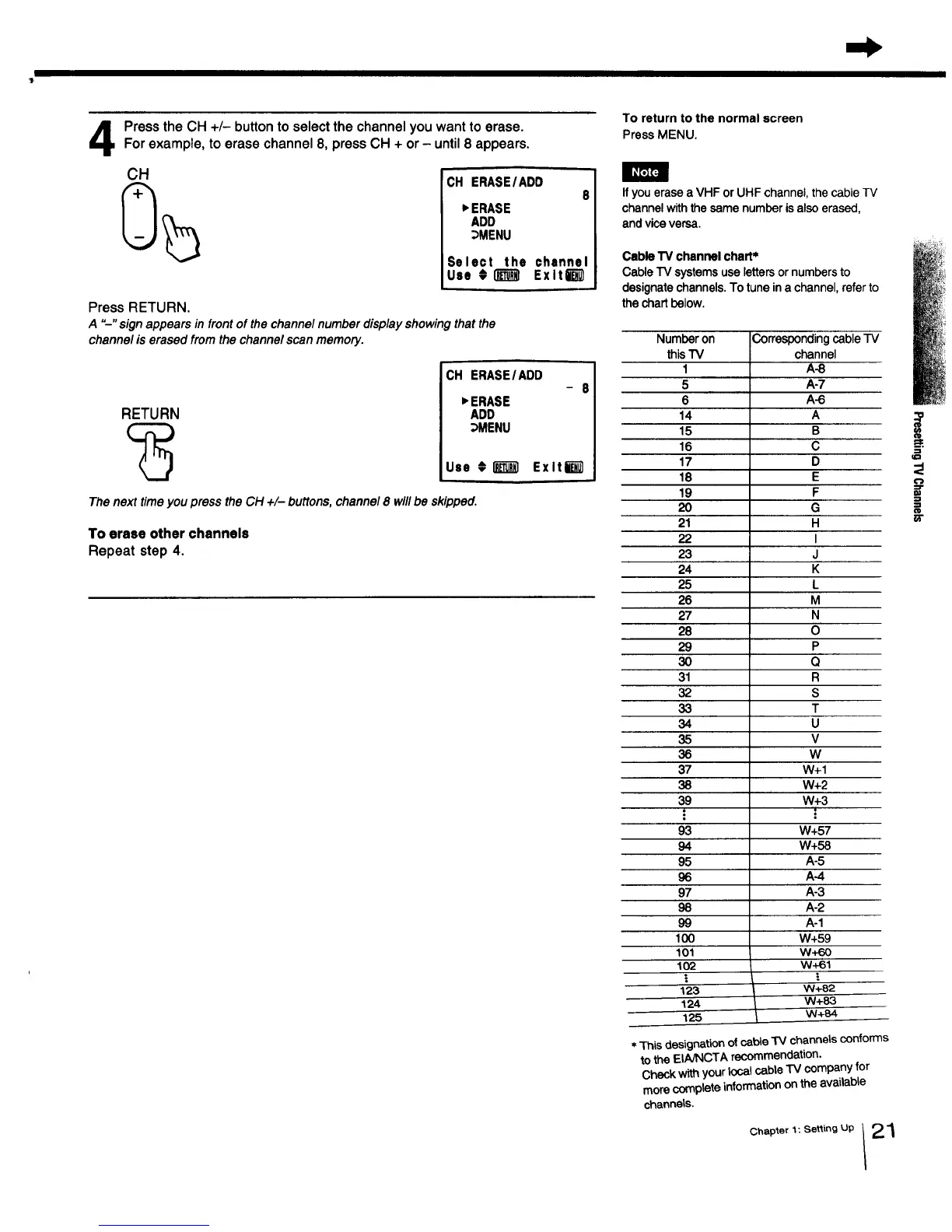
PresstheCH +/- button to select the channelyouwant to erase.Forexample,toerase channel8, pressCH + or- until8 appears.
CH
CH ERASE/ADD
8
_ERASE
ADD
_MENU
Select the channel
Use #_ Exlti_
Press RETURN.
A "--" sign appears in front of the channel number display showing that the
channel is erased from the channel scan memory.
RETURN
CH ERASE/ADD
- 8
_ERASE
ADD
_MENU
Use #l_'_l ExltW
The next time you press the CH +/- buttons, channel 8 will be skipped.
To erase other channels
Repeat step 4.
To return to the normal screen
Press MENU.
If you erase a VHF or UHF channel, the cable TV
channel withthe same number is also erased,
and vice versa.
Cable"IVchannelchart*
CableTV systemsuselettersornumbersto
designatechannels.Totuneina channel,referto
thechartbelow.
Number on
this"IV
I
5
6
14
15
16
17
18
19
2O
21
22
23
24
25
26
27
28
29
3O
31
32
33
34
35
36
37
38
39
93
94
95
96
97
98
99
IO0
1Ol
1o2
!
123
124
125
Correspondingcable "IV
channel
A-8
A-7
A-6
A
B
C
D
E
F
G
H
I
J
K
L
M
N
O
P
Q
R
S
T
U
V
W
W+I
W+2
W+3
.=
W+57
W+58
A-5
A-4
A-3
A-2
A-1
W+59
w+60
w+61
=.
W+82
W+83
W+84
* This designationof cable "IV channels conforms
to the EINNCTA recommendation.
Check with your local cable TV company for
more complete information on the available
channels.
Chapter 1 : Setting Up 2 "_
!
i



 To Next Page