EasyManua.ls Logo

Sony Cable Box - Page 25

Sony Cable Box
48 pages
Print Icon
To Next Page IconTo Next Page
To Previous Page IconTo Previous Page
Loading...
I Playing back recorded tapes 1
I 0 POWER
TVP/IDEO - VOLUME + - CHANNEL +
©
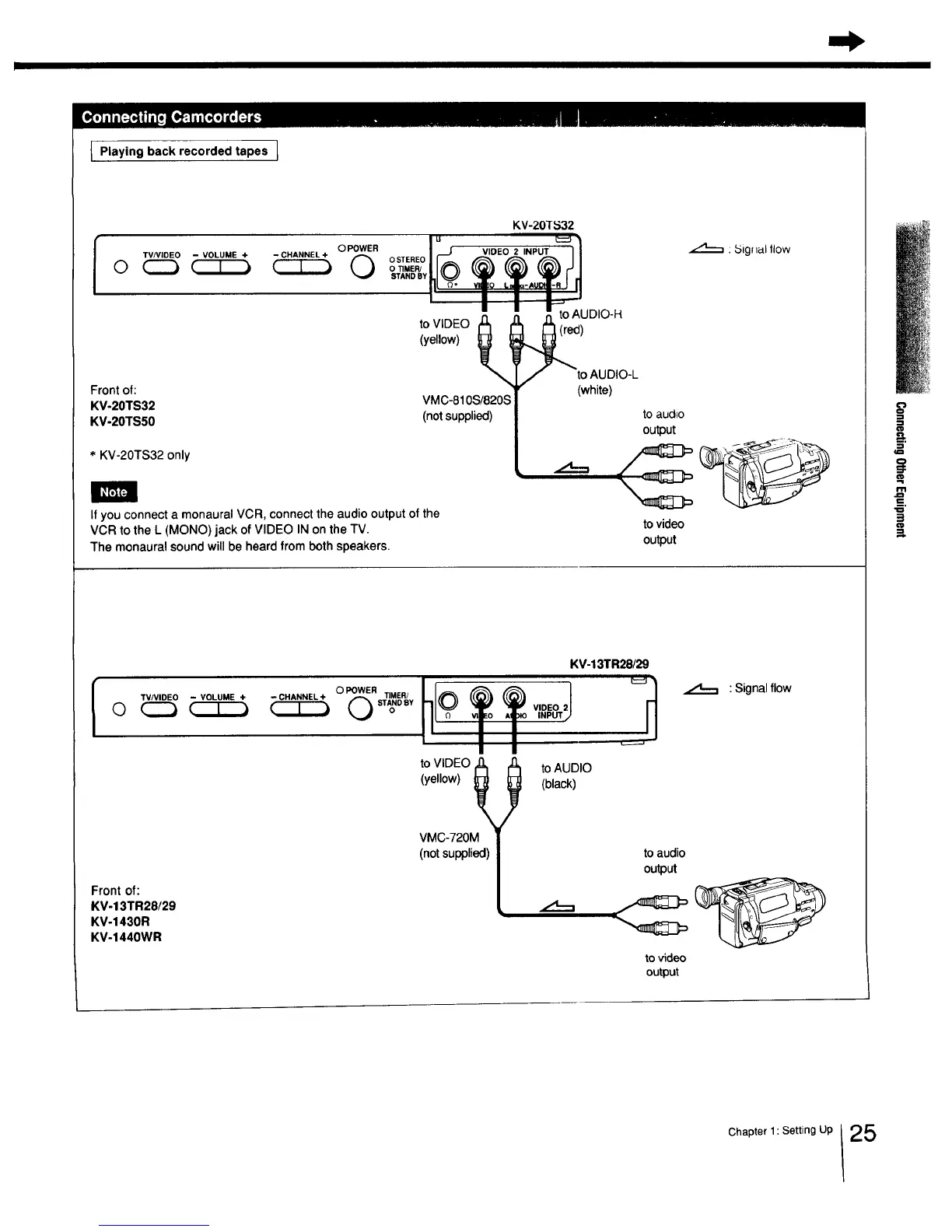
Front of:
KV-20TS32
KV-20TS50
* KV-20TS32 only
KV-20TS32
I _ WDEO2 =NPUT I/
- I I i_
,_ to AUDIO-H
toVIDEO _ _
(yellow) )
to AUDIO-L
(white)
VMC-810S/820S
(not supplied)
If you connect a monaural VCR, connect the audio output of the
VCR to the L (MONO) jack of VIDEO IN on the TV.
The monaural sound will be heard from both speakers.
: _5ignal llow
to audio
output
to video
output
l TVNIDEO - VOLUME +
Front of:
KM-13TR28/29
KV-1430R
KV-1440WR
hlot t v,,0oJ
t'11
KV-13TR28/29
--CHANNEL+
to VIDEO 1(_
(yellow) _
VMC-720M
(not supplied)
to AUDIO
(black)
.,,4---,
: Signal flow
to audio
output
to video
output
Chapter 1: Setting Up 25