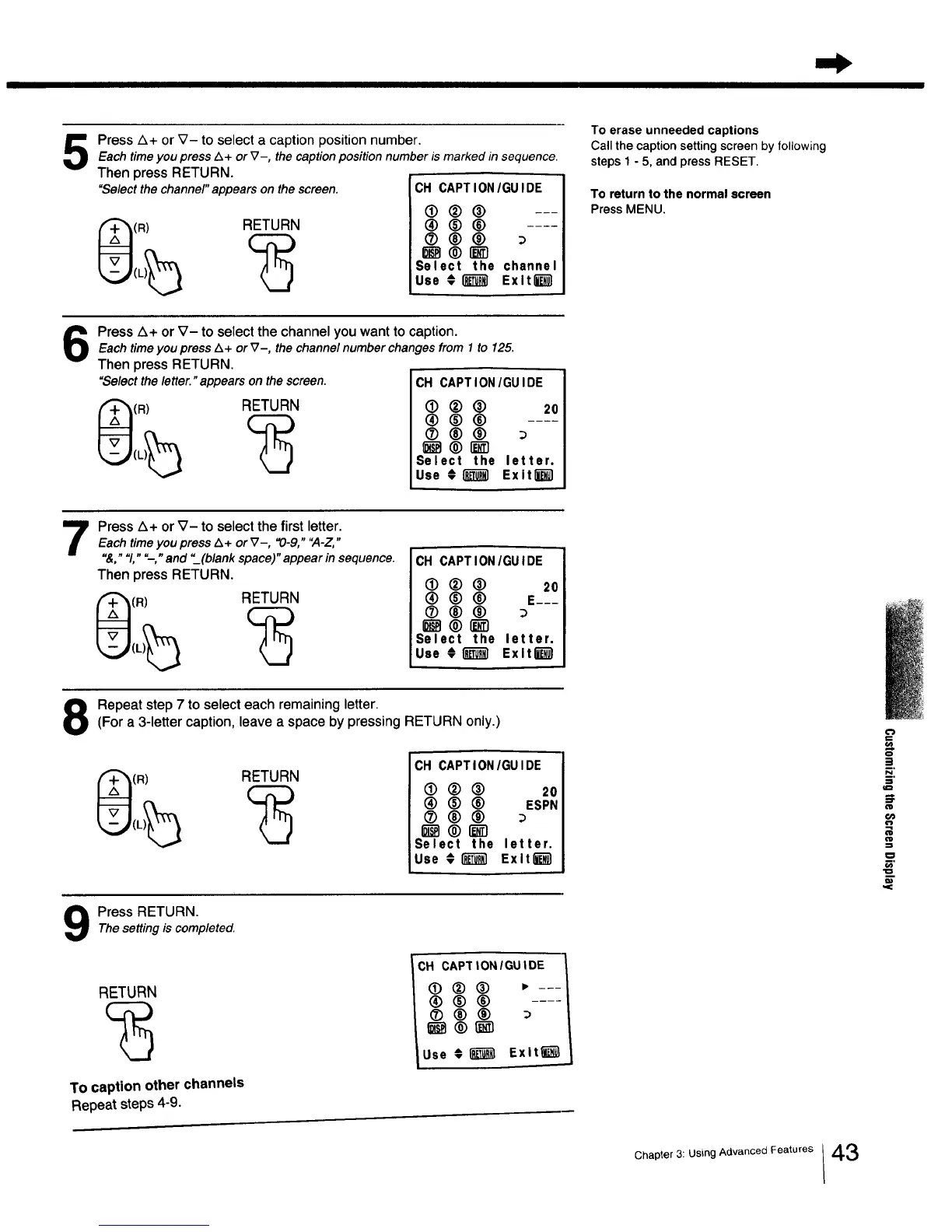
Press A+ or V- to select a caption position number.Each timeyou press Z_+ or V-, the captionposition number is marked in sequence.
Then press RETURN.
"Selectthe channel" appears on the screen. CH CAPTION/GU IDE
(R) RETURN
®(_® ---
®®®
Select the channel
Use # _ Exltl_l
To erase unneeded captions
Call the caption setting screen by following
steps 1 - 5, and press RESET.
To return to the normal screen
Press MENU.
Press Z_+ or V- to select the channel you want to caption.
Each timeyou press A+ or V-, the channel number changes from 1 to 125.
Then press RETURN.
"Select the letter. "appears on the screen.
(R) RETURN
CH CAPTION/GUIDE
(]) ® ® 20
®®®
(2) 00
_ ® r_-_
Select the letter.
Use # _ Exit_
7
Press A+ or V- to select the first letter.
Each time you press Z_+ or _7-, "0-9," "A-Z,"
"&," "1," "--," and "_(blank space)" appear in sequence.
Then press RETURN.
(R) RETURN
CH CAPTION/GUIDE
• ®® 20
® ® ® E---
®®®
_®_'1
Select the letter.
Use # _ Exlt_
Repeat step 7 to select each remaining letter.(For a 3-letter caption, leave a space by pressing RETURN only.)
(R) RETURN
CH CAPTION/GUIDE
(D (_) ® 20
(_) ® ® ESPN
(2) 00
_®_-1
Select the letter.
Use € _ Exitl_-_
Press RETURN.The setting is completed.
RETURN
To caption other channels
Repeat steps 4-9.
CH CAPTIONIGUIDE
lUse € [_ Exit_
€'}
!
:l
o
m,
Chapter 3: Using Advanced Features /43



 To Next Page