29
CCD-TR501E/TR502E/TR620E 3-859-127-13.E/R
Advanced operations ìÒÓ‚Â ¯ÂÌÒÚ‚Ó‚‡ÌÌ˚ ÓÔ ‡ˆËË
Recording with the
date or time
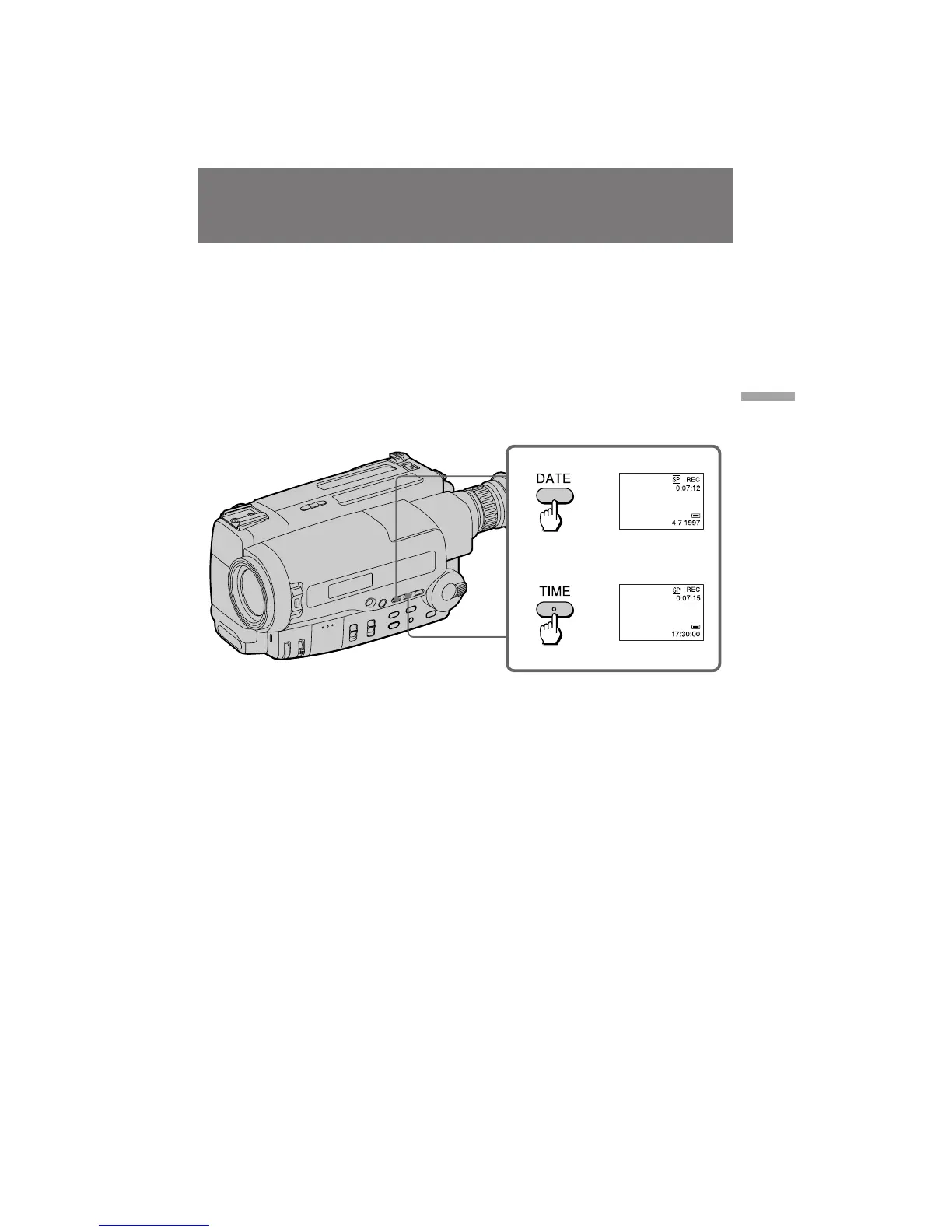
Before you start recording or during recording,
press DATE or TIME. You can record the date or
time displayed in the viewfinder with the
picture. You cannot record the date and time at
the same time. Except for the date or time
indicator, no indicator is recorded.
The clock is set at the factory to London time for
United Kingdom and to Paris time for the other
European models.
To stop recording with the date or
time
Press DATE or TIME again. The date or time
indicator disappears. The recording continues.
Note
You cannot superimpose a title during recording
the date or time.
è ‰ ÚÂÏ, Í‡Í Ç˚ ̇˜ÌÂÚ Á‡ÔËÒ¸, ËÎË ‚Ó
‚ ÂÏfl Á‡ÎËÒË Ì‡ÊÏËÚ DATE ËÎË TIME. Ç˚
ÏÓÊÂÚ Á‡ÔËÒ‡Ú¸ ‰‡ÚÛ ËÎË ‚ ÂÏfl,
ÓÚÓ· ‡ÊÂÌÌÓ ̇ ˝Í ‡Ì ÜäÑ ËÎË ‚
‚ˉÓËÒ͇ÚÂÎÂ, ‚ÏÂÒÚÂ Ò ËÁÓ· ‡ÊÂÌËÂÏ. Ç˚
Ì ÏÓÊÂÚ Á‡ÔËÒ˚‚‡Ú¸ ‰‡ÚÛ Ë ‚ ÂÏfl
Ó‰ÌÓ‚ ÂÏÂÌÌÓ. ä ÓÏ Ë̉Ë͇ÚÓ ‡ ‰‡Ú˚ ËÎË
‚ ÂÏÂÌË, ÌË͇ÍÓÈ Ë̉Ë͇ÚÓ Á‡ÔËÒ˚‚‡Ú¸Òfl
Ì ·Û‰ÂÚ. ó‡Ò˚ ÛÒÚ‡ÌÓ‚ÎÂÌ˚ ̇ Á‡‚Ӊ ̇
‚ ÂÏfl ãÓ̉Ó̇ ‰Îfl ëÓ‰ËÌÂÌÌÓ„Ó
äÓ Ó΂ÒÚ‚‡ Ë Ì‡ ‚ ÂÏfl è‡ Ëʇ ‰Îfl ‰ Û„Ëı
‚ ÓÔÂÈÒÍËı ÏÓ‰ÂÎÂÈ.
á‡ÔËÒ¸ Ò ‰‡ÚÓÈ ËÎË
‚ ÂÏÂÌÂÏ
ÑÎfl ÓÒÚ‡ÌÓ‚‡ Á‡ÔËÒË Ò ‰‡ÚÓÈ ËÎË
‚ ÂÏÂÌÂÏ
ç‡ÊÏËÚ DATE ËÎË TIME ÒÌÓ‚‡. à̉Ë͇ÚÓ
‰‡Ú˚ ËÎË ‚ ÂÏÂÌË ËÒ˜ÂÁÌÂÚ. á‡ÔËÒ¸
Ô Ó‰ÓÎÊËÚÒfl.
è ËϘ‡ËÂ
Ç˚ Ì ÏÓÊÂÚ ̇ÎÓÊËÚ¸ ̇‰ÔËÒ¸ ‚Ó ‚ ÂÏfl
Á‡ÔËÒË ‰‡Ú˚ ËÎË ‚ ÂÏÂÌË.


 To Next Page