CCD-TR501E/TR502E/TR620E 3-859-127-13.E/R
50
Changing the lithium battery in
the camcorder
WARNING
The battery may explode if mistreated. Do not
recharge, disassemble, or dispose of in fire.
Changing the lithium battery
When replacing the lithium battery, keep the
battery pack or other power source attached.
Otherwise, you will need to reset the date and
time .
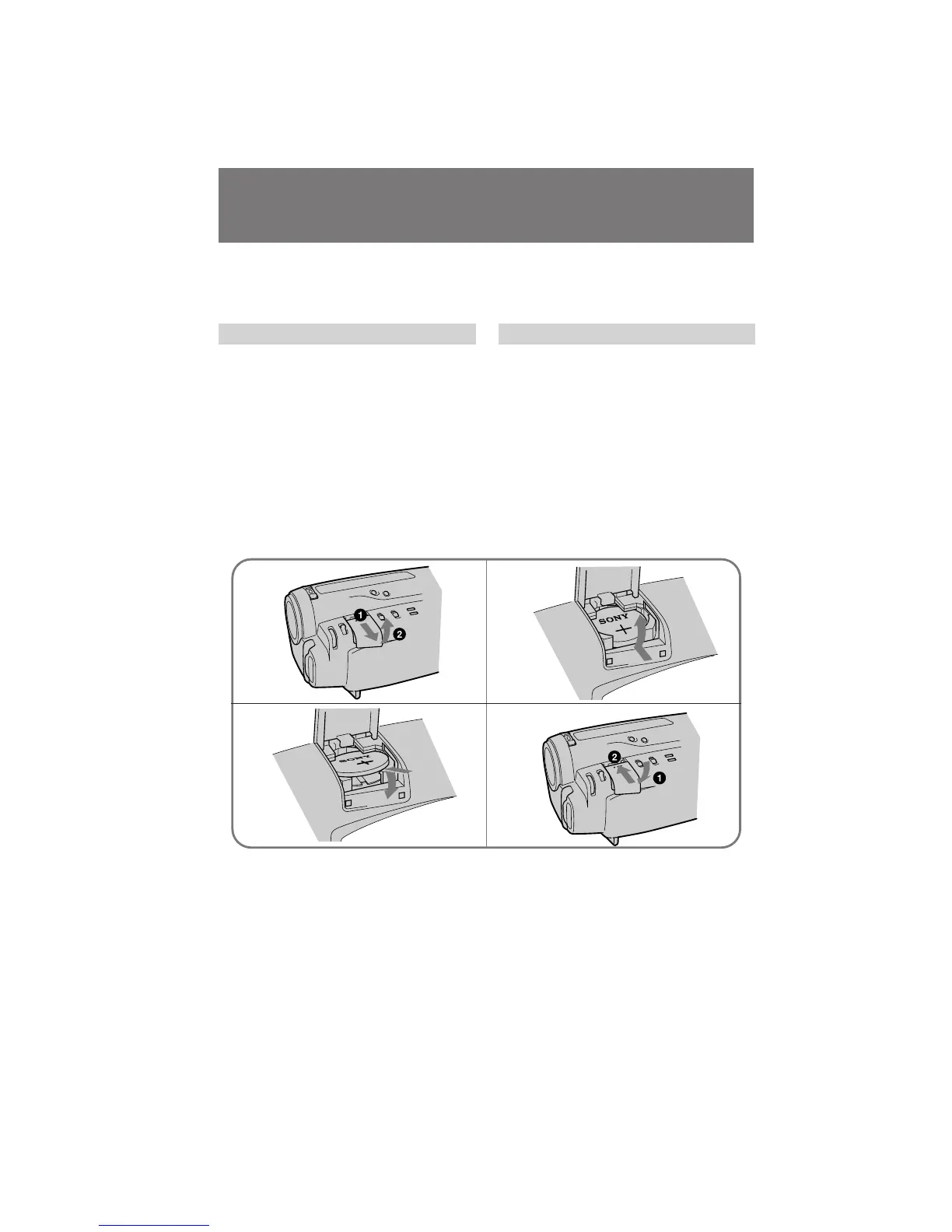
(1)Slide the cover, and then pull it up.
(2)Push the battery in once and pull it out from
the holder.
(3)Install the new lithium battery with the
positive (+) side facing out.
(4)Close the cover. Then slide the cover untill it
clicks.
á‡ÏÂ̇ ÎËÚË‚ÓÈ ·‡Ú‡ ÂÈÍË ‚
‚ˉÂÓ͇Ï Â
èêÖÑìèêÖÜÑÖçàÖ
ÖÒÎË Ò ·‡Ú‡ ÂÈÍÓÈ ÌÂÔ ‡‚ËθÌÓ Ó· ‡˘‡Ú¸Òfl,
Ó̇ ÏÓÊ ‚ÁÓ ‚‡Ú¸Òfl. ç Ô ÂÁ‡ flʇڸ, ÌÂ
‡Á·Ë ‡Ú¸ Ë Ì · ÓÒ‡Ú¸ ·‡Ú‡ ÂÈÍÛ ‚ Ó„Ó̸.
á‡ÏÂ̇ ÎËÚË‚ÓÈ ·‡Ú‡ ÂÈÍË
èË Á‡ÏÂÌ ÎËÚË‚ÓÈ ·‡Ú‡ ÂÈÍË ‰Â ÊËÚÂ
·‡Ú‡ ÂÈÌ˚È ·ÎÓÍ ËÎË ‰ Û„ÓÈ ËÒÚÓ˜ÌËÍ
ÔËÚ‡ÌËfl Ô ËÒÓ‰ËÌÂÌÌ˚Ï. à̇˜Â LJÏ
Ô Ë‰ÂÚÒfl Ô ÂÛÒڇ̇‚ÎË‚‡Ú¸ ‰‡ÚÛ Ë ‚ ÂÏfl.
(1)è ‰‚Ë̸ÚÂ Í ˚¯ÍÛ Ë ÔÓÚflÌËÚ ÂÂ
‚‚Â ı.
(2)ç‡ÊÏËÚ ·‡Ú‡ ÂÈÍÛ Ó‰ËÌ ‡Á Ë ‚˚Ú‡˘ËÚÂ
 ËÁ ‰Â ʇÚÂÎfl.
(3)ìÒÚ‡ÌÓ‚ËÚ ÌÓ‚Û˛ ÎËÚËÂ‚Û˛ ·‡Ú‡ ÂÈÍÛ
ÔÓÎÓÊËÚÂθÌÓÈ (+) ÒÚÓ ÓÌÓÈ, Ó· ‡˘ÂÌÌÓÈ
̇ ÛÊÛ.
(4)á‡Í ÓÈÚÂ Í ˚¯ÍÛ. á‡ÚÂÏ Ô ‰‚Ë̸ÚÂ
Í ˚¯ÍÛ, ÔÓ͇ Ó̇ Ì Á‡˘ÂÎÍÌÂÚÒfl.
12
34



 To Next Page