37
Advanced operations
Selecting the desired mode
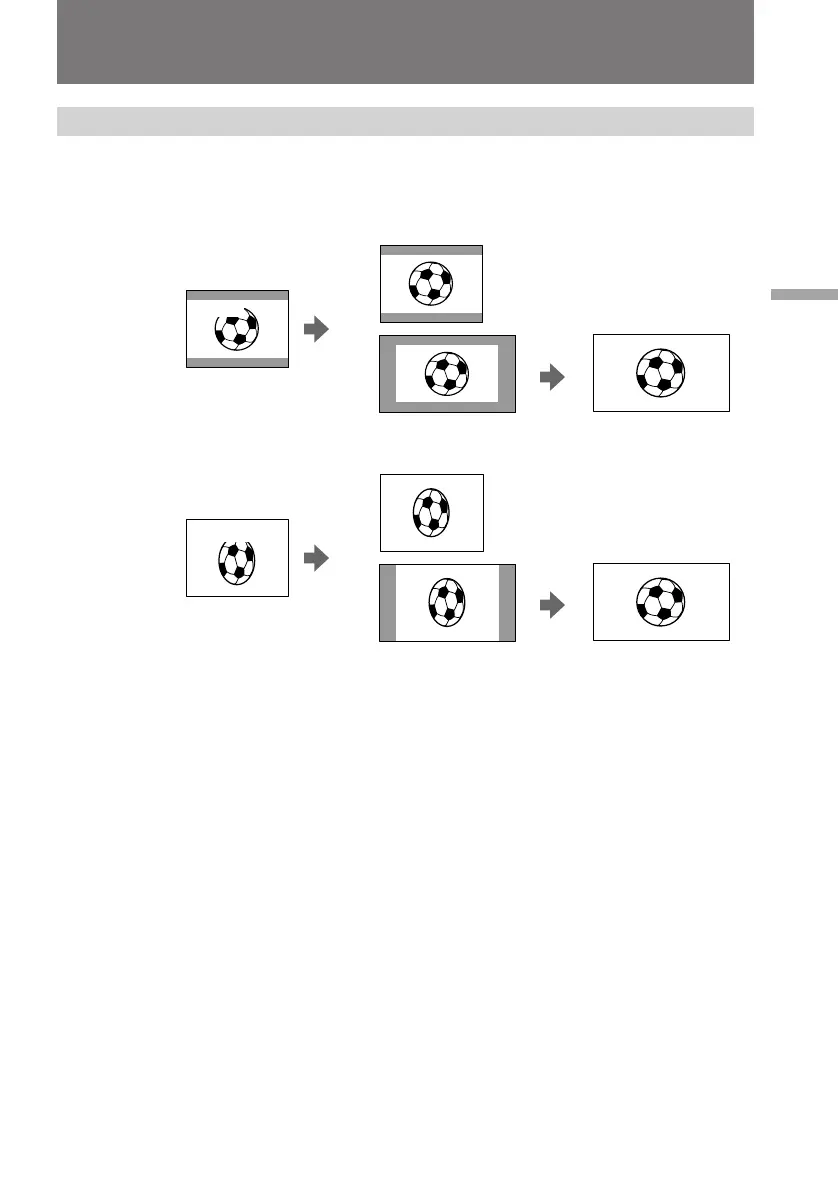
You can record a cinemalike picture (CINEMA) or a 16:9 wide picture to watch on the
16:9 wide-screen TV (16:9 FULL).
CINEMA
Black bands appear at the top and the bottom of the screen, and the viewfinder or LCD
screen [a] and a normal TV screen [b] look wide. You can also watch the picture
without black bands on a wide-screen TV [c].
16:9 FULL
The picture in the viewfinder or LCD screen [d] or on a normal TV [e] is horizontally
compressed. You can watch the picture of normal images on a wide-screen TV [f].
[b]
CINEMA
[a]
[c]
[e]
[f]
CINEMA
16:9 FULL
16:9 FULL
[d]
Using the wide mode function











 To Next Page