62
Simple setting of clock by time difference
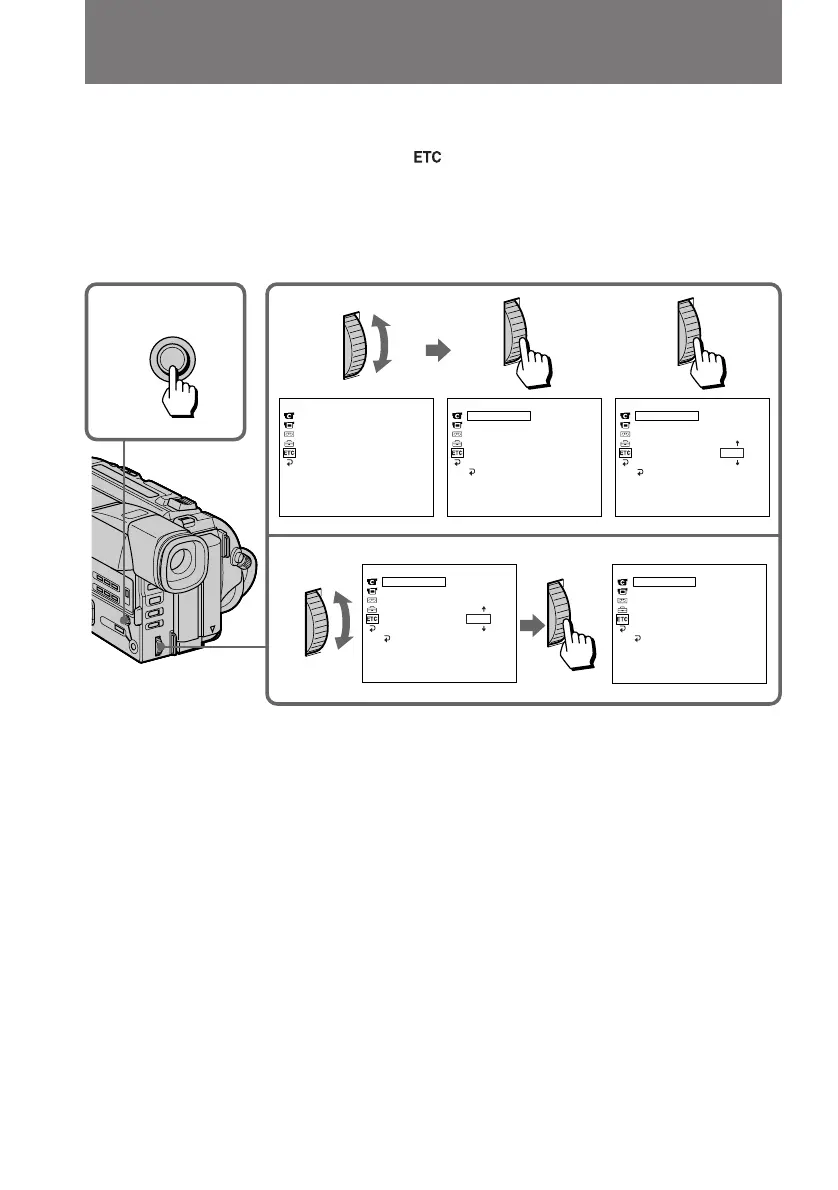
You can easily set the clock for a local time by a time difference in the menu system.
(1) While the camcorder is the standby mode, press MENU to display the menu.
(2) Turn the control dial to select
, then press the dial.
(3) Turn the control dial to select WORLD TIME, then press the dial.
(4) Turn the control dial to set a time difference, and press the dial. The hour of
clock changes in relation to a time difference which you set.
(5) Press MENU to erase the menu display.
Note on WORLD TIME
If the time is not set, WORLD TIME does not work.
1,
5
MENU
4
[MENU] : END
OTHERS
WORLD TIME
BEEP
COMMANDER
DISPLAY
REC LAMP
INDICATOR
[MENU] : END
OTHERS
WORLD TIME
BEEP
COMMANDER
DISPLAY
REC LAMP
INDICATOR
RETURN
– 8 HRS
[MENU] : END
OTHERS
WORLD TIME
BEEP
COMMANDER
DISPLAY
REC LAMP
INDICATOR
0 HR
RETURN
[MENU] : END
OTHERS
WORLD TIME
BEEP
COMMANDER
DISPLAY
REC LAMP
INDICATOR
0 HR
RETURN
JUL 4 1998
5:30:00
PM
[MENU] : END
OTHERS
WORLD TIME
BEEP
COMMANDER
DISPLAY
REC LAMP
INDICATOR
– 8 HRS
RETURN
JUL 4 1998
9:30:00
AM
23



 To Next Page
 Loading...










