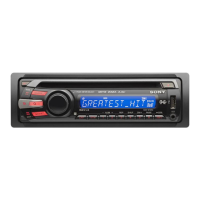
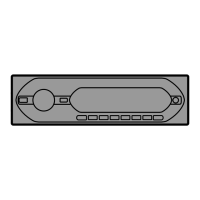
[Q]
DSPl
(display)/SCRl (scroll) button
(CDX-GT320/GT32W/GT220/GT22W)
page
8
To
change
display items (press); scroll the
display
item
(press
and
hold).
DSPl
(display) button (CDX-GT1201
GT-12W)
page
B
To
change
display items.
[1] SEEK -1+ buttons
CD::
To skip tracks (press); skip tracks
continuously (press,
then
press again within
about
1
second
and
hold); reverse/fast-
forvvard a
track
(press
and
hold).
Radio:
To tune in stations automatically (press); find
a station
manually
(press
and
hold).
[j1]
MODE button
page
8
To select the radio
band
(FM/
AM)*.
~
BTIVl/CAT
butte.n (CDX-GT320/GT32W)
pagle 8
To start the
BTM
function (press
and
hold).
BTIVI
button (CDX-GT220/GT22WI
GT'120/GT12W)
page
8
To start the
BTM
function (press
and
hold).
lHJ
RESET button (located
behind
the front
panel)
(CDX-GT320/GT32W only)
pa~le
5
!1§]
NUlmber
buttons
CD:
(D/®:
AlBMI-I+
(during
MP3IWMA
playback)
(CDX··GT320/GT32W/GT2201
GT:22W)
To skip albums (press); skip
albums
continuously
(press
and
hold).
®:
REP
pagE~
8
CD:
SHUF
pa~~e
8
@:PAUSE
To
pause
playback
of
a
CD
on
this unit.
To cancel, press again.
Radio:
To receive stored stations (press); store
stations (press
and
hold).
II§]
Receptor for the card remote
cornmander (CDX-GT320/GT32WI
GT:220/GT22W only)
The
following buttons
on
the
card
remote
commander
have also different buttons/functions
from the unit.
Remove
the insulation film before
use (page 5)
(CDX-GT320/GT32W
only).
m
..
(~)/"
(~)
buttons
To control CD/radio, the
same
as
(SEEK)
-/+
on
the unit.
Setup,
sound
setting, etc.,
can
be
operated
by
..
...
1m
DSPl
(display) button
To
change
display items.
IE
VOL (volume) +1- button
To adjust volume.
P1!]
ATT (attenuate) button
To attenuate the sound. To cancel, press
again.
m
SEl
(select) button
The
same
as the select button
on
the unit.
PE
t
(+)/~
(-)
buttons
To control
CD,
the
same
as
(D/®
(ALBM
-/+)
on
the unit.
Setup,
sound
setting, etc.,
can
be
operated
by
t~.
PE
SCRl
(scroll) button
To scroll the display item.
HI]
Number buttons
To receive stored stations (press); store
stations (press and hold).
*
In
the case
of
a CDIMD changer
or
SAT tuner being
connected; when (
sou
RCE)
is pressed, the
connected device ("MD,"
'XM"
or
"SR'') will appear in
the display, depending on which device is
connected. Furthermore,
if
(
MODE)
is pressed, you
can switch the changer,
or
SAT tuner band (CDX-
GT320IGT32Wonly).
Note
If
the unit is turned
off
and
the display disappears, it
cannot be operated with the card remote commander
unless (
SOURCE)
on the unit is pressed,
or
a disc is
inserted to activate the unit first.

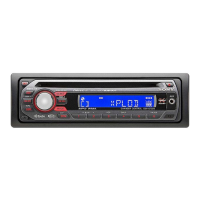

 To Next Page