EasyManua.ls Logo

Sony CLM-V55 - Adjusting the Direction of the Screen

Sony CLM-V55
41 pages
Print Icon
To Next Page IconTo Next Page
To Previous Page IconTo Previous Page
Loading...
Adjusting
the
direction
of
the
screen
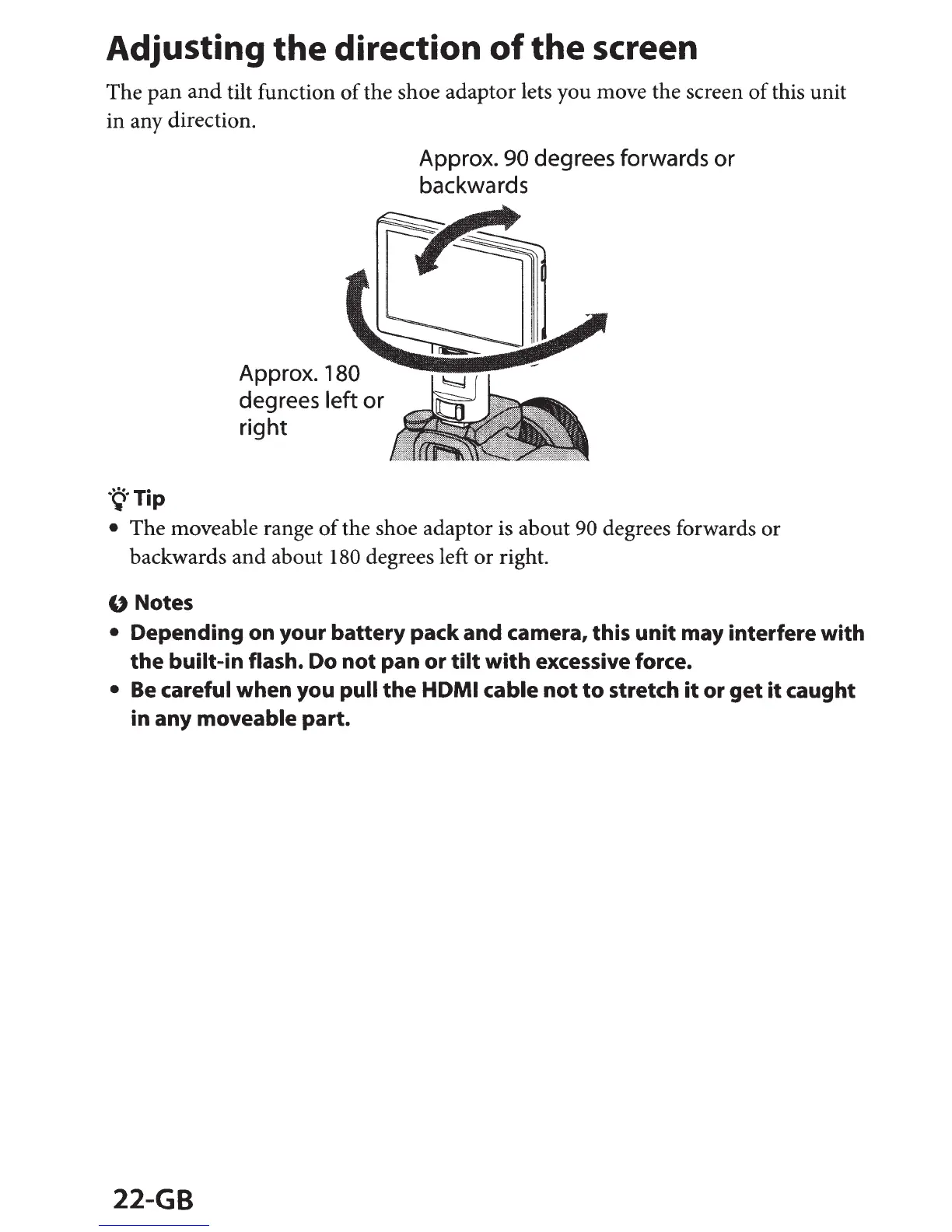
The
pan
and
tilt function
of
the shoe adaptor lets you move the screen
of
this unit
in any direction.
·~·Tip
Approx. 180
degrees left
or
right
Approx. 90 degrees forwards
or
backwards
The moveable range
of
the shoe adaptor is about 90 degrees forwards
or
backwards
and
about 180 degrees left or right.
U Notes
Depending on your
battery
pack and camera, this
unit
may interfere with
the
built-in flash. Do
not
pan or
tilt
with
excessive force.
Be
careful when you pull
the
HDMI
cable
not
to
stretch
it
or
get
it
caught
in any moveable part.
22-GB

Other manuals for Sony CLM-V55

Related product manuals