EasyManua.ls Logo

Sony CLM-V55 - Available Functions

Sony CLM-V55
41 pages
Print Icon
To Next Page IconTo Next Page
To Previous Page IconTo Previous Page
Loading...
Available
functions
You
can
set
the
following
functions
with
this
unit.
Icon
Function
Name
Setup details
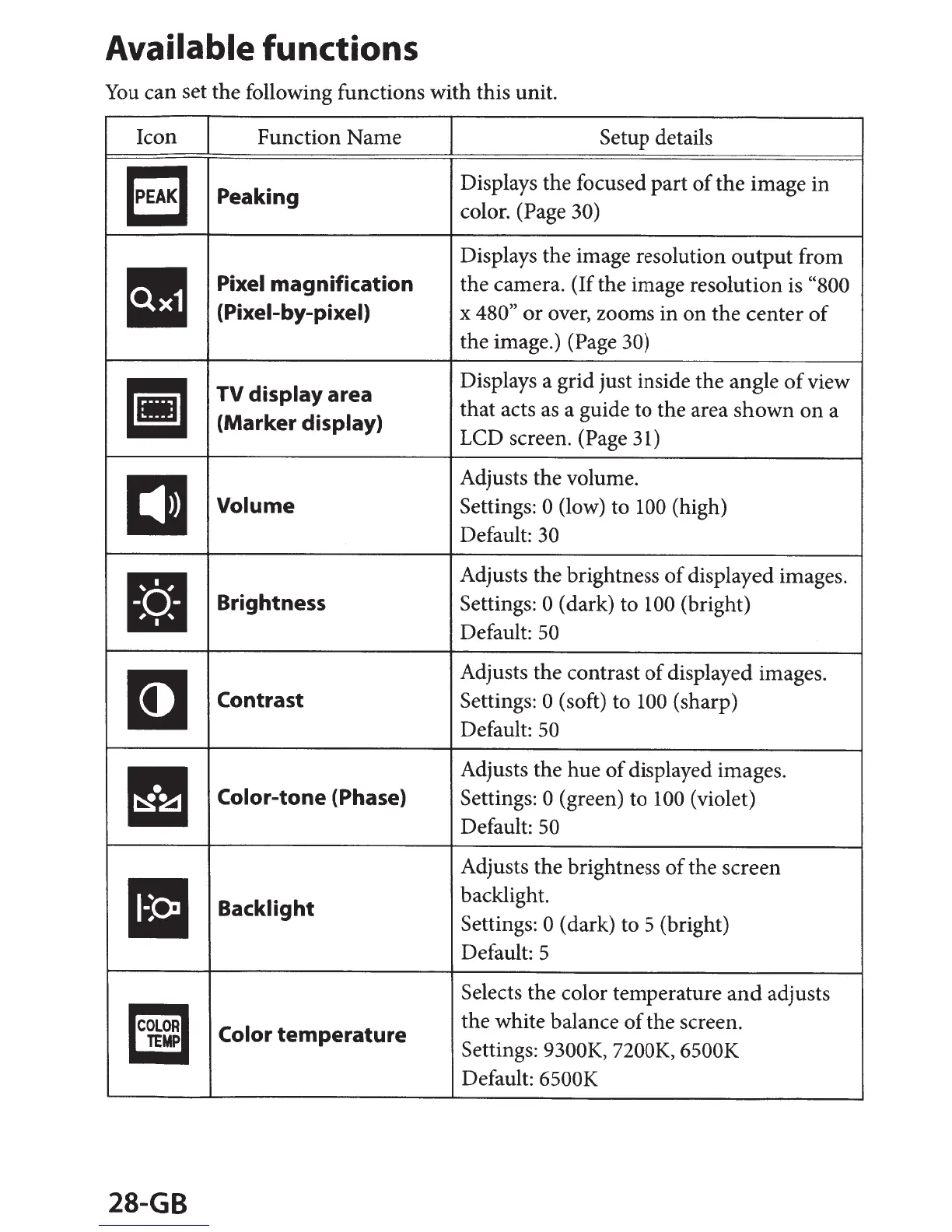
'PEAK
I
Peaking
Displays
the
focused
part
of
the
image
in
color. (Page
30)
Displays
the
image resolution
output
from
Pixel
magnification
the
camera. (If
the
image resolution is
"800
(Pixel-by-pixel)
x
480,
or
over, zooms
in
on
the
center
of
the
image.) (Page
30)
liJ
TV
display
area
Displays a
grid
just inside
the
angle
of
view
that
acts as a guide to
the
area
shown
on
a
(Marker
display)
LCD
screen. (Page 31)
DJ
Adjusts
the
volume.
Volume
Settings:
0
(low) to
100
(high)
Default:
30
Adjusts
the
brightness
of
displayed images .
Brightness Settings: 0
(dark)
to
100
(bright)
Default:
50
I]
Adjusts
the
contrast
of
displayed images.
Contrast Settings:
0
(soft) to
100
(sharp)
Default:
50
11!1
Adjusts
the
hue
of
displayed images.
Color-tone
(Phase)
Settings:
0
(green)
to
100
(violet)
Default: 50
Adjusts
the
brightness
of
the
screen
Backlight
backlight.
Settings: 0
(dark) to 5 (bright)
Default: 5
Iii
Selects
the
color temperature
and
adjusts
Color
temperature
the
white balance
of
the
screen.
Settings:
9300K, 7200K, 6500K
MP
Default:
6500K
28-GB

Other manuals for Sony CLM-V55

Related product manuals