Problem
Cause
I
Countermeasures
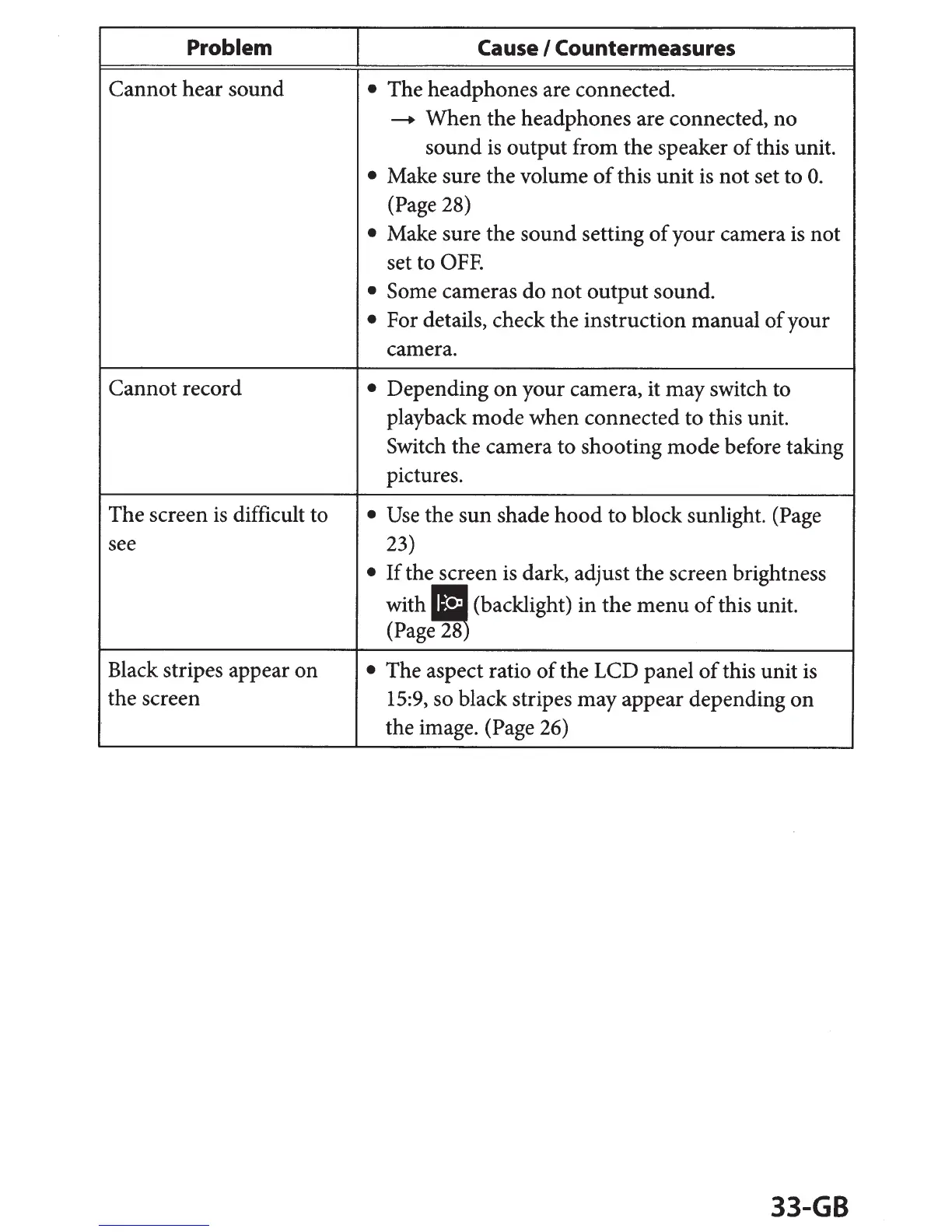
Cannot hear sound
• The headphones are connected.
--+
When the headphones are connected, no
sound
is
output from the speaker
of
this unit.
•
Make sure the volume
of
this unit
is
not set to
0.
(Page 28)
•
Make sure the sound setting
of
your camera
is
not
set to
OFF.
• Some cameras do not output sound.
•
For details, check the instruction manual
of
your
camera.
Cannot record
•
Depending
on
your camera, it may switch to
playback mode when connected to this unit.
Switch the camera to shooting mode before taking
pictures.
The screen
is
difficult to
• Use
the sun shade
hood
to block sunlight. (Page
see
23)
•
If
the screen
is
dark, adjust the screen brightness
with
~(backlight)
in
the
menu
of
this unit.
(Page
28
Black stripes appear on
•
The aspect
ratio
of
the LCD panel
of
this unit
is
the screen
15:9,
so black stripes may appear depending
on
the image. (Page 26)
33-GB


 To Next Page