MD – Editing
masterpage:Right
filename[\\Nas-data-server\SONY Current jobs\SONY CMT-SE7\CMT-
SE7_GBCT\DTP\4248325112\424832511CMTSE7HK\GB09MDE-CEK.fm]
49
GB
model name [CMT-SE7]
[4-248-325-11(2)]
What is the Group Function?
The Group Function allows you to play, record
and edit the tracks on an MD in groups. For
example, you can register tracks 1 to 5 on an MD
to the “Rock” group, and tracks 6 to 9 to the
“Pops” group. Then you can listen to the tracks
in only the desired group, add new tracks to a
group, and perform other operations. In
addition, the Group Function can be easily
turned on and off simply by pressing MD
GROUP.
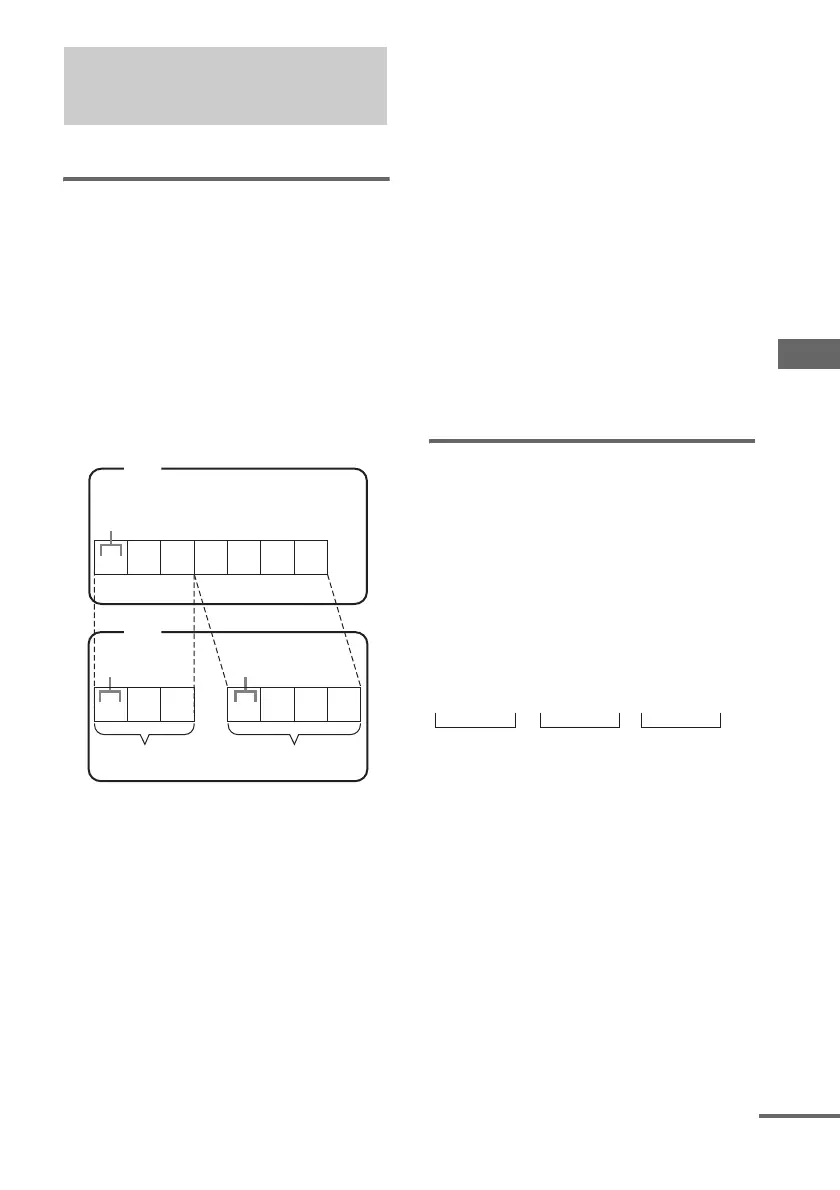
When the group function is turned on, track
numbers within groups are renumbered, starting
from track 1. In the above figure, for example,
tracks 4 to 7 are renumbered to 1 to 4 when the
group function is turned on.
Operations using the Group
Function
• Playing only the tracks in the desired group
(page 36)
• Recording a CD (page 40)
• Recording on an MD manually (page 42)
• Starting recording with 6 seconds of prestored
audio data (page 43)
• Labelling a group (page 50)
• Creating a new group (page 52)
• Releasing group registrations (page 53)
Note
MDs recorded using the Group Function of this system
can be used with other system that supports the Group
Function. However, note that the Group Function
operations of other system may differ from the
operations for this system.
How is group information
recorded?
When recording using the Group Function, the
group management information is automatically
recorded on the MD as the disc title.
Specifically, a character string such as the
following is written in the disc title recording
area.
Disc title recording area
1The disc title is “Favorites”.
2Tracks 1 to 5 are registered in the “Rock”
group.
3Tracks 6 to 9 are registered in the “Pops”
group.
Registering tracks in
groups
— Group Function
1234567
123 1234
MD
Track number
MD
Track number Track number
Group 1 Group 2
Group Function: Off
Group Function: On
0 ; Favorites // 1 – 5 ; Rock // 6 – 9 ; Pops // ...
231
continued


 To Next Page