masterpage:Left
filename[\\Nas-data-server\SONY Current jobs\SONY CMT-SE7\CMT-
SE7_GBCT\DTP\4248325112\424832511CMTSE7HK\GB05CON-CEK.fm]
8
GB
model name [CMT-SE7]
[4-248-325-11(2)]
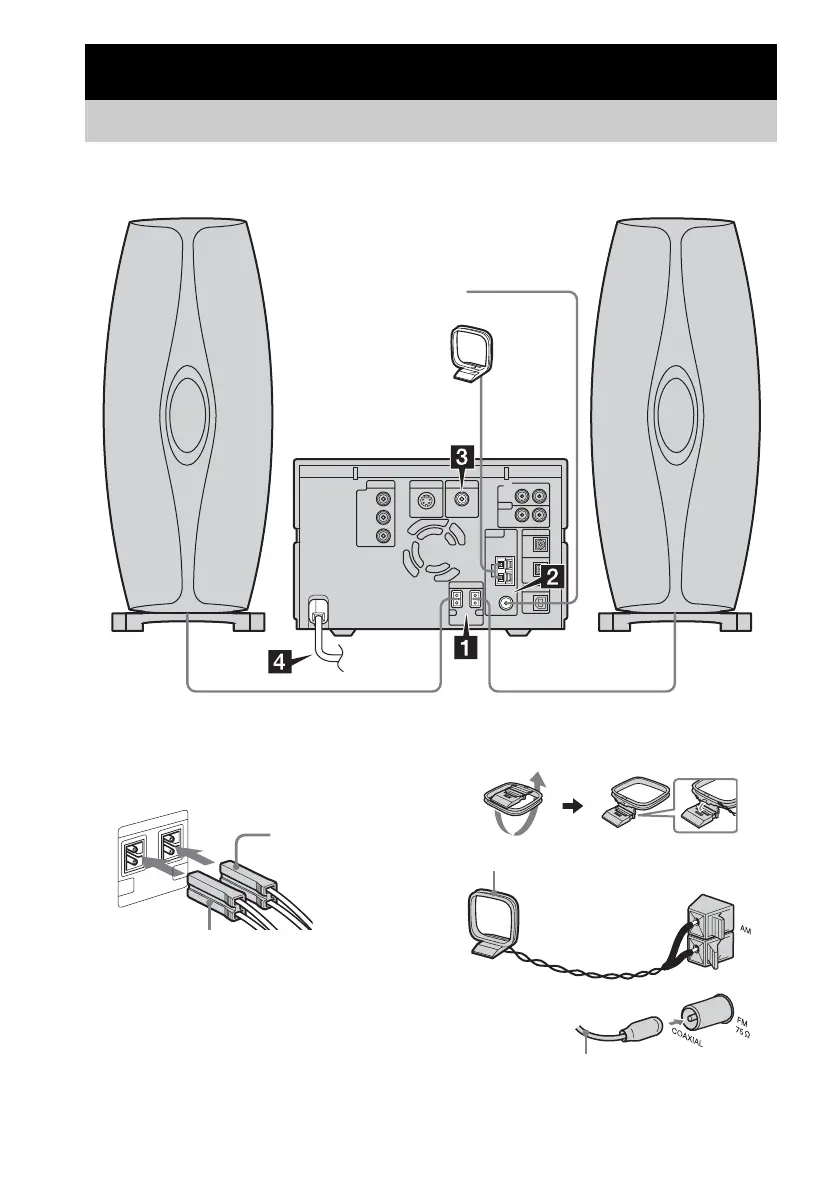
Perform the following procedures 1 to 5 to hook up your system using the supplied cords and
accessories.
1 Connect the speakers.
Connect the right and left speaker cords to
the SPEAKER terminals as shown below.
Note
Keep the speaker cords away from the antennas
to prevent noise.
2 Connect the FM and AM antennas.
Set up the AM loop atenna, then connect it.
Getting Started
Hooking up the system
AM loop antenna
FM lead antenna
R
L
Right speaker cord
Left speaker cord
Extend the FM lead antenna horizontally
AM loop antenna


 To Next Page