22
GB
For Windows 8/Windows 7
Turn on PC.
Click or tap the desktop on the Start
screen.
Select the or icon on the
bottom of the screen.
Select [Sony_Wireless_Audio_Setup]
from the network list.
For Windows Vista
Turn on PC.
Click the icon on the bottom of
the screen.
Select [Connect to a network].
Select [Sony_Wireless_Audio_Setup]
from the network list.
For Mac OS X
Turn on Mac.
Select the icon on the top of the
screen.
Select [Sony_Wireless_Audio_Setup]
from the network list.
4
Access the [Sony Network Device
Setting] screen.
For PC
Start the browser and input either of
the following URLs into the browser’s
address bar.
http://192.168.100.1
For Mac
Start Safari and select [Bonjour] under
([Bookmarks]), then select
[SONY:CMT-X7CD] or [SONY:CMT-
X7CDB].
5
Select the desired language
when the [Language Setup]
screen appears.
6
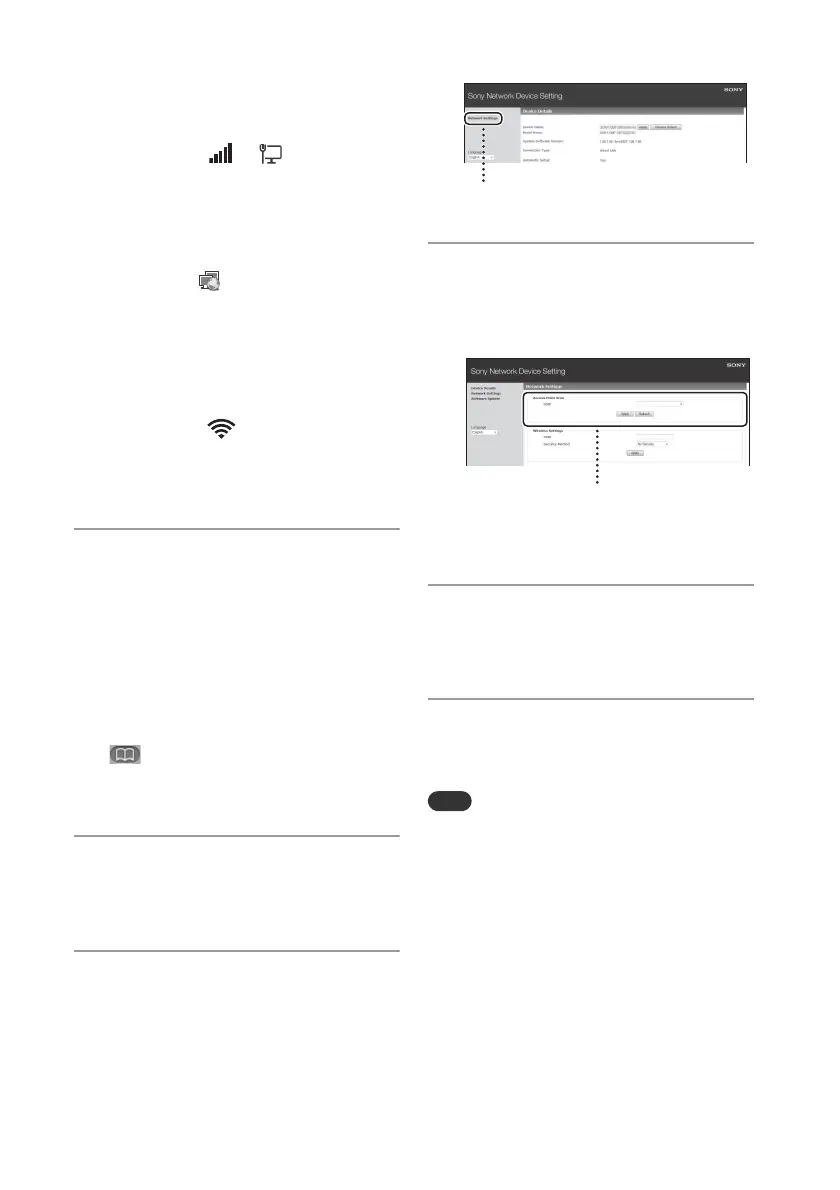
Select [Network Settings] from
the menu.
7
Select the SSID of the wireless
LAN router/access point, then
select [Apply].
If necessary, input the security key.
When the confirmation screen displays,
press [OK].
8
Press / to turn off the power,
then press / again to turn on
the power.
9
Connect the Mac or PC to the
wireless LAN router/access point
to be used.
This procedure needs to be completed within 10
minutes. If you cannot complete, reset your
computer (page 38).


 To Next Page