COM-2.US.3-213-855-11(1)
61
61
To enjoy AIM messaging, your friends with AIM Screen Names must be added
to your Buddies.
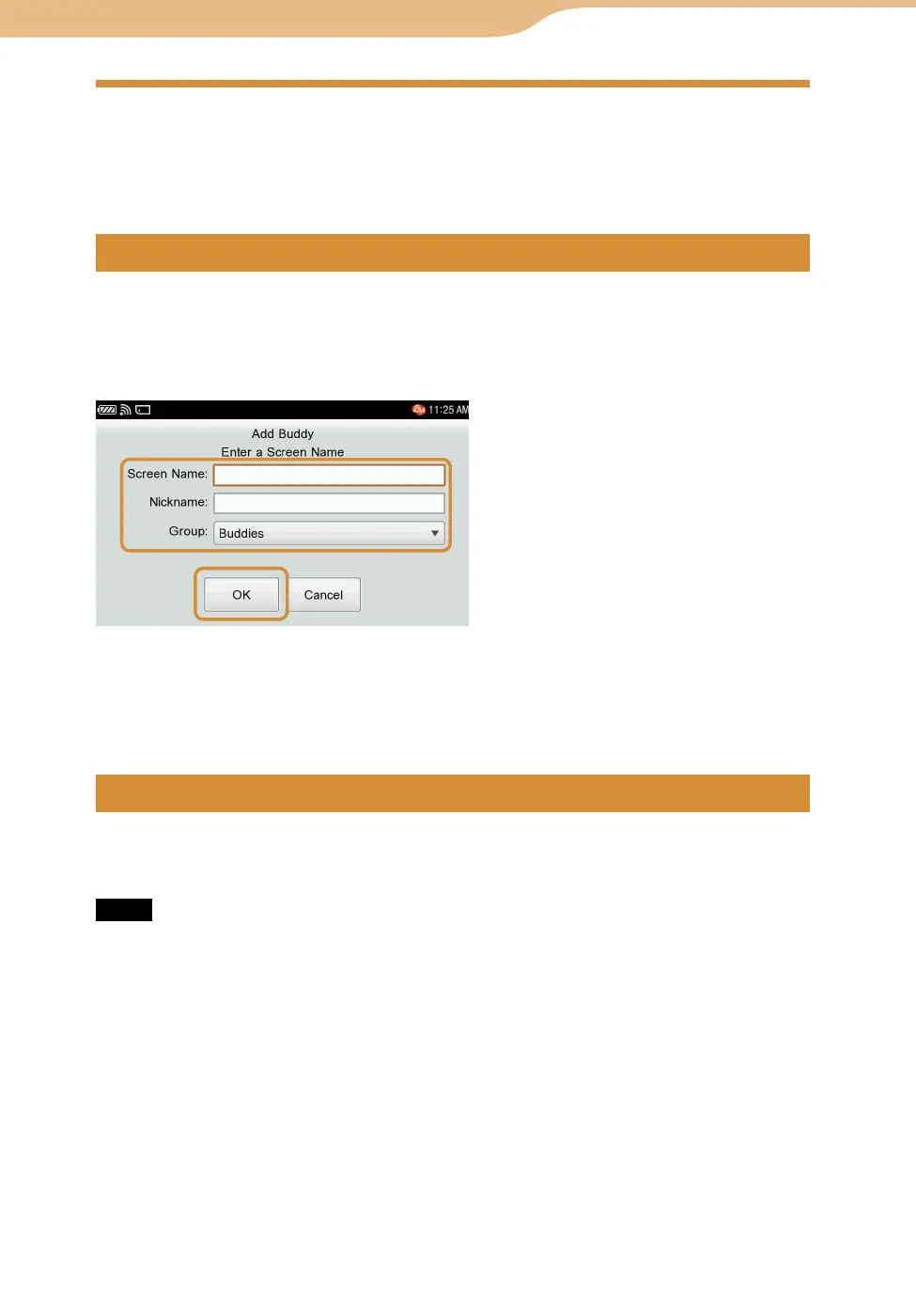
On the Buddies screen, select “Add Buddy” from the OPTION menu to enter a
Screen Name.
Input the Screen Name and Nickname you want to add, select a Group, and
then select “OK.”
Entering a Nickname is optional. If it is blank, the Screen Name entered is used as the
Nickname also.
On the Buddies screen, highlight a Buddy, then select the desired function from
the OPTION menu.
Note
To edit Groups (add, delete or rename), use AIM on your computer.
Delete the buddy’s Screen Name by selecting “Block List” from “Tools,”
followed by “Settings” (
page 64).
Highlight the Buddy’s Screen Name, and select “Rename” from the OPTION
menu.
Highlight the Buddy’s Screen Name, and select “Delete” from the OPTION
menu.
AIM









 To Next Page