EasyManua.ls Logo

Sony CRF-230B - Rear Cover Removal; Cabinet Removal.0

Sony CRF-230B
60 pages
Print Icon
To Next Page IconTo Next Page
To Previous Page IconTo Previous Page
Loading...
CRF-230B
SECTION
2
DISASSEMBLY
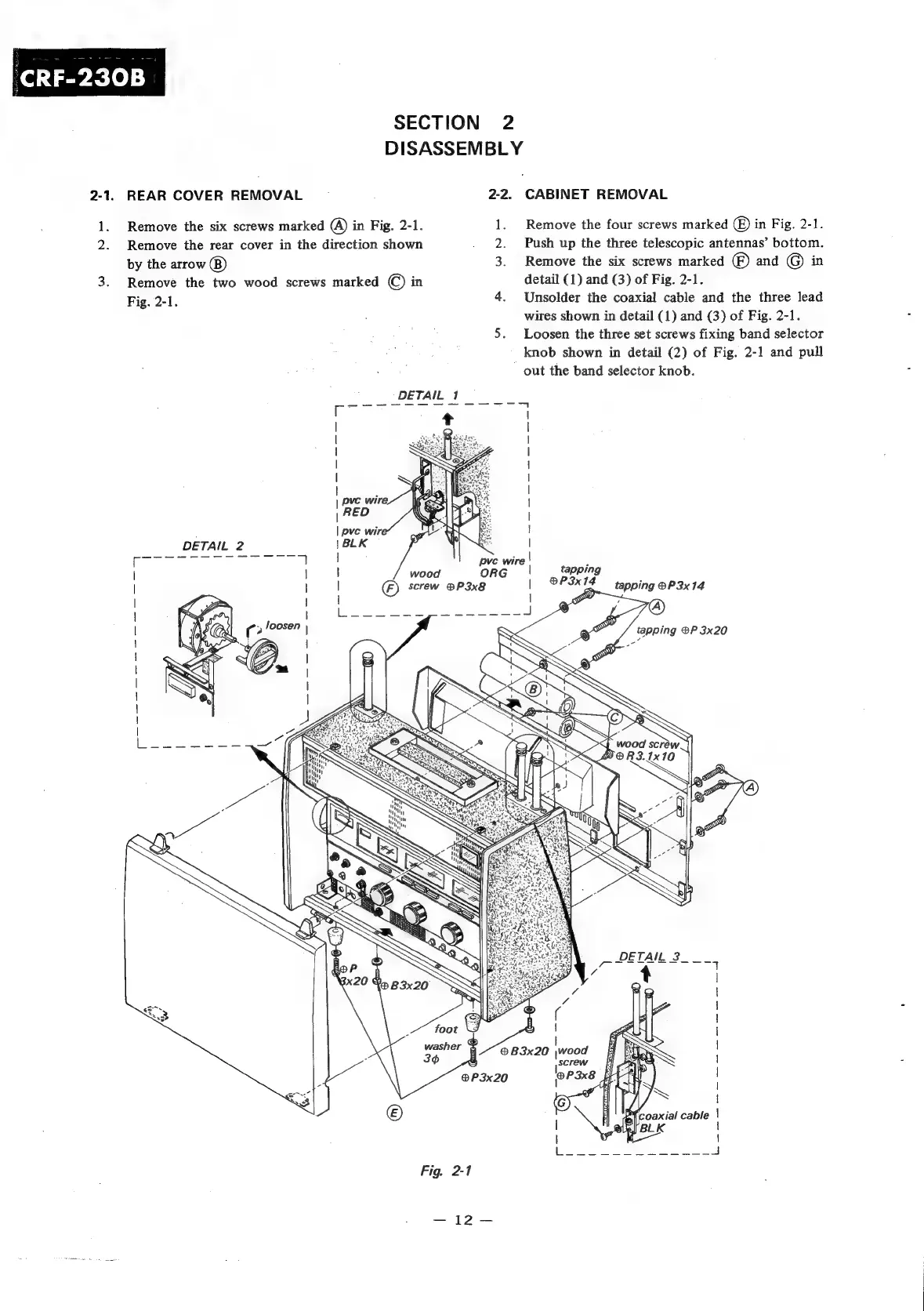
2-1.
REAR
COVER
REMOVAL
2-2.
CABINET
REMOVAL
1.
Remove
the
six
screws
marked
(A)
in
Fig.
2-1.
1.
Remove
the
four
screws
marked
(©)
in
Fig.
2-1.
2.
Remove
the
rear
cover
in
the
direction
shown
2.
Push
up
the
three
telescopic
antennas’
bottom.
by
the
arrow
(8)
3.
Remove
the
six
screws
marked
)
and
©
in
3.
Remove
the
two
wood
screws
marked
©)
in
detail
(1)
and
(3)
of
Fig.
2-1.
Fig.
2-1.
4.
Unsolder
the
coaxial
cable
and
the
three
lead
:
wires
shown
in
detail
(1)
and
(3)
of
Fig.
2-1.
5.
Loosen
the
three
set
screws
fixing
band
selector
knob
shown
in
detail
(2)
of
Fig.
2-1
and
pull
out
the
band
selector
knob.
DETAIL
Te
UT
SS
~~"
DETAIL
2
ORG
es
Sud
foot
gy
washer
@
3¢@
®P3x20
Fig.
2-1
=
Pe
pve
wire
|
®B3x20
\wood
tapping
®P3x14
PO
|
|
|
|
|
|
|
|
|
!
|
|
|
|
|
tapping ®P
3x14
tapping
®P
3x20
a
|
screw

Related product manuals