EasyManua.ls Logo

Sony CRF-230B - Power Supply Circuit Board

Sony CRF-230B
60 pages
Print Icon
To Next Page IconTo Next Page
To Previous Page IconTo Previous Page
Loading...
ICRF-230B
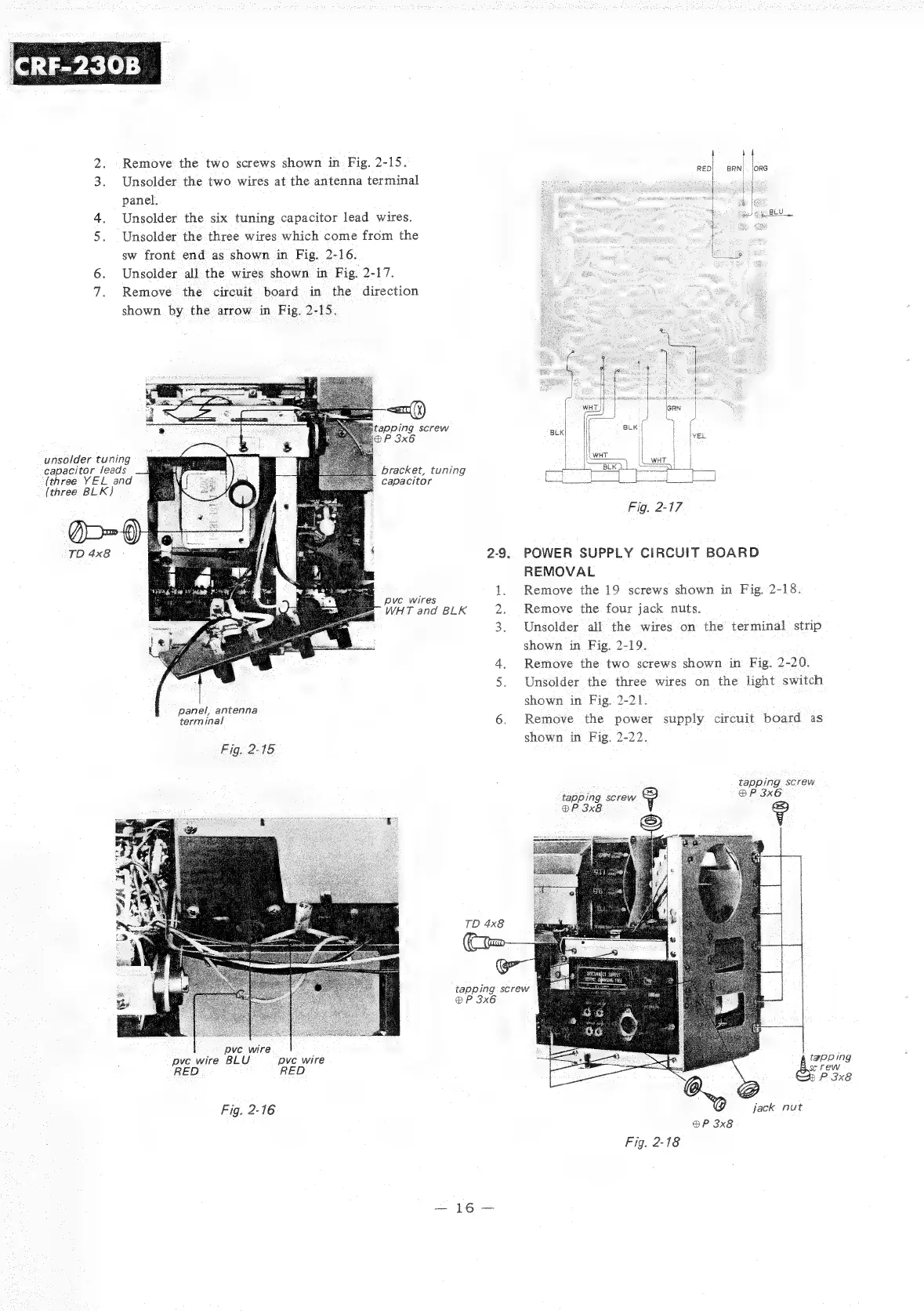
2.
Remove
the
two
screws
shown
in
Fig.
2-15.
3.
Unsolder
the
two
wires
at
the
antenna
terminal
panel.
4.
Unsolder
the
six
tuning
capacitor
lead
wires.
5.
Unsolder
the
three
wires
which
come
from
the
sw
front
end
as
shown
in
Fig.
2-16.
6.
Unsolder
all
the
wires
shown
in
Fig.
2-17.
7.
Remove
the
circuit
board
in
the
direction
shown
by
the
arrow
in
Fig.
2-15.
:
apping
screw
P
3x6
unsolder
tuning
capacitor
leads
(three
YEL
and
(three
BLK)
bracket,
tuning
capacitor
pve
wires
WHT
and
BLK
2
panel,
antenna
terminal
6.
Fig.
2-15
TD
4x8
(tam
®P
3x6
pve
wire
pve
wire
BLU
pve
wire
RED
RED
Fig.
2-16
a
eee
2-9.
tapping
screw
Fig.
2-17
POWER
SUPPLY
CIRCUIT
BOARD
REMOVAL
Remove
the
19
screws
shown
in
Fig.
2-18.
Remove
the
four
jack
nuts.
Unsolder
all
the
wires
on
the
terminal
strip
shown
in
Fig.
2-19.
Remove
the
two
screws
shown
in
Fig.
2-20.
Unsolder
the
three wires
on
the
light
switch
shown
in
Fig.
2-21.
Remove
the
power
supply
circuit
board
as
shown
in
Fig.
2-22.
tapping
screw
tapping
screw
BP
3x6
®P
3x8
9?
e,
jack
nut
®P
3x8
Fig.
2-18

Related product manuals