10
GB
Getting Started – BASIC –
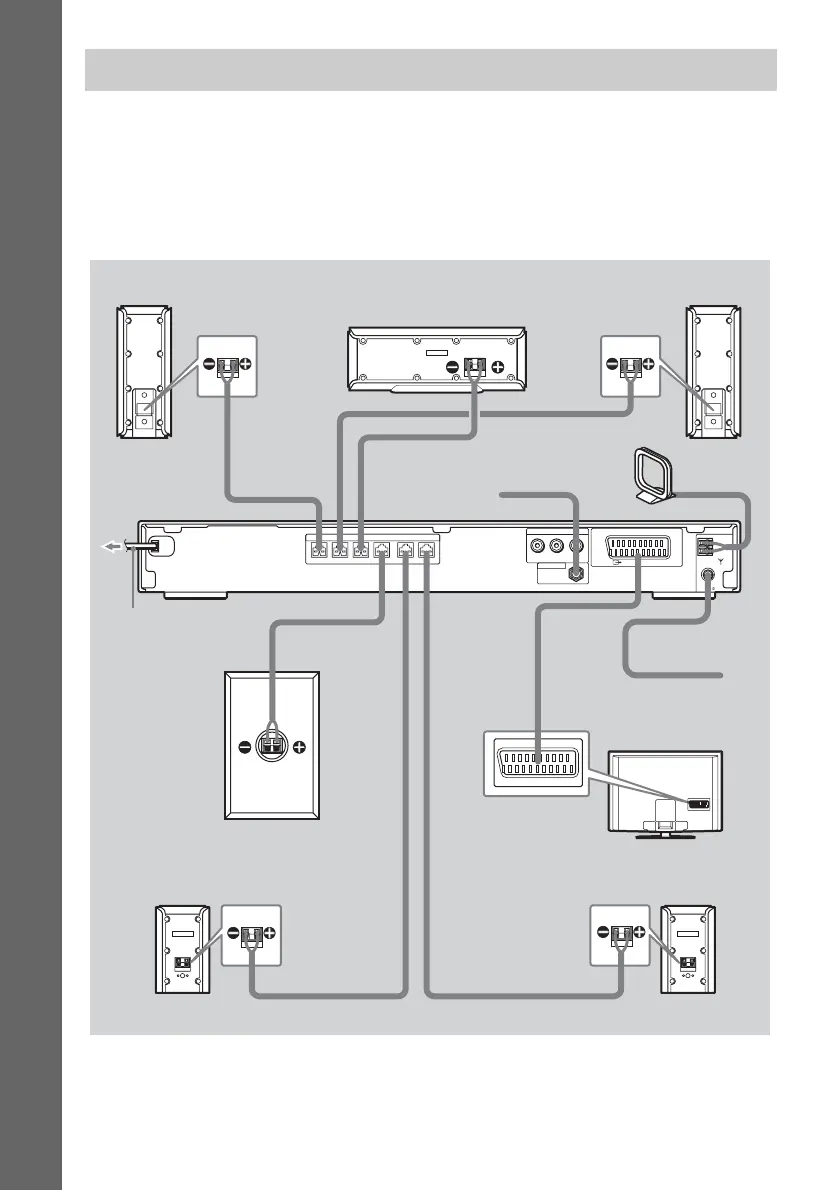
This hookup is the basic connection of the system to the speakers and TV. For other TV connections,
see page 21. For other component connection, see page 24.
To accept progressive signals, see page 22.
Refer to the connection diagram below, and read the additional information from 1 to 4 on the
following pages.
Step 1: Connecting the System and TV
COMPONENT VIDEO OUT
YP
B
/C
B
P
R
/C
R
(DVD
ONLY)
COAXIAL
AM
FM
75
SPEAKER
FRONT R FRONT L SUR R SUR LCENTER WOOFER
EURO AV
OUTPUT(TO TV)
ANTENNA
DAB 75Ω
AM loop antenna (aerial)
Subwoofer
AC power cord
(mains lead)
FM wire antenna
(aerial)
TV
Front speaker (R)
Center speaker
Front speaker (L)
Surround speaker (L)Surround speaker (R)
DAB wire antenna (aerial)



 To Next Page