Getting Started – ADVANCED –
21
GB
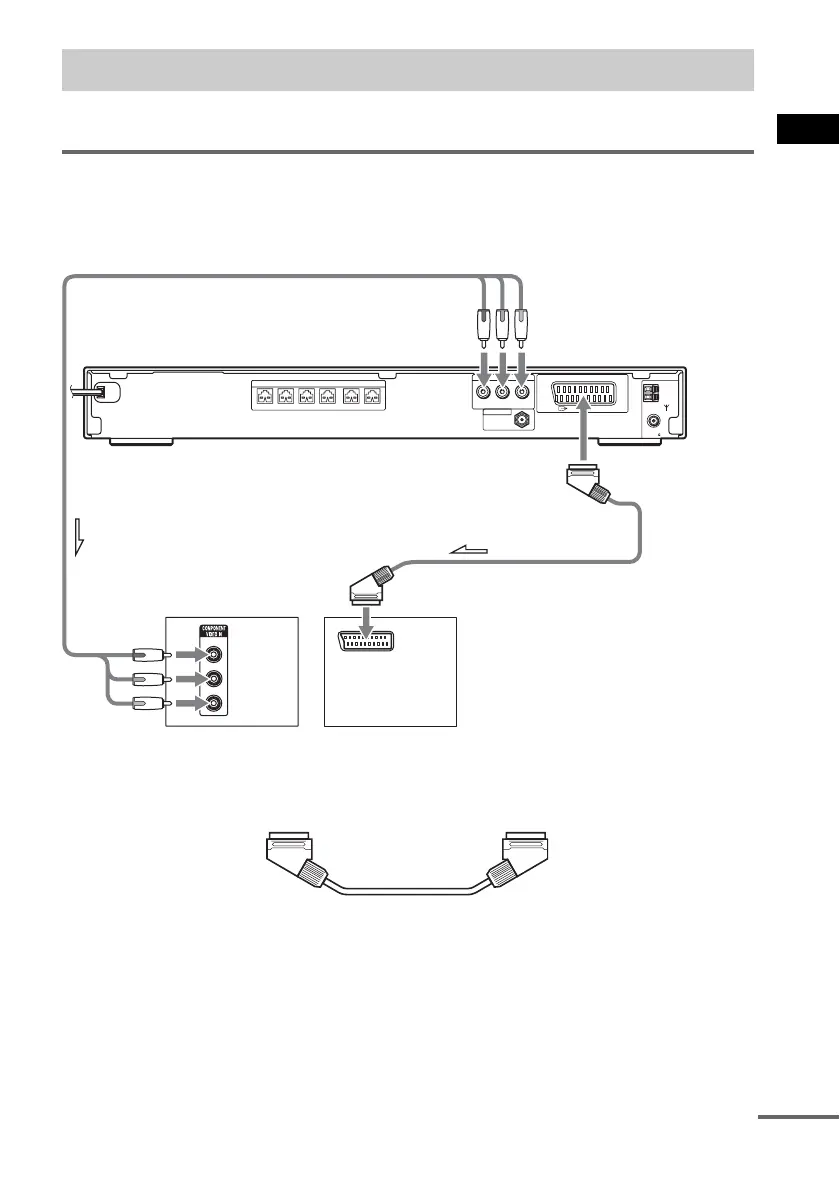
Select a hookup suitable for the jacks on your TV.
Connecting the video cords
Sends a played back DVD image to a TV.
Check the jacks of your TV, and choose connection method A or B. Picture quality improves in order
from A (standard) to B (component).
A To connect to a TV with the SCART (EURO AV) cord (not supplied)
.
Be sure to connect the SCART (EURO AV) cord to the EURO AV T OUTPUT (TO TV) jack on the
system.
When you connect using the SCART (EURO AV) cord, check that the TV conforms to S video or RGB
signals. If the TV conforms to S video, change the input mode of the TV to RGB signals. Refer to the
operating instructions supplied with the TV to be connected.
B To connect to a TV with the COMPONENT VIDEO IN jacks
Connect a component video cord (not supplied). To use the COMPONENT VIDEO OUT jacks (Y, PB/
C
B, PR/CR), your TV monitor must be equipped with via COMPONENT VIDEO IN jacks (Y,PB/CB,
TV Hookup (Advanced)
COMPONENT VIDEO OUT
YP
B
/C
B
P
R
/C
R
(DVD
ONLY)
COAXIAL
AM
FM
75
SPEAKER
FRONT R FRONT L SUR R SUR LCENTER WOOFER
EURO AV
OUTPUT(TO TV)
ANTENNA
DAB 75Ω
Y
PB/CB
PR/CR
TV with COMPONENT
VIDEO IN jacks
TV
BA
To COMPONENT
VIDEO OUT
To EURO AV
T OUTPUT
(TO TV)
To EURO AV INPUTTo COMPONENT VIDEO IN
continued



 To Next Page