24
GB
Getting Started
Step 2: Connecting the System
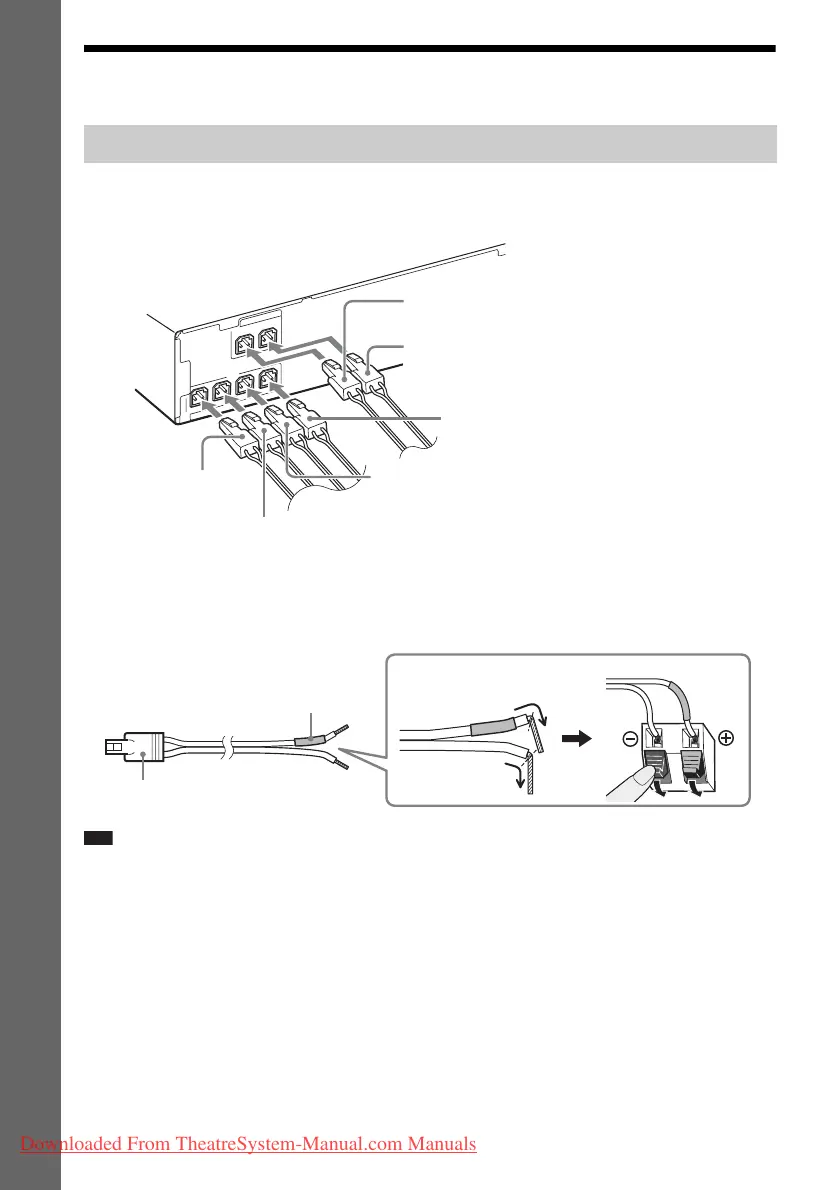
1 Insert the connectors of the speaker cords to match the color of the SPEAKERS jacks
of the unit until they click.
2 Connect the speaker cord with the color tube to 3, and the speaker cord without the
color tube to #.
The subwoofer speaker cord is fixed to the subwoofer.
Note
• Do not catch the speaker cord insulation (rubber covering) in the speaker terminals.
Connecting the speakers
CENTER
SUBWOOFER
FRONT L
FRONT R
S
P
E
A
K
E
R
S
SUR R
SUR L
S
P
E
A
K
E
R
S
Green
(Center speaker)
Purple
(Subwoofer)
White
(Front left speaker (L))
Red
(Front right speaker (R))
Gray
(Surround right speaker (R))
Blue
(Surround left speaker (L))
Color tube
(–)
(+)
Rear of the speaker
Connector
Downloaded From TheatreSystem-Manual.com Manuals



 To Next Page