Settings
61
GB
Performing Further
Settings
You can make various adjustments to items such
as picture and sound.
Displayed items vary depending on the area.
Note
• Playback settings stored in the disc take priority over
the Setup Display settings and not all the functions
described may work.
1 Press FUNCTION repeatedly to select
“DVD/CD.”
The selected item appears in the front panel
display.
2 Press DISPLAY while the system is
in stop mode.
3 Press X/x to select [SETUP],
then press .
4 Press X/x to select [CUSTOM], then
press .
5 Press X/x to select the setup item, then
press .
• [LANGUAGE SETUP] (page 61)
• [VIDEO SETUP] (page 62)
• [HDMI SETUP] (page 63)
• [AUDIO SETUP] (page 64)
• [SYSTEM SETUP] (page 66)
• [SPEAKER SETUP] (page 67)
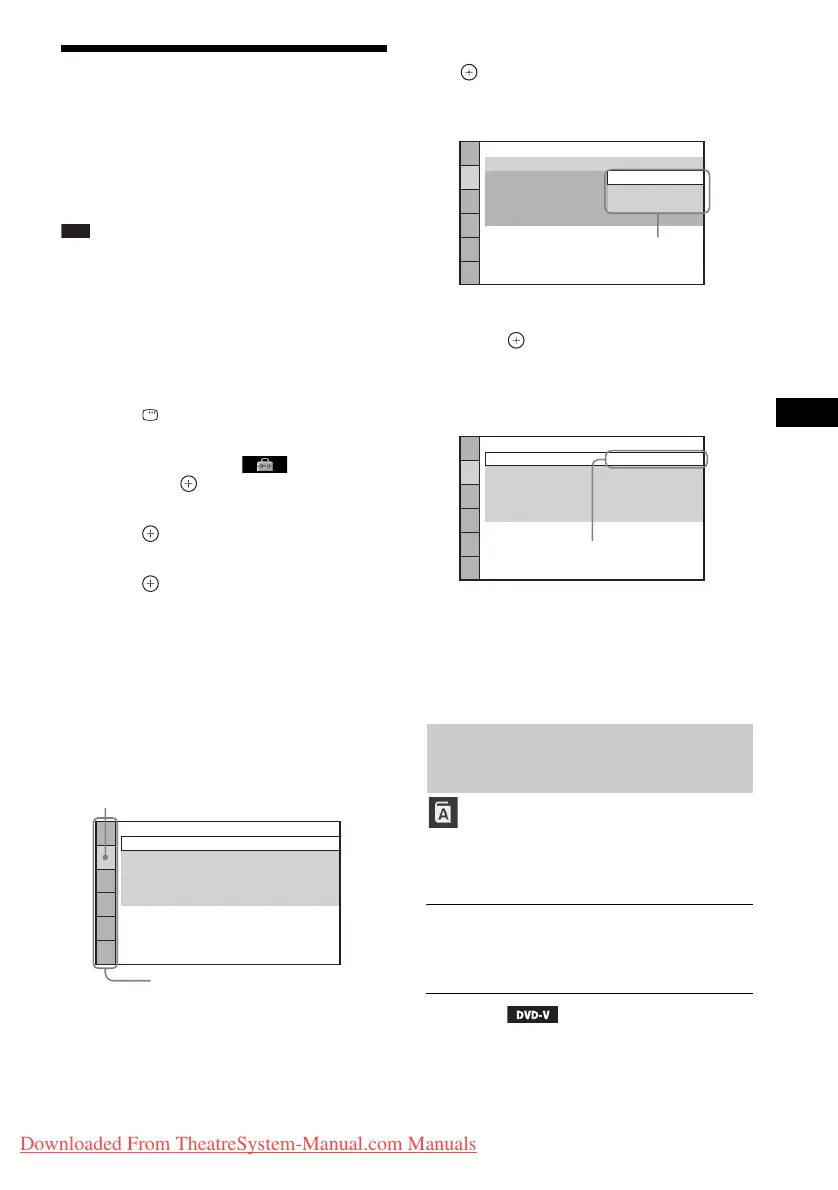
Example: [VIDEO SETUP]
6 Press X/x to select an item, then press
.
The options for the selected item appear.
Example: [TV TYPE]
7 Press X/x to select a setting, then
press .
The setting is selected and setup is
complete.
Example: [4:3 LETTER BOX]
To reset all of the [SETUP]
settings
To reset all of the [SETUP] settings, see
[RESET] (page 67).
Set various languages for the on-screen display
or sound track.
x [OSD] (On-Screen Display)
You can switch the display language on the TV
screen.
x [MENU]
You can switch the language for the disc’s
menu.
VIDEO SETUP
PROGRESSIVE
(COMPONENT OUT)
:
TV TYPE:
4:3 OUTPUT:
COLOR SYSTEM
(VIDEO CD)
:
16:9
OFF
FULL
AUTO
PAUSE MODE:
AUTO
Selected item
Setup items
Setting the display or sound
track language
[LANGUAGE SETUP]
AUTO
VIDEO SETUP
PROGRESSIVE
(COMPONENT OUT)
:
TV TYPE:
4:3 OUTPUT:
COLOR SYSTEM
(VIDEO CD)
:
PAUSE MODE:
16:9
OFF
FULL
AUTO
16:9
4:3 LETTER BOX
4:3 PAN SCAN
Options
VIDEO SETUP
PROGRESSIVE
(COMPONENT OUT)
:
TV TYPE:
4:3 OUTPUT:
COLOR SYSTEM
(VIDEO CD)
:
4:3 LETTER BOX
OFF
FULL
AUTO
PAUSE MODE:
AUTO
Selected setting
Downloaded From TheatreSystem-Manual.com Manuals



 To Next Page